
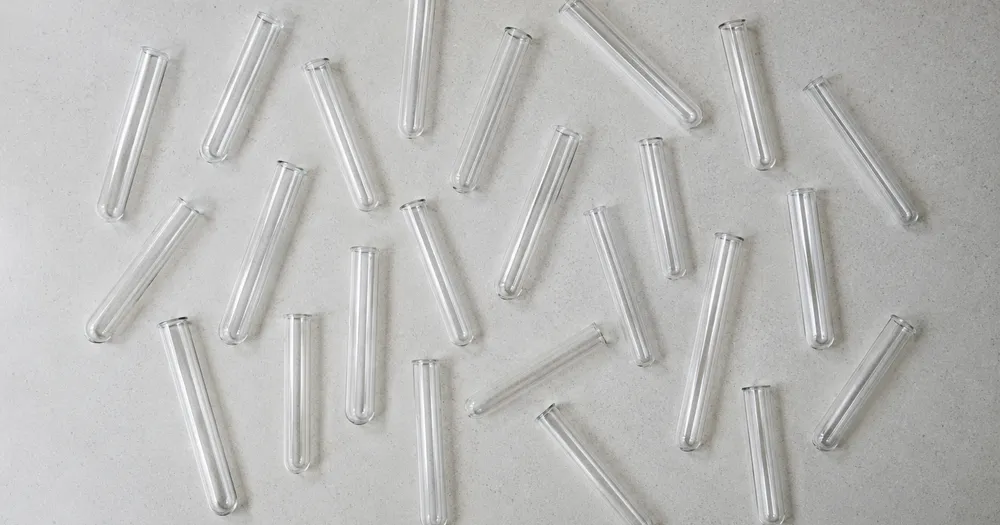
Laske telineessä olevat koeputket valokuvasta
Toimii seuraavien kanssa: JPG, PNG, WEBP · Ilmainen jopa 20 MB, Premium 50 MB
Levitä koeputket-kohteet yhdeksi kerrokseksi alustalle tai tasaiselle pinnalle ja kuvaa suoraan ylhäältä. Lasketut havainnot merkitään pisteillä. Suunniteltu käyttäjille: apteekit, klinikat, laboratoriot ja hoitokodit — tarkista ja korjaa jokainen kuva ennen CSV- tai PDF-koosteeseen lisäämistä.
- Tarkista kuva ja laske näkyvät koeputket-kohteet
- Upload a photo and get an automatic count
- Review the markers to catch test tubes counted twice or missed
- Ilmainen käyttää · Ei rekisteröitymistä · Ei vesileimaa
Lähetä kuva
Vinkkejä tarkkaan laskentaan
• Käytä tasaisesti valaistua kuvaa, jossa koko koeputket näkyy
• Keep your test tubes visible and avoid overlapping items
• Pisteet ja lämpökartta näyttävät säilytetyt tunnistukset — tarkista ja korjaa määrä
Tietoja Koeputket-laskurista
The test tubes counter counts visible test tubes from your photo and marks detections for review. Counting starts automatically once the photo and item are ready. Visibility, overlap and similar-looking items can affect the total. Built for pharmacies, clinics, labs and care homes.
Näin se toimii
1. Kuvaa koeputket
2. Upload your photo to count test tubes automatically
3. Review the markers and correct the tally if needed
4. Lisää laskentataulukkoon ja vie tuloksesi CSV-muodossa
Täydellinen kohteeseen
• Laboratorion kulutustarvikkeiden määrä eri telineissä
• Ota näyte erämääristä ennen käsittelyä
• Tavaransisäänkirjaukset toimittajan tilausta vastaan
• Luonnos inventaarioluvuista laboratorion laatutietueita varten
Usein kysytyt kysymykset
- Pitääkö kohteet erotella toisistaan ennen laskemista?
- Pieni kosketus voi toimia, mutta täydelliset päällekkäisyydet piilottavat kohteita ja tekevät tuloksesta vähemmän luotettavan. Levitä ne yksi kerros syvälle tasaisessa valossa, merkitse selkeä esimerkki ja tarkista jokainen tulosmerkki.
- Entä jos kuvassa on muutakin kuin koeputket-kohteita?
- The counter automatically looks for test tubes in your photo. Similar-looking distractors can still affect the result, so review every marker before using the total.
- Voinko laskea useita kuvia yhdeksi kokonaissummaksi?
- Yes — count each photo and add every reviewed result to the tally sheet as a labelled row. Export the tally as CSV or a PDF report, or save it to your account.
- Onko se ilmainen ja yksityinen?
- Kyllä. Voit laskea, tarkistaa ja ladata ilmaisen tuloksen ilman tiliä. Lataukset ovat maksuttomia ilman vesileimaa. Rekisteröitymistä ei tarvita. Palvelimella käsiteltävät kuvat salataan siirron ajaksi ja poistetaan tietoturvakäytäntömme mukaisesti.
Mitä voit tehdä sovelluksella Pillerilaskuri
Tarkista tärkeimmät ominaisuudet ennen kuin aloitat.
- Laske pillerit ja tabletit yhdestä valokuvasta
- Käytä merkittyä tarjottimen arviota manuaalisen laskennan ristiintarkistuksena
- Anna pätevän henkilön tarkistaa jokainen lasketun pillerin merkki
- Merkitse valinnaisesti esimerkki tarkentaaksesi hankalaa laskentaa
- Erälaske monta lokeroa joukkotarkastuksessa
- Suodata pienet täplät pois kokorajalla
Asetusten viite
14-asetukset
Käytettävissä olevat ohjaimet kohteelle Pillerilaskuri.
Lähetä
- Yksittäinen kuva / MassalaskentaEsiasetukset
- Valitse yksittäisten kuvien määrä tai Premium-joukkotarkastus. Tarkista jokainen tulos.Asetukset: Yksittäinen valokuvaMassatarkastus
Määrä
- Mukana merkitLiukusäädinAlue: 0–1 · Oletus: 0.21
- Starts at 21%; slide toward Show more to include weaker markers or Only strongest to hide them.
- PäällystystyyliEsiasetukset
- Valitse pisteitä, lämpökartta, molemmat tai puhdas esikatselu.Asetukset: MolemmatPisteitäLämpöEi mitään
Lisäasetukset
- TuloskerrosPudotusvalikko
- Choose how count markers appear in the on-screen preview; the download keeps its own markers.Asetukset: Pisteet + lämpökarttaVain pisteetVain lämpökartta
Laskenta
- Lisää laskentaanYksi napsautus
- Add this count to the tally sheet under the name of the object that was counted. Signed-in accounts add finished counts automatically unless that is turned off under Account settings; in bulk mode every photo also has its own Add to tally button.
- NimikeTekstin syöttö
- Rename a tally row. Edits and removals wait until you choose Save changes, so you can fix several rows at once.
- MääräNumeron syöttö
- Correct a row's count; totals, the chart and exports follow once the change is saved.
- Save changesYksi napsautus
- Apply every edited or removed tally row in one step, or choose Discard changes to leave the sheet as it was.
Chart
- By objectEsiasetukset
- The chart is the same in every counting tool and covers the tallies of all of them. By object draws a separate line chart for each tally name, such as pipes and people. By tool draws a chart for each counting tool.Asetukset: By objectBy tool
- AjanjaksoEsiasetukset
- Choose how far back the chart looks. Days without a count appear as zero.Asetukset: 7 days30 days90 days12 months
History
- Counting setupGalleria
- Keep comparable counts together. A first setup is created for you, so the first count can be saved straight away.
- Observed atTekstin syöttö
- The date and time of the count, shown as a date and a time field.
- NuotitTekstin syöttö
- Starts with every detected object and its count, one per line, such as Pipes - 11. Edit it before saving.
- Save countYksi napsautus
- Save the count to your account history. Open a saved count later to correct it or download its source photo.
Aiheeseen liittyvät työkalut kohteelle Pillerilaskuri
Työkalut yleisiä seuraavia vaiheita varten Pillerilaskuri jälkeen.

Laskenta ja varasto
Objektilaskuri
Estimate an object count from a photo. Review and correct the numbered markers before using the count.
Kokeile nyt
Laskenta ja varasto
Reaaliaikainen esinelaskuri
Suuntaa puhelimellasi erotettuihin, täysin näkyvissä oleviin esineisiin ja tarkista ilmaisinmerkit, kun lukema päivittyy reaaliajassa.
Kokeile nyt
Laskenta ja varasto
Pullolaskuri
Laske pullot hyllyillä, laatikoissa tai kylmähuoneissa yhdestä valokuvasta, ja lasketut havainnot on merkitty tarkistettavaksi.
Kokeile nytMiten Pillerilaskuri auttaa sinua saamaan sen tehtyä
Se ratkaisee todellisia ongelmia joka päivä – yrityksille, sisällöntuottajille ja jokapäiväisille tehtäville. Etsi itsellesi sopiva käyttötapa ja aloita.
Apteekin annostelun kaksoistarkistukset sekunneissa
Valokuvaa täytetty tarjotin manuaalisen laskennan toissijaisena tarkistuksena. Pätevän proviisorin on tarkistettava jokainen laskettu tunnistus, korjattava tekoälyn laskenta ja noudatettava vaadittua lääkemenettelyä ennen luovutusta.
Valvotun aineen luonnostarkistuksen seurantaketju
Käsittele tekoälyn laskentaa luonnoksena, anna pätevän henkilön suorittaa vaadittu manuaalinen valvottuja aineita koskeva menettely ja vie ainoastaan korjattu tulos virallisen tallenteen rinnalle. Tekoälyn raportti ei sellaisenaan ole vaatimustenmukaisuuden tarkastuspolku.
Hoivakodin lääkekierrosten laskenta
Käytä valokuvalaskentaa vain toissijaisena tarkistuksena. Pätevän hoitohenkilökunnan on tarkistettava ja korjattava merkinnät sekä suoritettava vuorojen välillä vaadittu manuaalinen lääkelaskenta; tekoäly ei saa korvata tätä menettelyä.
Lisäravinne- ja kapselivalmistuksen laadunvalvonta
Run Similar items mode käytössä production sample after marking specific capsule tai tablet sisällä Examples asetus, ja have qualified reviewer verify markers before shipping.
Monilokeroiset varastotarkastukset apteekeille
Avaa Bulk audit kohteeksi run Distinct kohteet mode across every tray kuva, then have qualified person review every marker ja correct each tray before exporting tally.
Katso jokainen muunnos valmiina
Every kuva crosses slash untouched ja comes out other side finished.























