
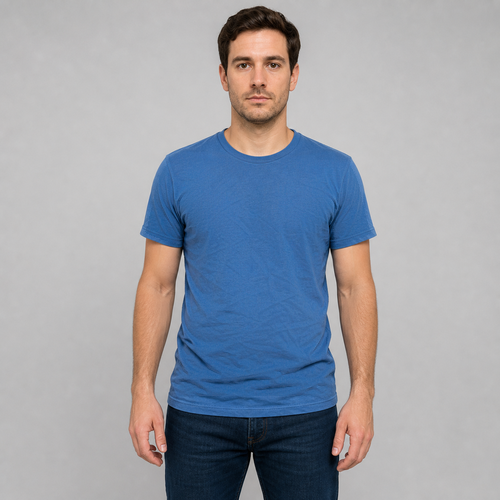
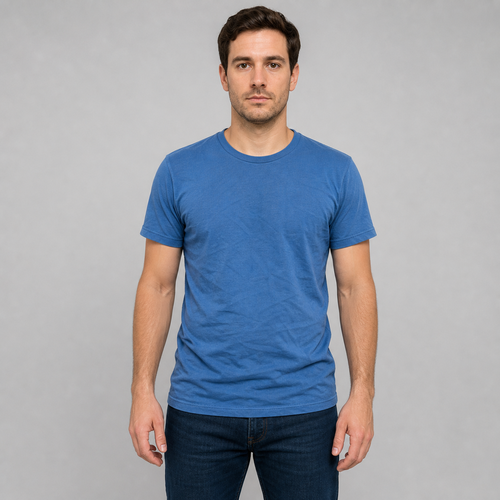
The same source image before and after applying ਕਪੜੇ ਨਰਮ.
ਕਪੜੇ ਨਰਮ applied to the same source image
Original source image before ਕਪੜੇ ਨਰਮ

ਕੱਪੜੇ ਮੁਲਾਇਮ ਕਰੋ—ਵਿਅਕਤੀ ਨੂੰ ਮੁੜ ਬਣਾਏ ਬਿਨਾਂ ਕਮੀਜ਼ ਦੀਆਂ ਸਲਵਟਾਂ ਹਲਕੀਆਂ ਕਰੋ

ਵਿਅਕਤੀ, ਕੱਪੜੇ ਦੀ ਰੂਪ-ਰੇਖਾ, ਕੱਪੜੇ ਦੀ ਬਾਰੀਕ ਬਣਤਰ, ਸਰੀਰ ਦਾ ਹੇਠਲਾ ਹਿੱਸਾ, ਬੈਕਗ੍ਰਾਊਂਡ ਅਤੇ ਐਲਫ਼ਾ ਬਿਨਾਂ ਬਦਲਾਅ ਰੱਖਦਿਆਂ ਸਿਰਫ਼ ਇੱਕ ਕੇਂਦਰੀ ਉੱਪਰਲੇ ਕੱਪੜੇ ਅੰਦਰ ਪ੍ਰਮਾਣਿਤ ਸਲਵਟਾਂ ਦਾ ਉਭਾਰ ਘਟਾਓ।

ਕਪੜੇ ਨਰਮ ਪ੍ਰਭਾਵ ਲਈ ਇੱਕ ਫੋਟੋ ਅੱਪਲੋਡ ਕਰੋ

ਤੁਸੀਂ ਕਪੜੇ ਨਰਮ ਪ੍ਰਭਾਵ ਨਾਲ ਕੀ ਕਰ ਸਕਦੇ ਹੋ

ਸ਼ੁਰੂ ਕਰਨ ਤੋਂ ਪਹਿਲਾਂ ਉਪਲਬਧ ਪ੍ਰਭਾਵ ਸਮਰੱਥਾਵਾਂ ਦੀ ਸਮੀਖਿਆ ਕਰੋ।

  • Apply the ਕਪੜੇ ਨਰਮ effect to any photo
  • Fine-tune the effect strength to taste
  • Preview your photo live as you edit
  • Download your edited photo in high quality
  • Apply ਕਪੜੇ ਨਰਮ to many photos at once

ਇਹ ਕਿਵੇਂ ਕੰਮ ਕਰਦਾ ਹੈ

Clothes Smooth softens shallow creases in a top without redrawing the person or blurring the picture. It locates each person by their face, shoulders and hips, then follows the centre of their top from below the chin to just above the hips, pulling the edge of that area inwards so the collar, sleeves, seams, silhouette, nearby skin and background all stay exactly as shot. Inside that margin it flattens only the shallow highlights and shadows a crease makes, while keeping the weave of the fabric and protecting the hard edges of seams, prints and logos. Everything else — face, hair, skin, arms, hands, lower body, background and transparency — is copied straight into a lossless PNG. In a group photo you pick who to change, or switch on "Apply to everyone" in Settings. Each top is handled on its own, so two tops that touch or overlap are left unchanged rather than smoothed together. Turned or cropped poses, covered torsos, loose or heavily patterned layers and fabric that is already smooth are left alone rather than blurred.


ਪ੍ਰੋਸੈੱਸ ਹੋ ਰਿਹਾ

ਕਪੜੇ ਨਰਮ ਇੱਕ AI ਕਾਰਵਾਈ ਦੀ ਵਰਤੋਂ ਕਰਦਾ ਹੈ। ਇਸ ਪ੍ਰਭਾਵ ਦੀ ਪ੍ਰਕਿਰਿਆ ਸ਼ੁਰੂ ਹੋਣ ਤੋਂ ਪਹਿਲਾਂ ਕੋਈ ਵੱਖਰਾ ਭੱਤਾ ਦਿਖਾਇਆ ਜਾਂਦਾ ਹੈ।

ਲਈ ਵਧੀਆ

sharp front-facing photos of a fitted plain or lightly patterned shirt or top, with a clear face, both shoulders and hips visible and arms held away from the middle of the torso — including group photos where each top is clearly separate.

ਇਸ ਲਈ ਘੱਟ ਅਨੁਕੂਲ: tops that touch or overlap in a group, side or seated poses, crossed arms, hands or hair covering the shirt, jackets and loose layered clothing, large prints or dense patterns, cropped shoulders or hips, motion blur, and garments that are already smooth.

ਕਪੜੇ ਨਰਮ ਦੀ ਵਰਤੋਂ ਕਰਨ ਦੇ ਤਰੀਕੇ

  • ਚਿਹਰੇ ਦੀ ਪਛਾਣ, ਚਮੜੀ, ਬਾਹਾਂ, ਹੱਥ ਜਾਂ ਫ਼ੋਟੋ ਦਾ ਬਾਕੀ ਹਿੱਸਾ ਬਦਲੇ ਬਿਨਾਂ ਕਮੀਜ਼ ਦੀਆਂ ਹਲਕੀਆਂ ਸਲਵਟਾਂ ਘਟਾਓ।
  • ਕੱਪੜੇ ਦੀ ਰੂਪ-ਰੇਖਾ, ਸਿਲਾਈਆਂ, ਲੋਗੋ ਅਤੇ ਬਾਰੀਕ ਬੁਣਾਈ ਬਰਕਰਾਰ ਰੱਖਦਿਆਂ ਦਰਮਿਆਨੇ ਪੱਧਰ ਦੀਆਂ ਕੱਪੜੇ ਦੀਆਂ ਸਲਵਟਾਂ ਹਲਕੀਆਂ ਕਰੋ।
  • ਪ੍ਰਮਾਣਿਤ ਸਿਰਫ਼-ਕੱਪੜਾ ਮਾਸਕ ਅੰਦਰ ਹਲਕਾ ਜਾਂ ਹੋਰ ਦਿਸਦਾ ਮੁਲਾਇਮ ਨਤੀਜਾ ਚੁਣਨ ਲਈ ਤੀਬਰਤਾ ਵਰਤੋ।

ਕਪੜੇ ਨਰਮ ਸਵਾਲ

ਕੀ ਕੱਪੜੇ ਮੁਲਾਇਮ ਕਰਨ ਵਾਲਾ ਟੂਲ ਮੇਰਾ ਚਿਹਰਾ, ਬਾਹਾਂ, ਲੋਗੋ ਜਾਂ ਬੈਕਗ੍ਰਾਊਂਡ ਧੁੰਦਲਾ ਕਰਦਾ ਹੈ?
ਨਹੀਂ। ਪ੍ਰਮਾਣਿਤ ਉੱਪਰਲੇ ਕੱਪੜੇ ਦੇ ਮਾਸਕ ਦਾ ਅੰਦਰ ਵੱਲ ਘਟਾਇਆ ਹਿੱਸਾ ਹੀ ਬਦਲ ਸਕਦਾ ਹੈ। ਚਿਹਰਾ, ਵਾਲ, ਚਮੜੀ, ਬਾਹਾਂ, ਹੱਥ, ਸਰੀਰ ਦਾ ਹੇਠਲਾ ਹਿੱਸਾ, ਬੈਕਗ੍ਰਾਊਂਡ, ਐਲਫ਼ਾ ਅਤੇ ਕੱਪੜੇ ਦੀ ਰੂਪ-ਰੇਖਾ ਸਰੋਤ ਤੋਂ ਜਿਉਂ ਦੀ ਤਿਉਂ ਨਕਲ ਹੁੰਦੀ ਹੈ। ਮਾਸਕ ਅੰਦਰ ਸਿਲਾਈ, ਪ੍ਰਿੰਟ ਅਤੇ ਲੋਗੋ ਦੇ ਸਪਸ਼ਟ ਕਿਨਾਰੇ ਵੀ ਸੁਰੱਖਿਅਤ ਰਹਿੰਦੇ ਹਨ।
ਕੱਪੜੇ ਉਸੇ ਤਰ੍ਹਾਂ ਮੁਲਾਇਮ ਕਿਉਂ ਨਾ ਕੀਤੇ ਜਾਣ ਜਿਵੇਂ ਵਰਚੁਅਲ ਸਟੇਜਿੰਗ ਕਮਰੇ ਨੂੰ ਐਡਿਟ ਕਰਦੀ ਹੈ?
ਵਰਚੁਅਲ ਸਟੇਜਿੰਗ ਤੋਂ ਨਵਾਂ ਫਰਨੀਚਰ ਬਣਾਉਣ ਅਤੇ ਕਮਰੇ ਦਾ ਵੱਡਾ ਰੰਗਿਆ ਖੇਤਰ ਬਦਲਣ ਦੀ ਉਮੀਦ ਹੁੰਦੀ ਹੈ। ਕੱਪੜੇ ਮੁਲਾਇਮ ਕਰਨ ਵਾਲੇ ਟੂਲ ਨੂੰ ਅਸਲ ਵਿਅਕਤੀ ਅਤੇ ਕੱਪੜੇ ਦੀ ਅਸਲ ਬਾਰੀਕੀ ਬਚਾਉਣੀ ਪੈਂਦੀ ਹੈ। ਇਸ ਲਈ ਇਹ ਪੋਜ਼ ਅਤੇ ਅਰਥਕ ਸਬੂਤ ਵਰਤਦਾ, ਕੱਪੜੇ ਅੰਦਰ ਸਿਰਫ਼ ਮਾਪੀ ਹੋਈ ਸਲਵਟ-ਚਮਕ ਐਡਿਟ ਕਰਦਾ ਅਤੇ ਜਨਰੇਟਰ ਨੂੰ ਵਿਅਕਤੀ ਮੁੜ ਖਿੱਚਣ ਲਈ ਕਹਿਣ ਦੀ ਬਜਾਏ ਅਸਪਸ਼ਟ ਫ਼ੋਟੋਆਂ ਅਸਵੀਕਾਰ ਕਰਦਾ ਹੈ।

ਹੋਰ ਪੋਰਟਰੇਟ ਅਤੇ ਸੁੰਦਰਤਾ ਪ੍ਰਭਾਵ

ਗਤੀ ਵਿੱਚ ਵਿਸ਼ੇਸ਼ ਪ੍ਰਭਾਵ ਵੇਖੋ

ਸਭ ਤੋਂ ਪ੍ਰਭਾਵਸ਼ਾਲੀ ਚੋਣਾਂ ਬਾਕੀ ਸੰਗ੍ਰਹਿ ਤੋਂ ਪਹਿਲਾਂ ਇਸ ਪੱਟੀ ਵਿੱਚ ਦਿਖਾਈਆਂ ਜਾਂਦੀਆਂ ਹਨ।


















