
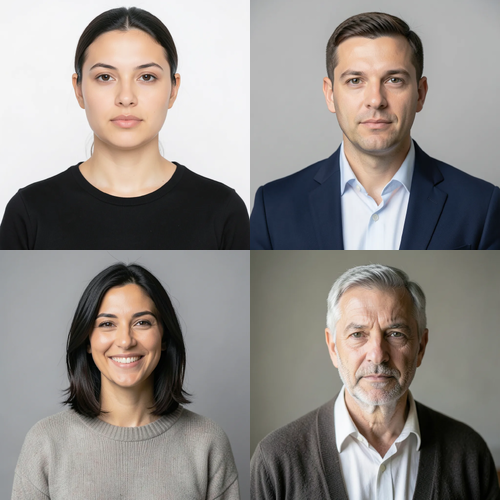
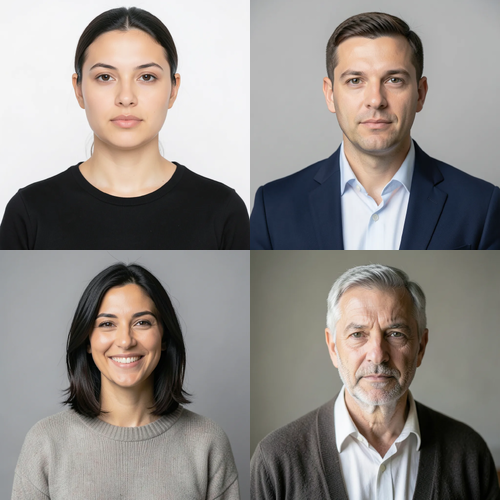
The same source image before and after applying 다중 얼굴 Retouch.
다중 얼굴 Retouch photo effect applied to the same source image
Original source image before the 다중 얼굴 Retouch photo effect

다중 얼굴 보정 — 누구도 다시 그리지 않고 두 개 이상의 얼굴 보정

두 개 이상의 검증된 얼굴에 질감을 보존하는 동일한 은은한 보정을 적용하며, 누구의 얼굴도 다시 그리거나 사진의 나머지 부분을 수정하지 않습니다.

다중 얼굴 Retouch 효과를 위한 사진 업로드

다중 얼굴 Retouch 효과로 수행할 수 있는 작업

시작하기 전에 사용 가능한 효과 기능을 검토하세요.

  • Apply the 다중 얼굴 Retouch effect to any photo
  • Fine-tune the effect strength to taste
  • Preview your photo live as you edit
  • Download your edited photo in high quality
  • Apply 다중 얼굴 Retouch to many photos at once

이용 방법

Multi-Face Retouch is a localized group-portrait treatment, not a full-frame generator. It needs at least two complete, near-front faces. Each face is found and checked on its own: its full shape is mapped, and its skin is separated from hair, beard, body, clothing, accessories, background, and neighboring people. Exactly three bounded zones per accepted face cover safe skin on the forehead and both cheeks, and slightly enlarged protective areas keep every eye, iris, eyebrow, nose, and lip untouched. Each face is measured only against its own skin, so another person, background, hair, or beard cannot influence its correction. Only medium-sized patches of uneven tone and color are reduced; fine detail, pores, wrinkles, and age cues are kept. Even at full intensity, each brightness and color correction is capped at a small fixed amount. Eyes, irises, eyebrows, nose, lips, inside of the mouth, hair, beard, face shape, expression, bodies, clothing, lighting, background, collage grid or image edges, framing, transparency, and every pixel outside the accepted zones are copied unchanged into a lossless PNG. It never smooths a whole face, sharpens, reshapes, patches, or regenerates a person. Side profiles, incomplete or tiny faces, unclear skin, obstructions, and already-even faces are left unchanged; the request is refused when fewer than two faces remain safe.


처리 중

다중 얼굴 Retouch는 AI 액션을 사용합니다. 이 효과가 처리되기 전에 별도의 허용량이 표시됩니다.

다음에 가장 적합

검증할 만큼 크고 조명이 좋으며 완전하고 거의 정면인 얼굴이 최소 두 개 있는 선명한 단체 인물 사진, 팀 프로필 사진, 가족 콜라주, 행사 사진.

다음과 같은 경우에는 덜 적합합니다. 한 사람의 인물 사진, 옆얼굴, 기울거나 잘린 얼굴, 안경, 얼굴 특징을 가린 머리카락이나 손, 멀리 있는 군중, 너무 작은 얼굴, 모션 블러, 진한 메이크업, 강한 색 조명, 안전하고 눈에 보이는 피부가 있는 얼굴이 두 개 미만인 사진.

다중 얼굴 Retouch 사용 방법

  • 팀 또는 가족사진의 각 얼굴을 개별적으로 측정한 뒤 안전 범위가 정해진 하나의 일관된 보정을 적용합니다.
  • 누구의 정체성, 나이의 특징, 표정, 머리카락, 의상, 주변 환경도 바꾸지 않고 이마와 볼의 작은 편차를 고르게 조정합니다.
  • Retouch the safe faces in a collage while its seams, panels, typography, transparency, and any skipped faces stay exactly as uploaded.

다중 얼굴 Retouch 효과에 관해 자주 묻는 질문

다중 얼굴 보정이 모든 사람을 똑같이 보이게 하나요?
아니요. 허용된 각 얼굴은 자기 원본 피부를 기준으로 측정하고 동일한 엄격한 보정 한도를 적용할 뿐, 같은 목표 색상이나 생성된 얼굴을 적용하지 않습니다. 정체성, 나이의 특징, 표정, 형태, 허용되지 않은 얼굴은 업로드 이미지에 그대로 유지됩니다.
다중 얼굴 보정을 가상 홈 스테이징의 실내 편집 방식처럼 적용하지 않는 이유는 무엇인가요?
가상 홈 스테이징은 교체 가능한 넓은 실내 영역을 의도적으로 합성합니다. 단체 사진에는 머리카락, 의상, 손, 다른 사람과 맞닿은 정체성 핵심 얼굴이 여러 개 있습니다. 따라서 다중 얼굴 보정은 각 얼굴을 별도로 검증하고 마스크하며 국소 보정 상한을 두고, 생성기에 그룹을 다시 그리게 하는 대신 안전한 얼굴이 두 개 미만이면 거부합니다.

더 많은 초상화 및 미용 효과

추천 효과를 움직이는 모습으로 보기

가장 추천하는 효과가 이 줄 맨 앞에 먼저 표시되고, 나머지 효과는 그 뒤에 이어집니다.


















