
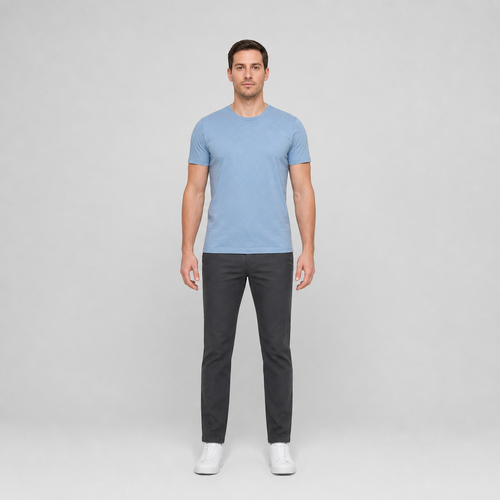
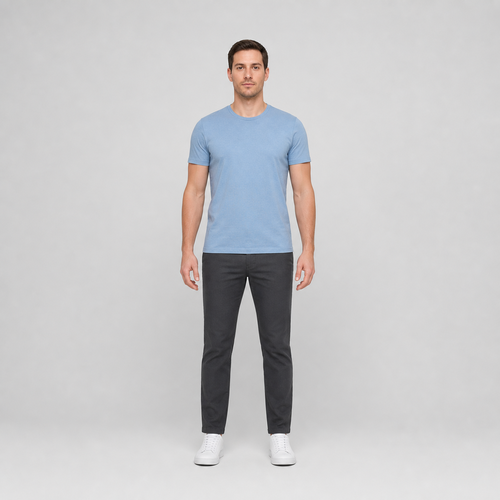
The same source image before and after applying Benlengde.
Benlengde photo effect applied to the same source image
Original source image before the Benlengde photo effect

Juster benlengde — forleng verifiserte ben uten å regenerere portrettet

Forleng bare to verifiserte, atskilte bensoner med eksisterende kildepiksler, samtidig som ansiktet, overkroppen og alle piksler utenfor begge avgrensede områdene forblir uendret.

Last opp et bilde for Benlengde-effekten

Hva du kan gjøre med Benlengde-effekten

Se gjennom de tilgjengelige effektfunksjonene før du begynner.

  • Apply the Benlengde effect to any photo
  • Fine-tune the effect strength to taste
  • Preview your photo live as you edit
  • Download your edited photo in high quality
  • Apply Benlengde to many photos at once

Slik fungerer det

Leg Length makes a restrained change to two clearly separated legs you can clearly see, and leaves the rest of the photo exactly as you shot it. It locates each person by their face, shoulders and hips, then separates two clearly separated legs from the background, hair, skin and clothing before anything moves. The adjustment eases off to nothing at every edge of that area, and nearby background is filled in behind the new outline so no gaps appear. The face and every pixel outside the adjusted area are copied straight into a lossless PNG. In a group photo you pick who to change, or switch on "Apply to everyone" in Settings. Anyone standing too close for their neighbour to stay untouched is left alone rather than guessed at. If the photo is unclear, cut off, transparent or ambiguous, it stops instead of guessing.


Behandler

Benlengde bruker en AI-handling. Eventuelt separat godtgjørelse vises før denne effekten starter behandling.

Best egnet for

sharp, opaque, front-facing photos with a clear face, both shoulders, hips, knees, ankles and shoes visible head to toe, straight legs held apart, and clean background beside and below both feet — including group photos where each person has clear space around them.

Mindre egnet til: people packed shoulder to shoulder with no gap between them, side or seated poses, seated or crossed legs, feet cut off at the frame edge, long skirts or coats that hide the legs, cluttered floors, transparent cutouts, motion blur, and bodies touching the image edge.

Måter å bruke Benlengde

  • Gjør en moderat justering av benlengden uten å regenerere ansiktsidentiteten, klesstrukturen, skoene eller hele portrettet.
  • Keep the face, torso, hips, arms, upper thighs, and distant background exactly as photographed while extending two isolated leg areas.
  • Bruk intensiteten til å velge en diskré eller tydeligere forhåndsvisning av benlengden innenfor en fast sikkerhetsgrense.

Benlengde spørsmål

Vil justering av benlengde strekke skoene eller overkroppen min?
The vertical stretch ends at each verified ankle, then the existing shoe pixels are moved downward as a unit within the checked area around them. The upper body and pixels outside both leg areas remain exact; a few smoothed edge pixels around each shoe may be redrawn slightly as it moves.
Hvorfor krever justering av benlengde gulvplass og atskilte ben?
For å flytte begge skoene nedover trengs verifisert kildebakgrunn som kan fordeles på nytt ved siden av og under dem. Hvis bena berører hverandre, en sko er beskåret eller et annet objekt opptar plassen, kan verktøyet ikke isolere to trygge områder og stopper i stedet for å forvrenge feil piksler.

Flere Portrett og skjønnhet-effekter

Se de utvalgte effektene i bevegelse

Den sterkeste effekten plukker leder dette beltet foran resten av katalogen.


















