
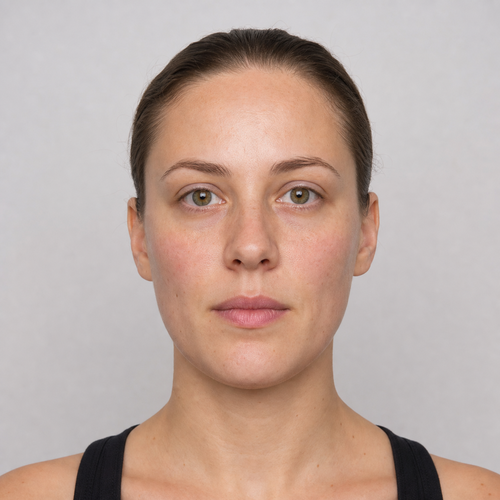
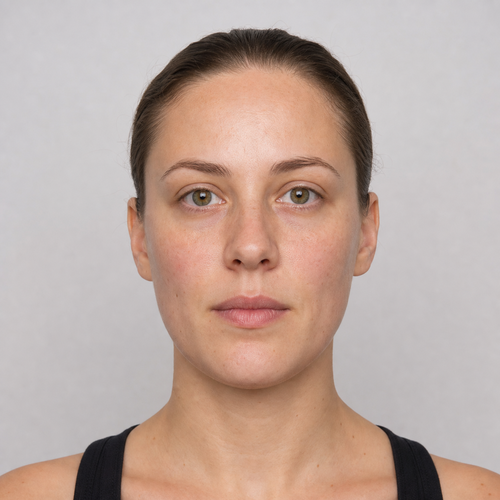
The same source image before and after applying Mjuk Glam.
Mjuk Glam photo effect applied to the same source image
Original source image before the Mjuk Glam photo effect

Soft Glam — Eight Precise Zones, No Face Regeneration

Kombinera strukturbevarande hudfinish med diskret ögonskugga, rouge och läpptoning i åtta verifierade zoner – utan att återskapa eller forma om ansiktet.

Ladda upp ett foto för Mjuk Glam-effekten

Vad du kan göra med Mjuk Glam-effekten

Granska de tillgängliga effektfunktionerna innan du börjar.

  • Apply the Mjuk Glam effect to any photo
  • Fine-tune the effect strength to taste
  • Preview your photo live as you edit
  • Download your edited photo in high quality
  • Apply Mjuk Glam to many photos at once

Så fungerar det

Soft Glam does not regenerate, reshape, patch, relight, or generally blur the portrait. It needs one complete, near-front face: the face is checked carefully, its full shape is mapped, and its skin is separated from hair, beard, body, clothing, accessories, and background. It combines exactly three broad skin-polish zones across the forehead and both cheeks with exactly five small makeup zones above both upper eyelids, over both upper cheeks, and inside the outer lip line. The skin polish is measured against the surrounding skin only, so nearby background, hair, or beard color cannot bleed into it; it reduces only medium-sized patches of uneven tone and color while keeping fine detail and pores. Even at full intensity, each skin correction is capped at a small fixed amount. Blush and lip tint add color while keeping the original brightness of the skin, and eyeshadow darkens the lids only very slightly. The eyes, irises, eyebrows, nose, and inside of the mouth are always protected. Face shape, expression, protected features, hair, beard, clothing, scene lighting, background, framing, transparency, and every pixel outside the eight zones are copied unchanged into a lossless PNG. Side profiles, incomplete or tiny faces, unclear skin, and glasses or anything else that leaves a required zone without enough visible skin are refused instead of redrawn. Already-even skin may receive only the makeup colors; a portrait with no safe visible correction is left unchanged and refused.


Bearbetar

Mjuk Glam använder en AI-åtgärd. Eventuell separat ersättning visas innan denna effekt börjar bearbetas.

Bäst för

skarpa, jämnt belysta porträtt nästan rakt framifrån med ett fullständigt ansikte och fritt synliga panna, ögonbryn, ögonlock, ögon, kinder, näsa, läppar, käke och haka.

Mindre lämpad för: sidoprofiler, lutande eller beskurna ansikten, glasögon, hår eller händer som täcker ansiktsdrag, kraftig befintlig teatermakeup, skarpa slagskuggor, mycket små ansikten, rörelseoskärpa och gruppfoton.

Sätt att använda Mjuk Glam

  • Förhandsvisa en samordnad diskret glamourstil med varsam hudfinish, ögonskugga, rouge och läpptoning utan att ändra ansiktets identitet eller geometri.
  • Bevara porer, fina huddetaljer, ögon, ögonbryn, näsa, munhåla, hår, skägg, kläder, ljus och bakgrund samtidigt som en avgränsad makeupfinish läggs till.
  • Use intensity to control one safety-bounded preset while all pixels outside the eight verified zones stay exactly as photographed.

Mjuk Glam frågor

Kommer Diskret glamour att jämna ut eller forma om hela mitt ansikte?
No. It does not generate a face, reshape, patch, relight the whole frame, or generally blur anything. It combines a small texture-preserving correction in three verified skin zones with color inside five verified makeup zones and copies the rest of the image from your original.
Varför tillämpas inte Diskret glamour på samma sätt som virtuell homestyling redigerar ett rum?
Virtual staging is expected to synthesize furniture across large replaceable room regions. Makeup and skin polish sit beside identity-critical eyes, brows, nose, lips, hair, texture, and facial contours. Soft Glam therefore locates each facial feature precisely, confirms which pixels are really skin, protects individual features, caps every correction, and refuses uncertain photos rather than asking a generator to redraw the person.

Fler Porträtt & skönhet-effekter

Se de utvalda effekterna i rörelse

De starkaste effektplockarna leder detta bälte före resten av katalogen.


















