
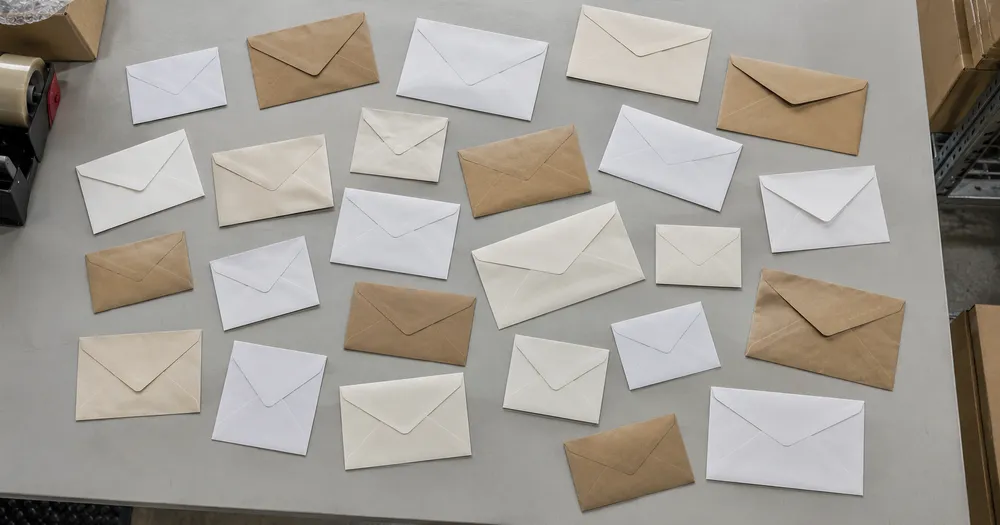
Tell konvolutter i en batch fra et bilde
Fungerer med JPG, PNG, WEBP · Gratis opptil 20 MB, Premium 50 MB
Spre konvolutter slik at de overlapper minst mulig — ett lag er ideelt — og fotografer ovenfra i jevnt lys. Laget for varehus, transportører og logistikkverft — kontroller og korriger hvert bilde før du legger det til en CSV- eller PDF-opptelling.
- Kontroller bildet, og tell deretter synlige konvolutter
- Upload a photo and get an automatic count
- Review the markers to catch envelopes counted twice or missed
- Gratis å bruke · Ingen registrering nødvendig · Uten vannmerke
Last opp bilde
Tips for en nøyaktig telling
• Bruk et jevnt belyst bilde der hele konvolutter er med i bildeflaten
• Keep your envelopes visible and avoid overlapping items
• Prikker og varmekart viser beholdte deteksjoner – gjennomgå og korriger tellingen
Om telleren for Konvolutter
The envelopes counter counts visible envelopes from your photo and marks detections for review. Counting starts automatically once the photo and item are ready. Visibility, overlap and similar-looking items can affect the total. Built for warehouses, hauliers and logistics yards.
Slik fungerer det
1. Fotografer konvolutter
2. Upload your photo to count envelopes automatically
3. Review the markers and correct the tally if needed
4. Legg til i opptellingsarket og eksporter tellingen din som CSV
Perfekt for
• Postroms utgående batchtelling før en posthenting
• Kontrollere en e-postkjøring mot mottakerlisten
• Frankering og portoavstemming
• Lagertellinger av forhåndstrykte skrivesaker
Ofte stilte spørsmål
- Fungerer den på en løs haug?
- Den kan bare markere det synlige laget. Spre elementer ett lag dypt, marker et tydelig eksempel, og se gjennom og korriger resultatmarkørene. Behandle en telling av synlige ansikter på en stor haug som et estimat og bruk samme innramming mellom sjekkene.
- Hva skjer hvis bildet inneholder mer enn bare konvolutter?
- The counter automatically looks for envelopes in your photo. Similar-looking distractors can still affect the result, so review every marker before using the total.
- Kan jeg telle flere bilder inn i én totalsum?
- Yes — count each photo and add every reviewed result to the tally sheet as a labelled row. Export the tally as CSV or a PDF report, or save it to your account.
- Er det gratis og privat?
- Ja. Du kan telle, kontrollere og laste ned et gratis resultat uten konto. Nedlasting er gratis uten vannmerke. Ingen registrering er nødvendig. Foto som behandles på serveren, krypteres under overføring og slettes i henhold til sikkerhetsreglene våre.
Hva du kan gjøre med Eske- & kartongteller
Se gjennom hovedfunksjonene før du begynner.
- Tell esker og kartonger på paller og stabler
- Gå raskt gjennom anslag for lastebillass og innkommende forsendelser
- Kontroller hver kartongmarkør og korriger totalen
- Kjør en masserevisjon på tvers av et lagerfotosett
- Legg til flere stabler til én løpende telling
- Ignorer små streifdeteksjoner for nøyaktighet
Innstillingsreferanse
14 innstillinger
Tilgjengelige kontroller for Eske- & kartongteller.
Last opp
- Enkeltbilde / MassetellingForhåndsinnstillinger
- Velg antall enkeltbilder eller en Premium-masserevisjon. Gjennomgå hvert resultat.Alternativer: EnkeltbildeMassetelling
Antall
- Inkluderte markørerSkyveknappRekkevidde: 0–1 · Standard: 0.21
- Starts at 21%; slide toward Show more to include weaker markers or Only strongest to hide them.
- OverleggsstilForhåndsinnstillinger
- Velg prikker, et varmekart, begge deler eller en ren forhåndsvisning.Alternativer: BeggePrikkerVarmeIngen
Avansert
- ResultatoverleggNedtrekksmeny
- Choose how count markers appear in the on-screen preview; the download keeps its own markers.Alternativer: Prikker + varmekartBare prikkerKun varmekart
Telling
- Legg til i opptellingEtt klikk
- Add this count to the tally sheet under the name of the object that was counted. Signed-in accounts add finished counts automatically unless that is turned off under Account settings; in bulk mode every photo also has its own Add to tally button.
- EtikettTekstinntasting
- Rename a tally row. Edits and removals wait until you choose Save changes, so you can fix several rows at once.
- AntallTallinntasting
- Correct a row's count; totals, the chart and exports follow once the change is saved.
- Save changesEtt klikk
- Apply every edited or removed tally row in one step, or choose Discard changes to leave the sheet as it was.
Chart
- By objectForhåndsinnstillinger
- The chart is the same in every counting tool and covers the tallies of all of them. By object draws a separate line chart for each tally name, such as pipes and people. By tool draws a chart for each counting tool.Alternativer: By objectBy tool
- PeriodeForhåndsinnstillinger
- Choose how far back the chart looks. Days without a count appear as zero.Alternativer: 7 days30 days90 days12 months
History
- Counting setupGalleri
- Keep comparable counts together. A first setup is created for you, so the first count can be saved straight away.
- Observed atTekstinntasting
- The date and time of the count, shown as a date and a time field.
- NoterTekstinntasting
- Starts with every detected object and its count, one per line, such as Pipes - 11. Edit it before saving.
- Save countEtt klikk
- Save the count to your account history. Open a saved count later to correct it or download its source photo.
Relaterte verktøy for Eske- & kartongteller
Verktøy for vanlige neste trinn etter Eske- & kartongteller.

Opptelling og lager
Objektteller
Estimer antallet objekter på et bilde. Se over og korriger de nummererte markørene før du bruker antallet.
Prøv det nå
Opptelling og lager
Direkte objektteller
Sikt telefonen din mot atskilte, fullt synlige gjenstander og se gjennom detektormarkørene mens tellingen oppdateres i sanntid.
Prøv det nå
Opptelling og lager
Flasketeller
Tell flasker på hyller, i kasser eller i kjølerom fra ett bilde, med talte deteksjoner merket for gjennomgang.
Prøv det nåSlik hjelper Eske- & kartongteller deg med å få jobben gjort
Virkelige problemer den løser hver dag – for bedrifter, skapere og hverdagslige oppgaver. Finn brukssaken som passer deg og start.
Sjekk inn et lastebillass mot fraktbrevet
Fotografer hver pall for en foreløpig kartongtelling, gå deretter gjennom den fysiske lasten, korriger markørene, og fullfør den normale manifestkontrollen før godkjenning av varemottak.
Kjør syklustellinger på lageret fra mobilen
Gå gjennom gangene og ta bilde av hver stabel med mobilkameraet, legg hvert antall til opptellingsarket, og eksporter hele syklustellingen som en CSV eller merkevaretilpasset PDF på slutten av runden.
Tell en utsendelse over flere lokasjoner i én omgang
Åpne Massekontroll to run Separate objekter mode across alle pallet bilde, then kontroller alle resultat before using the dispatch total.
Isoler én SKU på en blandet palle
For én kartongstørrelse eller SKU, merk en komplett kartong i Eksempelinntillingen før du teller, og gjennomgå deretter hver markør for lignende utseende bokser på pallen.
Overlevering av gjennomgått telling til varemottak
Etter at du har kontrollert og korrigert tellingen mot fysisk lagerbeholdning, lagrer du den og deler en skrivebeskyttet lenke, slik at varemottaksansvarlig kan gå gjennom den. Det merkede bildet beviser ikke antallet alene.
Gjennomgå en utgående grossistordre før forsendelse
Fotografer pakkede kartonger for en foreløpig telling, gå deretter gjennom den fysiske ordren, korriger markørene, og fullfør den normale utsendelseskontrollen før forsendelse.
Se hver forvandling lande
Hvert bilde krysser skråstreken uberørt og kommer ut på den andre siden ferdig.























