

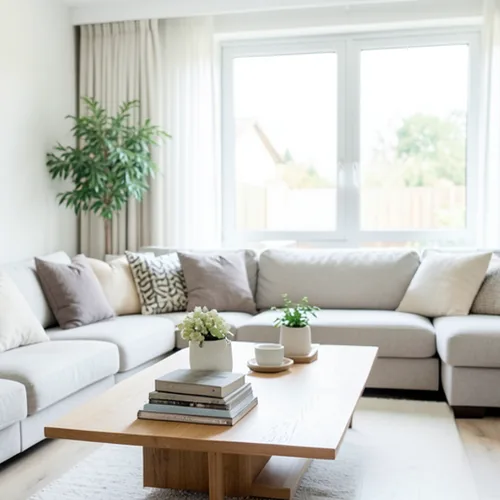
The same source image before and after applying ਡੈਪਥ ਐਨਾਗਲਿਫ 3D.
ਡੈਪਥ ਐਨਾਗਲਿਫ 3D photo effect applied to the same source image
Original source image before the ਡੈਪਥ ਐਨਾਗਲਿਫ 3D photo effect

ਡੂੰਘਾਈ Anaglyph 3D ਫੋਟੋ ਫਿਲਟਰ ਆਨਲਾਈਨ

Create a comfortable red-cyan 3D view for standard glasses from the estimated depth of your photo. Control the strength, compare the result, and download a finished image from your browser.

ਡੈਪਥ ਐਨਾਗਲਿਫ 3D ਪ੍ਰਭਾਵ ਲਈ ਇੱਕ ਫੋਟੋ ਅੱਪਲੋਡ ਕਰੋ

ਤੁਸੀਂ ਡੈਪਥ ਐਨਾਗਲਿਫ 3D ਪ੍ਰਭਾਵ ਨਾਲ ਕੀ ਕਰ ਸਕਦੇ ਹੋ

ਸ਼ੁਰੂ ਕਰਨ ਤੋਂ ਪਹਿਲਾਂ ਉਪਲਬਧ ਪ੍ਰਭਾਵ ਸਮਰੱਥਾਵਾਂ ਦੀ ਸਮੀਖਿਆ ਕਰੋ।

  • Apply the ਡੈਪਥ ਐਨਾਗਲਿਫ 3D effect to any photo
  • Fine-tune the effect strength to taste
  • Preview your photo live as you edit
  • Download your edited photo in high quality
  • Apply ਡੈਪਥ ਐਨਾਗਲਿਫ 3D to many photos at once

ਇਹ ਕਿਵੇਂ ਕੰਮ ਕਰਦਾ ਹੈ

Depth Anaglyph 3D estimates which parts of your photo are nearer or farther, builds slightly shifted left-eye and right-eye views from that depth, and combines them into one red-cyan image tuned to reduce ghosting through standard 3D glasses. The intensity control changes the real 3D separation instead of fading a ghosted copy over the image. At full strength, nearer surfaces shift by at most 1% and farther surfaces by at most 2% of the image width, and a narrow strip along the frame edges stays flat so nothing is doubled or clipped at the border. Framing and transparency stay the same, and the result is a lossless PNG.


ਪ੍ਰੋਸੈੱਸ ਹੋ ਰਿਹਾ

ਡੈਪਥ ਐਨਾਗਲਿਫ 3D ਇੱਕ AI ਕਾਰਵਾਈ ਦੀ ਵਰਤੋਂ ਕਰਦਾ ਹੈ। ਇਸ ਪ੍ਰਭਾਵ ਦੀ ਪ੍ਰਕਿਰਿਆ ਸ਼ੁਰੂ ਹੋਣ ਤੋਂ ਪਹਿਲਾਂ ਕੋਈ ਵੱਖਰਾ ਭੱਤਾ ਦਿਖਾਇਆ ਜਾਂਦਾ ਹੈ।

ਲਈ ਵਧੀਆ

ਕਈ ਡੂੰਘਾਈ ਪਰਤਾਂ ਵਾਲੀ ਅੰਦਰੂਨੀ ਸਜਾਵਟ, ਸਥਿਰ-ਵਸਤੂ ਦ੍ਰਿਸ਼, ਇਮਾਰਤਾਂ, ਭੂ-ਦ੍ਰਿਸ਼, ਵਿਗਿਆਨਕ ਜਾਂ ਅਜਾਇਬਘਰ ਸਮੱਗਰੀ, ਐਲਬਮ ਕਲਾ ਅਤੇ ਮਿਆਰੀ ਲਾਲ-ਸਿਆਨ 3D ਐਨਕ ਲਈ ਬਣਾਏ ਚਿੱਤਰ.

ਇਸ ਲਈ ਘੱਟ ਅਨੁਕੂਲ: ਸਮਤਲ ਦ੍ਰਿਸ਼, ਪਾਰਦਰਸ਼ੀ ਜਾਂ ਪਰਾਵਰਤਕ ਸਤਹਾਂ, ਮਿਲਦੇ-ਜੁਲਦੇ ਬੈਕਗ੍ਰਾਊਂਡ ਸਾਹਮਣੇ ਵਾਲ ਜਾਂ ਪੱਤੇ, ਫ੍ਰੇਮ ਦੇ ਕਿਨਾਰੇ ਤੋਂ ਕੱਟੀਆਂ ਵਸਤੂਆਂ ਅਤੇ ਅਜਿਹੀ ਹਰ ਵਰਤੋਂ ਜੋ ਐਨਕ ਤੋਂ ਬਿਨਾਂ ਆਮ ਦਿਸਣੀ ਲਾਜ਼ਮੀ ਹੋਵੇ, ਕਿਉਂਕਿ ਰੰਗੀਨ ਕਿਨਾਰੇ ਜਾਣਬੁੱਝ ਕੇ ਬਣਾਏ ਜਾਂਦੇ ਹਨ.

ਡੈਪਥ ਐਨਾਗਲਿਫ 3D ਦੀ ਵਰਤੋਂ ਕਰਨ ਦੇ ਤਰੀਕੇ

    ਡੈਪਥ ਐਨਾਗਲਿਫ 3D ਸਵਾਲ

    ਕੀ ਮੈਨੂੰ ਪ੍ਰਭਾਵ ਦੇਖਣ ਲਈ 3D ਐਨਕਾਂ ਦੀ ਲੋੜ ਹੈ?
    ਹਾਂ, ਸਟੀਰੀਓਸਕੋਪਿਕ ਡੂੰਘਾਈ ਲਈ: ਮਿਆਰੀ ਐਨਕ ਵਰਤੋ, ਜਿਸ ਵਿੱਚ ਖੱਬੀ ਅੱਖ ਉੱਤੇ ਲਾਲ ਅਤੇ ਸੱਜੀ ਉੱਤੇ ਸਿਆਨ ਲੈਂਸ ਹੋਵੇ। ਐਨਕ ਤੋਂ ਬਿਨਾਂ ਨਤੀਜਾ ਆਮ ਰੰਗਾਂ ਵਾਲੀ ਫ਼ੋਟੋ ਦੀ ਬਜਾਏ ਜਾਣਬੁੱਝ ਕੇ ਦਿੱਤਾ ਲਾਲ-ਸਿਆਨ ਗ੍ਰਾਫਿਕ ਸੁਧਾਰ ਹੀ ਰਹਿੰਦਾ ਹੈ।
    ਕੀ ਨਤੀਜਾ ਅਸਲ ਦੋ-ਕੈਮਰਾ ਸਟੀਰੀਓ ਫ਼ੋਟੋ ਵਰਗਾ ਹੁੰਦਾ ਹੈ?
    No. One photograph contains no view of surfaces hidden behind foreground objects. Estimating depth and shifting the picture sideways within strict limits creates a convincing stereo pair, but the edges where one object hides another, glass, reflections, hair, and foliage can remain imperfect. The 1% near and 2% far limits keep the 3D depth from becoming excessive; viewing comfort still depends on display size, distance, glasses, and the viewer, so lower the intensity or stop viewing if it feels uncomfortable.

    ਹੋਰ ਡੂੰਘਾਈ ਅਤੇ ਮਾਪ ਪ੍ਰਭਾਵ

    ਸਮਾਰਟ ਰੀਫੋਕਸ

    ਡੂੰਘਾਈ ਅਤੇ ਮਾਪਉੱਨਤ AI

    ਆਪਣੇ ਆਪ ਪਛਾਣੇ ਇੱਕ ਮੁੱਖ ਵਿਸ਼ੇ ਨੂੰ ਤਿੱਖਾ ਰੱਖੋ ਅਤੇ ਬੈਕਗ੍ਰਾਊਂਡ ਉੱਤੇ ਡੂੰਘਾਈ-ਸਚੇਤ ਸਾਫ਼ ਬਲਰ ਲਗਾਓ

    ਪੰਨਾ ਖੋਲ੍ਹੋ

    ਟਿਲਟ-ਸ਼ਿਫਟ ਡਾਇਓਰਾਮਾ

    ਡੂੰਘਾਈ ਅਤੇ ਮਾਪਉੱਨਤ AI

    ਉੱਚਾਈ ਤੋਂ ਖਿੱਚੀਆਂ ਸੜਕਾਂ ਅਤੇ ਭੂ-ਦ੍ਰਿਸ਼ਾਂ ਨੂੰ ਡੂੰਘਾਈ-ਸਹਾਇਕ ਸਾਫ਼ ਫੋਕਸ ਪੱਟੀ ਨਾਲ ਛੋਟੇ ਨਮੂਨਾ-ਦ੍ਰਿਸ਼ਾਂ ਵਿੱਚ ਬਦਲੋ

    ਪੰਨਾ ਖੋਲ੍ਹੋ

    ਵਿਗਲਗ੍ਰਾਮ 3D

    ਡੂੰਘਾਈ ਅਤੇ ਮਾਪਉੱਨਤ AI

    Create a clean eight-frame depth loop where nearer and farther parts move by different amounts

    ਪੰਨਾ ਖੋਲ੍ਹੋ

    ਕ੍ਰਿਸਟਲ ਵਿਖੰਡਨ

    ਡੂੰਘਾਈ ਅਤੇ ਮਾਪਉੱਨਤ AI

    Refract only the background through bounded crystal facets while keeping the detected subject fixed

    ਪੰਨਾ ਖੋਲ੍ਹੋ

    ਪੈਰਾਲੈਕਸ ਕੱਟਆਊਟ ਪੋਸਟਰ

    ਡੂੰਘਾਈ ਅਤੇ ਮਾਪਉੱਨਤ AI

    ਲੋਕਾਂ ਜਾਂ ਵਸਤੂਆਂ ਦੀ ਨਕਲ ਕੀਤੇ ਬਿਨਾਂ ਸਰੋਤ ਨਾਲ ਇਕਸਾਰ ਕਾਗਜ਼ ਦੀਆਂ ਪੰਜ ਚੌੜੀਆਂ ਪਰਤਾਂ ਬਣਾਓ

    ਪੰਨਾ ਖੋਲ੍ਹੋ

    ਭੂ-ਆਕ੍ਰਿਤਿਕ ਡੂੰਘਾਈ ਰੇਖਾਵਾਂ

    ਡੂੰਘਾਈ ਅਤੇ ਮਾਪਉੱਨਤ AI

    Trace 18 clean depth contour bands over your photo without moving people or objects

    ਪੰਨਾ ਖੋਲ੍ਹੋ

    ਕਾਗਜ਼ Depth Diorama

    ਡੂੰਘਾਈ ਅਤੇ ਮਾਪਉੱਨਤ AI

    Style the frame as up to seven layered paper sheets without duplicating people or objects

    ਪੰਨਾ ਖੋਲ੍ਹੋ

    ਮਾਹੌਲੀ ਡੂੰਘਾਈ ਵਾਲੀ ਧੁੰਦ

    ਡੂੰਘਾਈ ਅਤੇ ਮਾਪਉੱਨਤ AI

    Add soft atmospheric haze that grows with the estimated distance in your photo

    ਪੰਨਾ ਖੋਲ੍ਹੋ

    ਨੇੜੇ–ਦੂਰ ਵੰਡਿਆ ਰੰਗ-ਟੋਨ

    ਡੂੰਘਾਈ ਅਤੇ ਮਾਪਉੱਨਤ AI

    Apply cool-far and warm-near color grading from the estimated depth of your photo

    ਪੰਨਾ ਖੋਲ੍ਹੋ

    ਲੈਂਸਬਾਲ ਵਰਲਡ

    ਡੂੰਘਾਈ ਅਤੇ ਮਾਪ

    ਇੱਕ ਸੀਮਿਤ ਕੱਚ ਦੇ ਗੋਲੇ ਅੰਦਰ ਦ੍ਰਿਸ਼ ਨੂੰ ਸੰਕੁਚਿਤ ਅਤੇ ਉਲਟਾਓ, ਜਦਕਿ ਬਾਹਰਲਾ ਹਰ ਪਿਕਸਲ ਬਿਨਾਂ ਬਦਲਾਅ ਰੱਖੋ

    ਪੰਨਾ ਖੋਲ੍ਹੋ

    ਲੈਂਟੀਕੁਲਰ ਡੂੰਘਾਈ ਪ੍ਰਿੰਟ

    ਡੂੰਘਾਈ ਅਤੇ ਮਾਪਉੱਨਤ AI

    Interlace depth-shifted strips only across the background while keeping the detected subject fixed

    ਪੰਨਾ ਖੋਲ੍ਹੋ

    ਗਤੀ ਵਿੱਚ ਵਿਸ਼ੇਸ਼ ਪ੍ਰਭਾਵ ਵੇਖੋ

    ਸਭ ਤੋਂ ਪ੍ਰਭਾਵਸ਼ਾਲੀ ਚੋਣਾਂ ਬਾਕੀ ਸੰਗ੍ਰਹਿ ਤੋਂ ਪਹਿਲਾਂ ਇਸ ਪੱਟੀ ਵਿੱਚ ਦਿਖਾਈਆਂ ਜਾਂਦੀਆਂ ਹਨ।




























