
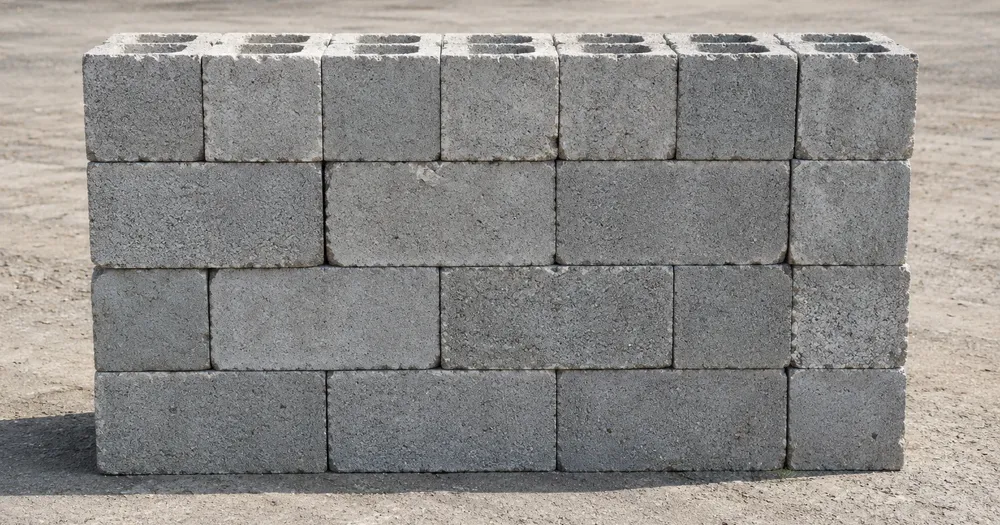
Policz bloki betonowe na palecie ze zdjęcia
Działa z JPG, PNG, WEBP · Bezpłatnie do 20 MB, Premium 50 MB
Sfotografuj widoczną stronę stosu lub palety na wprost — SI oszacuje liczbę widocznych obiektów bloczki betonowe; sprawdź i popraw każdą stronę przed połączeniem rzędów. Narzędzie powstało z myślą o grupie budowlańcy, kierownicy budowy i dostawcy materiałów budowlanych — sprawdź i popraw każde zdjęcie przed dodaniem go do zestawienia CSV lub PDF.
- Sprawdź zdjęcie, a następnie policz widoczne obiekty bloczki betonowe
- Upload a photo and get an automatic count
- Review the markers to catch concrete blocks counted twice or missed
- Bezpłatne korzystanie · Bez rejestracji · Bez znaku wodnego
Prześlij obraz
Wskazówki dla dokładnego zliczania
• Użyj równomiernie oświetlonego zdjęcia, na którym obiekt bloczki betonowe w całości mieści się w kadrze
• Keep your concrete blocks visible and avoid overlapping items
• Kropki i mapa cieplna pokazują zachowane wykrycia — sprawdź i popraw wynik liczenia
O liczniku Bloczki betonowe
The concrete blocks counter counts visible concrete blocks from your photo and marks detections for review. Counting starts automatically once the photo and item are ready. Visibility, overlap and similar-looking items can affect the total. Built for builders, site managers and building-material suppliers.
Jak to działa
1. Sfotografuj swój obiekt: bloczki betonowe
2. Upload your photo to count concrete blocks automatically
3. Review the markers and correct the tally if needed
4. Dodaj do arkusza zliczeń i wyeksportuj wynik jako CSV
Idealne do
• Weryfikacja dostaw blokowych z wielkością zamówienia
• Bloki śledzące używane pomiędzy etapami kompilacji
• Liczenie zwrotów i części palet na koniec fazy
• Stocznia budowlana przyjmuje zapasy bez drabiny
Najczęściej zadawane pytania
- Czy policzy pełny stos, gdy część przedmiotów jest zasłonięta?
- Może oszacować wyłącznie to, co widać na zdjęciu. Przy regularnych stosach fotografuj i sprawdzaj każdą dostępną ścianę, popraw wynik, a mnożenie przez głębokość traktuj jedynie jako szacunek. Oznaczone zdjęcie ułatwia weryfikację, ale nie jest dowodem faktycznej ilości.
- Co zrobić, jeśli na zdjęciu znajdują się nie tylko obiekty bloczki betonowe?
- The counter automatically looks for concrete blocks in your photo. Similar-looking distractors can still affect the result, so review every marker before using the total.
- Czy mogę zliczyć kilka zdjęć w jeden łączny wynik?
- Yes — count each photo and add every reviewed result to the tally sheet as a labelled row. Export the tally as CSV or a PDF report, or save it to your account.
- Czy to jest za darmo i prywatne?
- Tak. Możesz policzyć, sprawdzić i pobrać bezpłatny wynik bez konta. Pobieranie jest bezpłatne i bez znaku wodnego. Rejestracja nie jest wymagana. Zdjęcia przetwarzane na serwerze są szyfrowane podczas przesyłania i usuwane zgodnie z zasadami bezpieczeństwa.
Co możesz zrobić za pomocą Licznik cegieł
Zanim zaczniesz, przejrzyj główne możliwości.
- Licz cegły i bloki na stosach i paletach
- Szybko sprawdzaj dostawy i szacunki stanu magazynowego na miejscu
- Sprawdź każdy znacznik policzonej cegły i skoryguj sumę
- Kontroluj wiele palet w jednym przejściu zbiorczym
- Prowadź bieżące rejestrowanie oznaczonych ładunków
- Sprawdź gęsto ułożone rzędy pod kątem pominiętych lub zdublowanych cegieł
Odniesienie do ustawień
14 ustawień
Dostępne elementy sterujące dla Licznik cegieł.
Prześlij
- Pojedyncze zdjęcie / Audyt masowyUstawienia gotowe
- Wybierz liczbę pojedynczych zdjęć lub audyt zbiorczy Premium. Przejrzyj każdy wynik.Opcje: Pojedyncze zdjęcieAudyt masowy
Liczba
- Uwzględnione znacznikiSuwakZasięg: 0–1 · Domyślne: 0.21
- Starts at 21%; slide toward Show more to include weaker markers or Only strongest to hide them.
- Styl nakładkiUstawienia gotowe
- Wybierz kropki, mapę cieplną, oba lub czysty podgląd.Opcje: ObaKropkiCiepłoBrak
Zaawansowane
- Nakładka wynikuLista rozwijana
- Choose how count markers appear in the on-screen preview; the download keeps its own markers.Opcje: Kropki + mapa cieplnaTylko kropkiTylko mapa cieplna
Zliczenie
- Dodaj do zliczeńJedno kliknięcie
- Add this count to the tally sheet under the name of the object that was counted. Signed-in accounts add finished counts automatically unless that is turned off under Account settings; in bulk mode every photo also has its own Add to tally button.
- EtykietaWprowadzanie tekstu
- Rename a tally row. Edits and removals wait until you choose Save changes, so you can fix several rows at once.
- LiczbaWprowadzanie numeru
- Correct a row's count; totals, the chart and exports follow once the change is saved.
- Save changesJedno kliknięcie
- Apply every edited or removed tally row in one step, or choose Discard changes to leave the sheet as it was.
Chart
- By objectUstawienia gotowe
- The chart is the same in every counting tool and covers the tallies of all of them. By object draws a separate line chart for each tally name, such as pipes and people. By tool draws a chart for each counting tool.Opcje: By objectBy tool
- OkresUstawienia gotowe
- Choose how far back the chart looks. Days without a count appear as zero.Opcje: 7 days30 days90 days12 months
History
- Counting setupGaleria
- Keep comparable counts together. A first setup is created for you, so the first count can be saved straight away.
- Observed atWprowadzanie tekstu
- The date and time of the count, shown as a date and a time field.
- NutyWprowadzanie tekstu
- Starts with every detected object and its count, one per line, such as Pipes - 11. Edit it before saving.
- Save countJedno kliknięcie
- Save the count to your account history. Open a saved count later to correct it or download its source photo.
Powiązane narzędzia dla Licznik cegieł
Narzędzia do typowych kolejnych kroków po Licznik cegieł.

Liczenie i magazyn
Licznik obiektów
Oszacuj liczbę obiektów na zdjęciu. Przed użyciem wyniku sprawdź i popraw ponumerowane znaczniki.
Wypróbuj teraz
Liczenie i magazyn
Licznik obiektów na żywo
Skieruj telefon na oddzielone, w pełni widoczne przedmioty i przeglądaj znaczniki detektora, gdy liczba będzie aktualizowana w czasie rzeczywistym.
Wypróbuj teraz
Liczenie i magazyn
Licznik butelek
Licz butelki na półkach, w skrzynkach lub w chłodniach z jednego zdjęcia, a wykryte obiekty są oznaczone do sprawdzenia.
Wypróbuj terazJak Licznik cegieł pomaga Ci osiągnąć cel
Prawdziwe problemy, które rozwiązuje każdego dnia — dla firm, twórców i codziennych zadań. Znajdź przypadek użycia, który Ci odpowiada i zacznij.
Sprawdź dostawę cegieł przed rozładunkiem
Sfotografuj paletę, aby uzyskać wstępne zestawienie cegieł, a następnie sprawdź fizyczną dostawę, popraw znaczniki i przeprowadź standardową kontrolę listu dostawy, zanim ciężarówka odjedzie.
Śledź pozostały materiał między etapami
Sfotografuj pozostały stos, aby uzyskać wspomagane przez AI oszacowanie, a następnie sprawdź je i popraw względem faktycznego stanu, zanim zaplanujesz kolejny etap budowy.
Przeprowadź audyt całego placu za jednym razem
Otwórz audyt zbiorczy, aby uruchomić tryb odrębnych obiektów dla każdego zdjęcia stosu, a następnie przejrzyj każdy wynik przed użyciem łącznej sumy jardów.
Policz zapasy na budowie z telefonu
Przejdź teren, robiąc telefonem zdjęcie każdego stosu, dodaj każdy wynik do Arkusza zliczeń, a następnie wyeksportuj dzienny stan zapasów na terenie jako raport CSV lub PDF dla kierownika budowy.
Oddziel cegły od mieszanego gruzu budowlanego
Oznacz jedną pełną cegłę w ustawieniu Przykłady, zanim rozpocznie się liczenie, aby bloki i gruz nie zostały pomylone z cegłami, a następnie sprawdź każdy znacznik przed użyciem całkowitej liczby.
Oszacuj całkowitą liczbę na palecie z jednego zdjęcia frontu
Policz cegły widoczne na jednym boku prostokątnego stosu, a następnie pomnóż przez znaną głębokość, aby szybko oszacować całą paletę — przydatne, gdy wspinanie się wokół stosu w celu sfotografowania każdego boku jest niepraktyczne na ruchliwej budowie.
Obejrzyj each transformation li
Every zdjęcie crosses the slash untouched i comes out the other side finished.























