
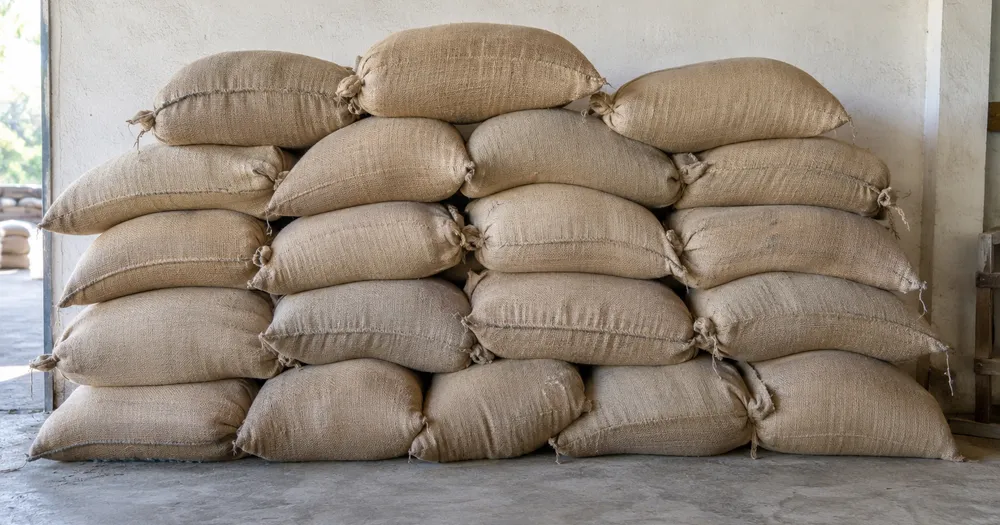
عد أكياس الحبوب في المتجر من الصورة
يدعم JPG وPNG وWEBP · مجانًا حتى 20 MB، وPremium حتى 50 MB
صوّر الواجهة الظاهرة للرصة أو المنصة النقالة من الأمام مباشرة؛ يقدّر الذكاء الاصطناعي عناصر «أكياس حبوب» الظاهرة، فراجع كل واجهة وصححها قبل جمع الصفوف. مصمم لـ المزارع وبيوت التعبئة وتجار الجملة — راجع كل صورة وصححها قبل إضافتها إلى حصر CSV أو PDF.
- راجع الصورة، ثم عدّ العناصر الظاهرة من فئة «أكياس حبوب»
- Upload a photo and get an automatic count
- Review the markers to catch grain sacks counted twice or missed
- مجاني الاستخدام · لا يلزم التسجيل · بدون علامة مائية
رفع الصورة
نصائح للحصول على عدّ دقيق
• استخدم صورة متجانسة الإضاءة وواضحة يظهر فيها عنصر «أكياس حبوب» كاملًا داخل الإطار
• Keep your grain sacks visible and avoid overlapping items
• تعرض النقاط والخريطة الحرارية الاكتشافات المحتجزة - قم بمراجعة النتيجة وتصحيحها
حول عداد أكياس حبوب
The grain sacks counter counts visible grain sacks from your photo and marks detections for review. Counting starts automatically once the photo and item are ready. Visibility, overlap and similar-looking items can affect the total. Built for farms, packhouses and produce wholesalers.
كيف يعمل
1. صوّر عنصرًا من فئة «أكياس حبوب»
2. Upload your photo to count grain sacks automatically
3. Review the markers and correct the tally if needed
4. أضِفه إلى جدول الإحصاء وصدّر عدّك بصيغة CSV
مثالي لـ
• تخزين عدد المخزون بين عمليات التسليم والإرسال
• فحص البضائع الواردة مقابل الميزان وإشعار التسليم
• إحصاءات استهلاك المطاحن والتاجر
• مشروع أرقام لسجل تأمين المحاصيل المخزنة
الأسئلة الشائعة
- هل يمكنه عدّ رصّة كاملة عندما تكون بعض العناصر مخفية؟
- يمكنه فقط تقدير محتوى الصورة المرئية. بالنسبة للمكدسات المنتظمة، قم بتصوير ومراجعة كل وجه يمكن الوصول إليه، وصحح العدد، وتعامل مع أي ضرب في العمق كتقدير. الصورة المميزة تدعم المراجعة ولكنها لا تثبت الكمية المادية.
- ماذا لو احتوت الصورة على عناصر أخرى غير «أكياس حبوب»؟
- The counter automatically looks for grain sacks in your photo. Similar-looking distractors can still affect the result, so review every marker before using the total.
- هل يمكنني عدّ عدة صور في إجمالي واحد؟
- Yes — count each photo and add every reviewed result to the tally sheet as a labelled row. Export the tally as CSV or a PDF report, or save it to your account.
- هل الأداة مجانية وخاصة؟
- نعم. يمكنك إجراء العد ومراجعته وتنزيل النتيجة مجانًا من دون حساب. التنزيلات مجانية وبدون علامة مائية، ولا يلزم التسجيل. تُشفّر الصور المعالجة على الخادم أثناء النقل وتُحذف وفق سياسة الأمان لدينا.
ما يمكنك فعله باستخدام عدّاد الفاكهة
قم بمراجعة القدرات الرئيسية قبل البدء.
- احتسب الفاكهة في الصناديق والصينيات ومجمعات الحصاد
- التفاح الثلاثي، البرتقالي، المانجو
- قم بمراجعة كل علامة فاكهة معدودة قبل تقدير المحصول
- مجاميع حصاد المسار عبر صناديق ملصقة
- عدد كبير من الصناديق في مراجعة الحسابات
- اختياريًا، قم بوضع علامة على الفاكهة لتحسين الأكوام المجمعة
مرجع الإعدادات
14 إعدادًا
عناصر التحكم المتاحة لـ عدّاد الفاكهة.
رفع
- صورة واحدة / جرد بالجملةالإعدادات الجاهزة
- اختر عددًا من الصور الفردية أو تدقيقًا مجمعًا مميزًا. مراجعة كل نتيجة.الخيارات: صورة واحدةالتدقيق المجمّع
العدد
- علامات المدرجةالمنزلقيتراوح: 0–1 · افتراضي: 0.21
- يبدأ عند 21%؛ حرّك المؤشر نحو «إظهار المزيد» لتضمين العلامات الأضعف، أو نحو «الأقوى فقط» لإخفائها.
- أسلوب التفوقالإعدادات الجاهزة
- اختر النقاط أو الخريطة الحرارية أو كليهما أو معاينة نظيفة.الخيارات: كلاهماالنقاطحرارةبلا
متقدّم
- طبقة عرض النتيجةهبوط
- Choose how count markers appear in the on-screen preview; the download keeps its own markers.الخيارات: نقاط + خريطة حراريةنقاط فقطخريطة حرارية فقط
الإحصاء
- أضِف إلى العدّلعق واحد
- Add this count to the tally sheet under the name of the object that was counted. Signed-in accounts add finished counts automatically unless that is turned off under Account settings; in bulk mode every photo also has its own Add to tally button.
- التسميةمدخلات نصية
- Rename a tally row. Edits and removals wait until you choose Save changes, so you can fix several rows at once.
- العددعدد المدخلات
- Correct a row's count; totals, the chart and exports follow once the change is saved.
- Save changesلعق واحد
- Apply every edited or removed tally row in one step, or choose Discard changes to leave the sheet as it was.
Chart
- By objectالإعدادات الجاهزة
- The chart is the same in every counting tool and covers the tallies of all of them. By object draws a separate line chart for each tally name, such as pipes and people. By tool draws a chart for each counting tool.الخيارات: By objectBy tool
- الفترةالإعدادات الجاهزة
- Choose how far back the chart looks. Days without a count appear as zero.الخيارات: 7 days30 days90 days12 months
History
- Counting setupمعرض
- Keep comparable counts together. A first setup is created for you, so the first count can be saved straight away.
- Observed atمدخلات نصية
- The date and time of the count, shown as a date and a time field.
- النوتاتمدخلات نصية
- Starts with every detected object and its count, one per line, such as Pipes - 11. Edit it before saving.
- Save countلعق واحد
- Save the count to your account history. Open a saved count later to correct it or download its source photo.
الأدوات ذات الصلة بـ عدّاد الفاكهة
أدوات للخطوات التالية الشائعة بعد عدّاد الفاكهة.

العد والجرد
عدّاد الأشياء
قدّر عدد العناصر في صورة. راجع العلامات المرقّمة وصحّحها قبل استخدام العدد.
جرّبه الآن
العد والجرد
عدّاد العناصر المباشر
قم بتوجيه هاتفك نحو العناصر المنفصلة والمرئية بالكامل وراجع علامات الكاشف مع تحديث العدد في الوقت الفعلي.
جرّبه الآن
العد والجرد
عدّاد الزجاجات
قم بإحصاء الزجاجات الموجودة على الرفوف، أو في الصناديق، أو في الغرف الباردة من صورة واحدة، مع وضع علامة على الاكتشافات المعدودة للمراجعة.
جرّبه الآنكيف تساعدك عدّاد الفاكهة على إنجاز مهمتك
فهو يحل المشكلات الحقيقية كل يوم، للشركات والمبدعين والمهام اليومية. ابحث عن حالة الاستخدام التي تناسبك وابدأ.
تتبّع محصول يوم الحصاد
افتح التدقيق المجمع لتشغيل وضع الكائنات المميزة عبر كل صورة للصندوق، ثم قم بمراجعة كل نتيجة قبل مقارنة إجمالي التشغيل بالموسم الماضي.
مخزون سوق المزارعين والأكشاك على جانب الطريق
قم بتشغيل وضع العناصر المتشابهة على نوع واحد من الفاكهة قبل الفتح ومرة أخرى عند الإغلاق، ثم قم بمراجعة كلا الرقمين وتصحيحهما قبل استخدام الفرق بينهما كتقدير للمبيعات.
أخذ عينات البساتين لتقدير المحصول
صوّر قسماً مضاءً جيداً من مظلة الأشجار ودع الذكاء الاصطناعي يعدّ الثمار المرئية كطريقة أخذ عينات، مستخدماً شريط حساسية الكشف للضبط للثمار المخفية جزئياً عند تقدير محصول بستان كامل.
تصنيف Packhouse ومراجعة الصناديق
حدد 1-3 نماذج من الفاكهة في إعداد الأمثلة - واحدة لكل صنف في الصندوق - واستخدم نتيجة العناصر المماثلة كمسودة قبل إغلاق الصندوق. ثم قم بفحص الصندوق الفعلي وتصحيح الأخطاء أو التكرارات قبل تسجيل الخروج من غرفة التعبئة.
مراجعة عدد التسليم بالجملة
استخدم الصورة المميزة لمراجعة مسودة التسليم بمساعدة الذكاء الاصطناعي، ومقارنتها مع العد اليدوي أو الفعلي المؤهل، وحفظ العدد المصحح باستخدام سجلات التسليم العادية. الصورة ليست دليلا على الكمية في حد ذاتها.
عدّ محصول حديقة المنزل
قم بتصوير سلة من الطماطم أو التفاح أو التوت المزروعة محليًا في وقت الاختيار لتقدير الحصاد، ثم قم بمراجعة العلامات وتصحيحها قبل إضافة صف إحصاء للموسم.
شاهد كل تحويل عند اكتماله
تعبر كل صورة خط المقارنة من دون تعديل وتظهر في الجهة الأخرى مكتملة.























