
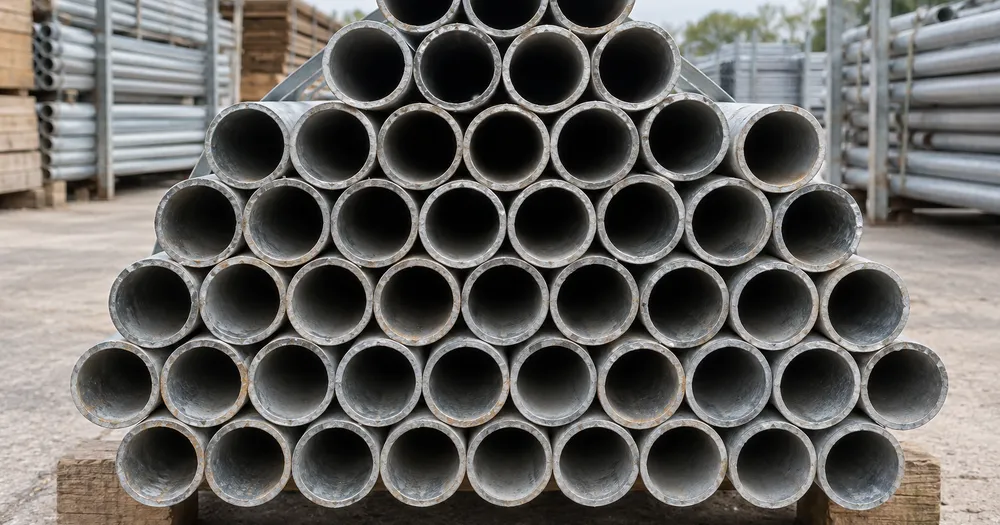
عد أنابيب السقالات في حزمة من الصورة
يدعم JPG وPNG وWEBP · مجانًا حتى 20 MB، وPremium حتى 50 MB
صوّر الأطراف المقطوعة للحزمة من الأمام مباشرة كي تظهر المقاطع العرضية لعناصر «أنابيب سقالات» بوضوح؛ يضع الذكاء الاصطناعي علامات على العناصر المعدودة لمراجعتها. مصمم لـ البنائين ومديري المواقع وموردي مواد البناء — راجع كل صورة وصححها قبل إضافتها إلى حصر CSV أو PDF.
- راجع الصورة، ثم عدّ العناصر الظاهرة من فئة «أنابيب سقالات»
- Upload a photo and get an automatic count
- Review the markers to catch scaffolding tubes counted twice or missed
- مجاني الاستخدام · لا يلزم التسجيل · بدون علامة مائية
رفع الصورة
نصائح للحصول على عدّ دقيق
• استخدم صورة متجانسة الإضاءة وواضحة يظهر فيها عنصر «أنابيب سقالات» كاملًا داخل الإطار
• Keep your scaffolding tubes visible and avoid overlapping items
• تعرض النقاط والخريطة الحرارية الاكتشافات المحتجزة - قم بمراجعة النتيجة وتصحيحها
حول عداد أنابيب سقالات
The scaffolding tubes counter counts visible scaffolding tubes from your photo and marks detections for review. Counting starts automatically once the photo and item are ready. Visibility, overlap and similar-looking items can affect the total. Built for builders, site managers and building-material suppliers.
كيف يعمل
1. صوّر عنصرًا من فئة «أنابيب سقالات»
2. Upload your photo to count scaffolding tubes automatically
3. Review the markers and correct the tally if needed
4. أضِفه إلى جدول الإحصاء وصدّر عدّك بصيغة CSV
مثالي لـ
• التحقق من عدد الأنابيب داخل وخارج الإيجار قبل رفع الفواتير
• التأكد من ما عاد من الموقع ضد ما خرج
• جرد ساحة مخزون الأنابيب بين العقود
• توثيق الكميات الخاصة بالنزاع الإيجاري
الأسئلة الشائعة
- كيف ينبغي أن أصوّر الحزمة للعدّ؟
- قم بتصوير النهايات بشكل مستقيم، وقريبة بدرجة كافية بحيث يبلغ عرض كل طرف بضع بكسلات على الأقل، مع وجود ضوء متساوي وعدم وجود ظلال قوية داخل الحزمة. استخدم النقاط لمراجعة كل اكتشاف تم الاحتفاظ به، ثم قم بتصحيح الأخطاء أو التكرارات قبل استخدام الإجمالي.
- ماذا لو احتوت الصورة على عناصر أخرى غير «أنابيب سقالات»؟
- The counter automatically looks for scaffolding tubes in your photo. Similar-looking distractors can still affect the result, so review every marker before using the total.
- هل يمكنني عدّ عدة صور في إجمالي واحد؟
- Yes — count each photo and add every reviewed result to the tally sheet as a labelled row. Export the tally as CSV or a PDF report, or save it to your account.
- هل الأداة مجانية وخاصة؟
- نعم. يمكنك إجراء العد ومراجعته وتنزيل النتيجة مجانًا من دون حساب. التنزيلات مجانية وبدون علامة مائية، ولا يلزم التسجيل. تُشفّر الصور المعالجة على الخادم أثناء النقل وتُحذف وفق سياسة الأمان لدينا.
ما يمكنك فعله باستخدام عدّاد الطوب
قم بمراجعة القدرات الرئيسية قبل البدء.
- الكونت الطوب والكتل على الأكياس والنوافذ
- قم بمراجعة التسليم وتقديرات المخزون في الموقع بسرعة
- افحص كل علامة من الطوب المعدود وقم بتصحيح المجموع
- مصاريف متعددة لمراجعة الحسابات في بطاقة واحدة للجملة
- حافظوا على الركض عبر الحمولات الملصقة
- قم بمراجعة الصفوف المكتظة بإحكام بحثًا عن الطوب المفقود أو المكرر
مرجع الإعدادات
14 إعدادًا
عناصر التحكم المتاحة لـ عدّاد الطوب.
رفع
- صورة واحدة / جرد بالجملةالإعدادات الجاهزة
- اختر عددًا من الصور الفردية أو تدقيقًا مجمعًا مميزًا. مراجعة كل نتيجة.الخيارات: صورة واحدةالتدقيق المجمّع
العدد
- علامات المدرجةالمنزلقيتراوح: 0–1 · افتراضي: 0.21
- يبدأ عند 21%؛ حرّك المؤشر نحو «إظهار المزيد» لتضمين العلامات الأضعف، أو نحو «الأقوى فقط» لإخفائها.
- أسلوب التفوقالإعدادات الجاهزة
- اختر النقاط أو الخريطة الحرارية أو كليهما أو معاينة نظيفة.الخيارات: كلاهماالنقاطحرارةبلا
متقدّم
- طبقة عرض النتيجةهبوط
- Choose how count markers appear in the on-screen preview; the download keeps its own markers.الخيارات: نقاط + خريطة حراريةنقاط فقطخريطة حرارية فقط
الإحصاء
- أضِف إلى العدّلعق واحد
- Add this count to the tally sheet under the name of the object that was counted. Signed-in accounts add finished counts automatically unless that is turned off under Account settings; in bulk mode every photo also has its own Add to tally button.
- التسميةمدخلات نصية
- Rename a tally row. Edits and removals wait until you choose Save changes, so you can fix several rows at once.
- العددعدد المدخلات
- Correct a row's count; totals, the chart and exports follow once the change is saved.
- Save changesلعق واحد
- Apply every edited or removed tally row in one step, or choose Discard changes to leave the sheet as it was.
Chart
- By objectالإعدادات الجاهزة
- The chart is the same in every counting tool and covers the tallies of all of them. By object draws a separate line chart for each tally name, such as pipes and people. By tool draws a chart for each counting tool.الخيارات: By objectBy tool
- الفترةالإعدادات الجاهزة
- Choose how far back the chart looks. Days without a count appear as zero.الخيارات: 7 days30 days90 days12 months
History
- Counting setupمعرض
- Keep comparable counts together. A first setup is created for you, so the first count can be saved straight away.
- Observed atمدخلات نصية
- The date and time of the count, shown as a date and a time field.
- النوتاتمدخلات نصية
- Starts with every detected object and its count, one per line, such as Pipes - 11. Edit it before saving.
- Save countلعق واحد
- Save the count to your account history. Open a saved count later to correct it or download its source photo.
الأدوات ذات الصلة بـ عدّاد الطوب
أدوات للخطوات التالية الشائعة بعد عدّاد الطوب.

العد والجرد
عدّاد الأشياء
قدّر عدد العناصر في صورة. راجع العلامات المرقّمة وصحّحها قبل استخدام العدد.
جرّبه الآن
العد والجرد
عدّاد العناصر المباشر
قم بتوجيه هاتفك نحو العناصر المنفصلة والمرئية بالكامل وراجع علامات الكاشف مع تحديث العدد في الوقت الفعلي.
جرّبه الآن
العد والجرد
عدّاد الزجاجات
قم بإحصاء الزجاجات الموجودة على الرفوف، أو في الصناديق، أو في الغرف الباردة من صورة واحدة، مع وضع علامة على الاكتشافات المعدودة للمراجعة.
جرّبه الآنكيف تساعدك عدّاد الطوب على إنجاز مهمتك
فهو يحل المشكلات الحقيقية كل يوم، للشركات والمبدعين والمهام اليومية. ابحث عن حالة الاستخدام التي تناسبك وابدأ.
قم بمراجعة تسليم الطوب قبل التفريغ
قم بتصوير البليت للحصول على مسودة من الطوب، ثم قم بمراجعة التسليم الفعلي، وصحح العلامات، وأكمل فحص مذكرة التسليم العادية قبل مغادرة الشاحنة.
تتبّع المواد المتبقّية بين المراحل
قم بتصوير المجموعة المتبقية للحصول على تقدير بمساعدة الذكاء الاصطناعي، ثم قم بمراجعتها وتصحيحها مقابل المخزون الفعلي قبل التخطيط لمرحلة البناء التالية.
تدقيق ساحة كاملة في دفعة واحدة
افتح التدقيق المجمع لتشغيل وضع الكائنات المميزة عبر كل صورة مكدسة، ثم قم بمراجعة كل نتيجة قبل استخدام إجمالي الياردة المجمعة.
عُدّ مخزون الموقع من هاتفك
تجوّل في الموقع والتقط صورة لكل رصّة بكاميرا هاتفك، وأضف كل نتيجة إلى ورقة الإحصاء، ثم صدّر مخزون الموقع اليومي كتقرير CSV أو PDF لمدير الموقع.
فصل الطوب عن مخلّفات الموقع المختلطة
حدد قالبًا واحدًا كاملاً في إعداد الأمثلة قبل بدء العد حتى لا يتم الخلط بين الكتل والركام وبين الطوب، ثم قم بمراجعة كل علامة قبل استخدام الإجمالي.
تقدير إجمالي منصة نقّالة كاملة من صورة وجه واحدة
عُدّ الطوب الظاهر على وجه واحد من كومة مستطيلة، ثم اضرب في العمق المعروف للحصول على تقدير سريع للمنصة بأكملها — مفيد عندما يكون التسلق حول الكومة لتصوير كل وجه غير عملي في موقع مزدحم.
شاهد كل تحويل عند اكتماله
تعبر كل صورة خط المقارنة من دون تعديل وتظهر في الجهة الأخرى مكتملة.























