

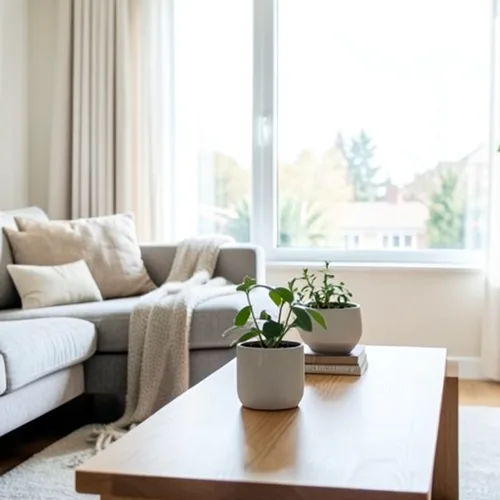
The same source image before and after applying 위글그램 3D.
위글그램 3D photo effect applied to the same source image
Original source image before the 위글그램 3D photo effect

온라인 3D 흔들림 사진 필터

Create a clean eight-frame depth loop where nearer and farther parts move by different amounts. Control the strength, compare the result, and download a finished image from your browser.

위글그램 3D 효과를 위한 사진 업로드

위글그램 3D 효과로 수행할 수 있는 작업

시작하기 전에 사용 가능한 효과 기능을 검토하세요.

  • Apply the 위글그램 3D effect to any photo
  • Fine-tune the effect strength to taste
  • Preview your photo live as you edit
  • Download your edited photo in high quality
  • Apply 위글그램 3D to many photos at once

이용 방법

Wigglegram 3D estimates which parts of your photo are nearer or farther and keeps one plane near the center of the composition steady. Eight frames then move nearer and farther surfaces sideways by different amounts in a smooth back-and-forth rhythm; intensity changes how far they really move instead of fading a still copy over every frame. Nearer surfaces stay in front where things overlap, edges stay clean, and the narrow gaps that open beside foreground objects are filled by continuing the background behind them. At full strength, movement is capped at 2% of the image width and fades to nothing at the side edges. The unchanged center view appears twice so the loop plays seamlessly, and image and transparency move together in a lossless animated WebP. Very large photos are scaled down proportionally to 1.75 megapixels so all eight lossless frames stay small enough to download.


처리 중

위글그램 3D는 AI 액션을 사용합니다. 이 효과가 처리되기 전에 별도의 허용량이 표시됩니다.

다음에 가장 적합

중앙에 배치된 인물 사진, 반려동물, 제품, 정물, 실내, 건축물, 전경·중간 거리·배경이 명확히 분리된 장면.

다음과 같은 경우에는 덜 적합합니다. 평평한 장면, 중앙에서 벗어난 피사체, 매우 미세한 머리카락이나 나뭇잎, 투명하거나 반사되는 물체, 움직이는 원본 사진, 원본 사진에 숨은 표면이 필요한 큰 시점 변화.

위글그램 3D 사용 방법

    위글그램 3D 효과에 관해 자주 묻는 질문

    위글그램이란 무엇인가요?
    안경을 통하지 않고 두 개 이상의 시점이 빠르게 교대로 표시되는 스테레오 이미지입니다. 동작 자체가 깊이를 전달하기 때문에 특별한 장비 없이도 어떤 화면에서도 작동합니다.
    좋은 흔들기 그램을 만드는 것은 무엇입니까?
    Place the main subject near the centre and include recognisable detail both in front of and behind it. The central depth stays most stable while other layers move relative to it. One photo cannot reveal surfaces hidden from the camera, so the tool limits motion and continues only the farther visible background across narrow gaps; complex hair, glass, reflections, and wide separations can still reveal imperfect edges. Lower the intensity when that happens.

    더 많은 깊이 및 치수 효과

    스마트 재초점

    깊이 및 치수고급 AI

    자동 감지된 주 피사체 하나는 선명하게 유지하고 깔끔한 깊이 인식 배경 흐림을 적용합니다

    페이지 열기

    틸트시프트 디오라마

    깊이 및 치수고급 AI

    높은 곳에서 촬영한 거리와 풍경을 깔끔한 깊이 보조 초점 대역으로 미니어처 장면처럼 바꿉니다

    페이지 열기

    깊이 애너글리프 3D

    깊이 및 치수고급 AI

    Create a comfortable red-cyan 3D view for standard glasses from the estimated depth of your photo

    페이지 열기

    크리스털 Refraction

    깊이 및 치수고급 AI

    Refract only the background through bounded crystal facets while keeping the detected subject fixed

    페이지 열기

    Parallax Cutout 포스터

    깊이 및 치수고급 AI

    사람이나 물체를 복제하지 않고 원본에 정렬된 다섯 개의 넓은 종이 평면을 만듭니다

    페이지 열기

    지형 깊이 선

    깊이 및 치수고급 AI

    Trace 18 clean depth contour bands over your photo without moving people or objects

    페이지 열기

    종이 깊이 디오라마

    깊이 및 치수고급 AI

    Style the frame as up to seven layered paper sheets without duplicating people or objects

    페이지 열기

    대기 깊이 안개

    깊이 및 치수고급 AI

    Add soft atmospheric haze that grows with the estimated distance in your photo

    페이지 열기

    Near–Far 분할 Tone

    깊이 및 치수고급 AI

    Apply cool-far and warm-near color grading from the estimated depth of your photo

    페이지 열기

    렌즈볼월드

    깊이 및 치수

    경계가 제한된 유리 구 안에서 장면을 압축하고 반전하며, 구 밖의 모든 픽셀은 그대로 유지합니다

    페이지 열기

    렌티큘러 깊이 인화

    깊이 및 치수고급 AI

    Interlace depth-shifted strips only across the background while keeping the detected subject fixed

    페이지 열기

    추천 효과를 움직이는 모습으로 보기

    가장 추천하는 효과가 이 줄 맨 앞에 먼저 표시되고, 나머지 효과는 그 뒤에 이어집니다.




























