
使用流程
上传一张有一张清晰人脸的照片。面部和裸露的皮肤会被重新生成,年龄痕迹回退约十年,并要求保持相同的脸型、五官、肤色和表情,然后在自动识别的面部及皮肤区域内贴回您的照片。当人脸在画面中较小时,会先放大进行编辑,再缩回原尺寸,因此远处的面孔也能像近处的一样得到细致处理。皮肤保留照片本身的颜色。服装、背景和构图均为您的原始像素。如果结果不会有明显差异,工具会告知您,而不是为一张未变化的图片收费。
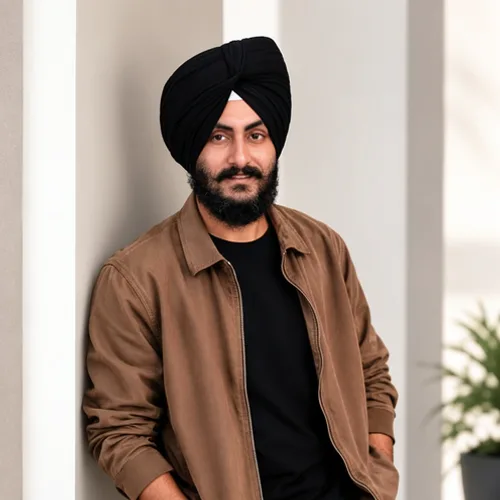

Turn back the signs of age on one face by about ten years, with the same person looking back.
在开始之前查看可用的效果功能。
上传一张有一张清晰人脸的照片。面部和裸露的皮肤会被重新生成,年龄痕迹回退约十年,并要求保持相同的脸型、五官、肤色和表情,然后在自动识别的面部及皮肤区域内贴回您的照片。当人脸在画面中较小时,会先放大进行编辑,再缩回原尺寸,因此远处的面孔也能像近处的一样得到细致处理。皮肤保留照片本身的颜色。服装、背景和构图均为您的原始像素。如果结果不会有明显差异,工具会告知您,而不是为一张未变化的图片收费。
上传照片,调整人工智能年龄回归强度,将处理后的预览与源进行比较,然后下载最终结果。
使用强度控制来平衡 人工智能年龄回归 处理与原始照片的细节和特征。
缩小的 人工智能年龄回归 预览可保持调整响应。免费下载是干净的并且是网页大小的; Premium 或积分解锁原始分辨率。
人工智能年龄回归 上传内容在安全服务器上处理,并根据正常的 Pixoate 保留策略自动删除。
上传一张有一张清晰人脸的照片。面部和裸露的皮肤会被重新生成,年龄痕迹回退约十年,并要求保持相同的脸型、五官、肤色和表情,然后在自动识别的面部及皮肤区域内贴回您的照片。当人脸在画面中较小时,会先放大进行编辑,再缩回原尺寸,因此远处的面孔也能像近处的一样得到细致处理。皮肤保留照片本身的颜色。服装、背景和构图均为您的原始像素。如果结果不会有明显差异,工具会告知您,而不是为一张未变化的图片收费。
人工智能年龄回归使用 AI 动作。任何单独的余量都会在该效果开始处理之前显示。
sharp portraits of adults with the whole face visible; in a group photo each clear face is edited on its own.
不太适合: side profiles, faces covered by hands, hair or sunglasses, very small faces, and photos of children, where there are no signs of age to turn back.























