
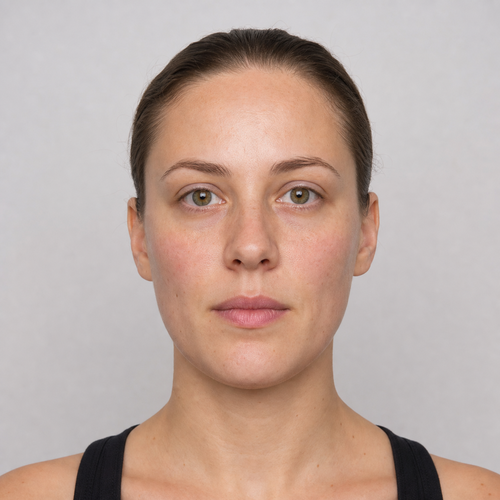
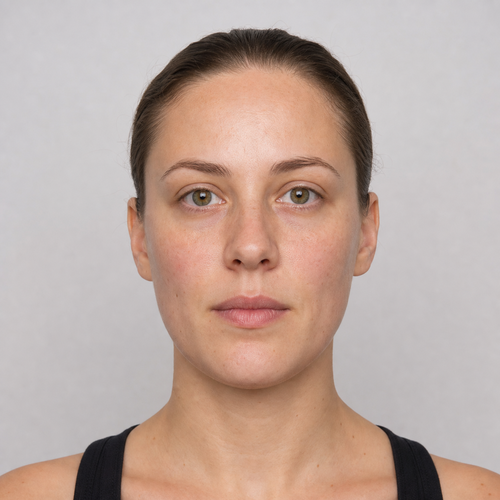
The same source image before and after applying Мягкий глэм.
Мягкий глэм photo effect applied to the same source image
Original source image before the Мягкий глэм photo effect

Soft Glam — Eight Precise Zones, No Face Regeneration

Сочетайте коррекцию кожи с сохранением текстуры и деликатные тени, румяна и оттенок губ в восьми подтверждённых зонах — без регенерации или изменения формы лица.

Загрузите фотографию для эффекта Мягкий глэм.

Что можно сделать с эффектом Мягкий глэм

Прежде чем начать, просмотрите доступные возможности эффектов.

  • Apply the Мягкий глэм effect to any photo
  • Fine-tune the effect strength to taste
  • Preview your photo live as you edit
  • Download your edited photo in high quality
  • Apply Мягкий глэм to many photos at once

Как это работает

Soft Glam does not regenerate, reshape, patch, relight, or generally blur the portrait. It needs one complete, near-front face: the face is checked carefully, its full shape is mapped, and its skin is separated from hair, beard, body, clothing, accessories, and background. It combines exactly three broad skin-polish zones across the forehead and both cheeks with exactly five small makeup zones above both upper eyelids, over both upper cheeks, and inside the outer lip line. The skin polish is measured against the surrounding skin only, so nearby background, hair, or beard color cannot bleed into it; it reduces only medium-sized patches of uneven tone and color while keeping fine detail and pores. Even at full intensity, each skin correction is capped at a small fixed amount. Blush and lip tint add color while keeping the original brightness of the skin, and eyeshadow darkens the lids only very slightly. The eyes, irises, eyebrows, nose, and inside of the mouth are always protected. Face shape, expression, protected features, hair, beard, clothing, scene lighting, background, framing, transparency, and every pixel outside the eight zones are copied unchanged into a lossless PNG. Side profiles, incomplete or tiny faces, unclear skin, and glasses or anything else that leaves a required zone without enough visible skin are refused instead of redrawn. Already-even skin may receive only the makeup colors; a portrait with no safe visible correction is left unchanged and refused.


Обработка

Мягкий глэм использует действие ИИ. Любые отдельные допуски отображаются до начала обработки этого эффекта.

Лучшее для

резкие, равномерно освещённые портреты почти анфас с одним полностью попавшим в кадр лицом и открытыми лбом, бровями, веками, глазами, щеками, носом, губами, челюстью и подбородком.

Менее подходит для: лица в профиль, наклонённые или обрезанные лица, очки, волосы или кисти, закрывающие черты лица, уже нанесённый театральный макияж, выраженные падающие тени, слишком маленькие лица, размытие движения и групповые фотографии.

Способы использования Мягкий глэм

  • Посмотрите согласованный образ Soft Glam с деликатной коррекцией кожи, тенями, румянами и оттенком губ без изменения идентичности или геометрии лица.
  • Сохраните поры, мелкие детали кожи, глаза, брови, нос, внутреннюю область рта, волосы, бороду, одежду, освещение и фон при добавлении ограниченной косметической обработки.
  • Use intensity to control one safety-bounded preset while all pixels outside the eight verified zones stay exactly as photographed.

Мягкий глэм вопросы

Сгладит ли Soft Glam всё моё лицо или изменит его форму?
No. It does not generate a face, reshape, patch, relight the whole frame, or generally blur anything. It combines a small texture-preserving correction in three verified skin zones with color inside five verified makeup zones and copies the rest of the image from your original.
Почему нельзя применять Soft Glam так же, как виртуальная меблировка изменяет комнату?
Virtual staging is expected to synthesize furniture across large replaceable room regions. Makeup and skin polish sit beside identity-critical eyes, brows, nose, lips, hair, texture, and facial contours. Soft Glam therefore locates each facial feature precisely, confirms which pixels are really skin, protects individual features, caps every correction, and refuses uncertain photos rather than asking a generator to redraw the person.

Больше Портрет и красота эффектов

Посмотрите избранные эффекты в движении

Выбор с самым сильным эффектом возглавляет этот пояс перед остальными в каталоге.


















