

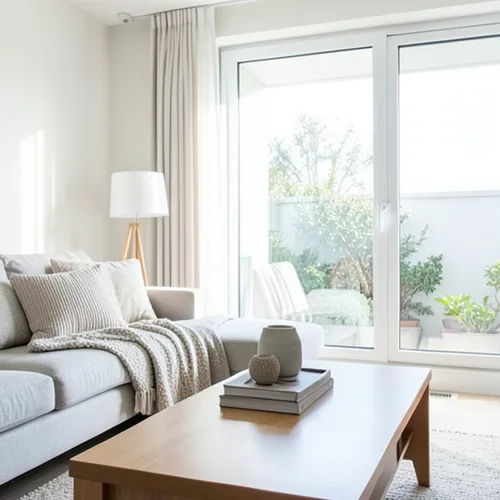
The same source image before and after applying Nära–fjärran delad ton.
Nära–fjärran delad ton photo effect applied to the same source image
Original source image before the Nära–fjärran delad ton photo effect

Nära–fjärrt delad tonfotofilter online

Apply cool-far and warm-near color grading from the estimated depth of your photo. Control the strength, compare the result, and download a finished image from your browser.

Ladda upp ett foto för Nära–fjärran delad ton-effekten

Vad du kan göra med Nära–fjärran delad ton-effekten

Granska de tillgängliga effektfunktionerna innan du börjar.

  • Apply the Nära–fjärran delad ton effect to any photo
  • Fine-tune the effect strength to taste
  • Preview your photo live as you edit
  • Download your edited photo in high quality
  • Apply Nära–fjärran delad ton to many photos at once

Så fungerar det

Near–Far Split Tone estimates relative—not measured—depth, ignores the most extreme near and far readings, and cleans up tiny isolated specks. It then cools the colors of farther areas and warms the colors of nearer areas, with no overlap between the two, around a neutral middle band left exactly as photographed. Intensity directly controls how strong the color shift is; brightness is not deliberately changed, and already saturated colors are shifted more gently so they do not clip to flat color. Each pixel is only recolored in place: nothing is moved, copied, stretched, repainted, or generated, framing stays fixed, and transparency is kept in the lossless PNG. Larger uploads may be resized proportionally first: free results are delivered at web size, and very large photos are scaled down before depth analysis.


Bearbetar

Nära–fjärran delad ton använder en AI-åtgärd. Eventuell separat ersättning visas innan denna effekt börjar bearbetas.

Bäst för

porträtt med tydligt avskilt motiv, filmiska stillbilder, interiörer, resefotografier, produkter och affischer som gynnas av en återhållsam färgriktning med varmt nära och svalt på avstånd.

Mindre lämpad för: platta scener, glas, speglar, reflektioner, rök, fint hår eller lövverk, överlappande ytor, redan mättade färger och fotografier där källans exakta färg måste förbli oförändrad; osäkert relativt djup kan tona fel yta utan att flytta den.

Sätt att använda Nära–fjärran delad ton

    Nära–fjärran delad ton frågor

    Kan effekten flytta, duplicera eller forma om mitt motiv?
    No. It only changes the color of each pixel where it already is. It never moves, copies, stretches, repaints, or generates a face, arm, body, object, or background pixel, and transparency is kept in the lossless PNG. A mistaken depth estimate can color the wrong surface, but it cannot deform a face or body.
    Kan jag byta plats på de varma och svala sidorna?
    No. The direction is deliberately fixed to warm-near and cool-far so the control stays predictable. Intensity changes only the strength of that real perceptual color shift; it cannot swap or reverse the two grades. Strongly saturated colors receive a gentler shift so they do not clip to flat color.

    Fler Djup & Dimension-effekter

    Smart omfokusering

    Djup & DimensionAvancerad AI

    Håll ett automatiskt identifierat huvudmotiv skarpt med ren, djupmedveten bakgrundsoskärpa

    Öppna sidan

    Tilt-shift-diorama

    Djup & DimensionAvancerad AI

    Förvandla gator och landskap sedda ovanifrån till miniatyrscener med ett rent, djupassisterat fokusband

    Öppna sidan

    3D-wigglegram

    Djup & DimensionAvancerad AI

    Create a clean eight-frame depth loop where nearer and farther parts move by different amounts

    Öppna sidan

    Djupanaglyf i 3D

    Djup & DimensionAvancerad AI

    Create a comfortable red-cyan 3D view for standard glasses from the estimated depth of your photo

    Öppna sidan

    Kristallbrytning

    Djup & DimensionAvancerad AI

    Refract only the background through bounded crystal facets while keeping the detected subject fixed

    Öppna sidan

    Parallax Cutout affisch

    Djup & DimensionAvancerad AI

    Bygg fem breda, källanpassade papperslager utan att duplicera personer eller objekt

    Öppna sidan

    Topografiska djuplinjer

    Djup & DimensionAvancerad AI

    Trace 18 clean depth contour bands over your photo without moving people or objects

    Öppna sidan

    Pappersdiorama med djup

    Djup & DimensionAvancerad AI

    Style the frame as up to seven layered paper sheets without duplicating people or objects

    Öppna sidan

    Atmosfärisk djupdimma

    Djup & DimensionAvancerad AI

    Add soft atmospheric haze that grows with the estimated distance in your photo

    Öppna sidan

    Glaskulevärld

    Djup & Dimension

    Komprimera och vänd scenen inuti en avgränsad glaskula medan varje pixel utanför förblir oförändrad

    Öppna sidan

    Linsformigt djuptryck

    Djup & DimensionAvancerad AI

    Interlace depth-shifted strips only across the background while keeping the detected subject fixed

    Öppna sidan

    Se de utvalda effekterna i rörelse

    De starkaste effektplockarna leder detta bälte före resten av katalogen.




























