
Preview for free. Create a free account to download.

AI 面部美颜工具

Retouch selfies naturally — smooth, not plastic

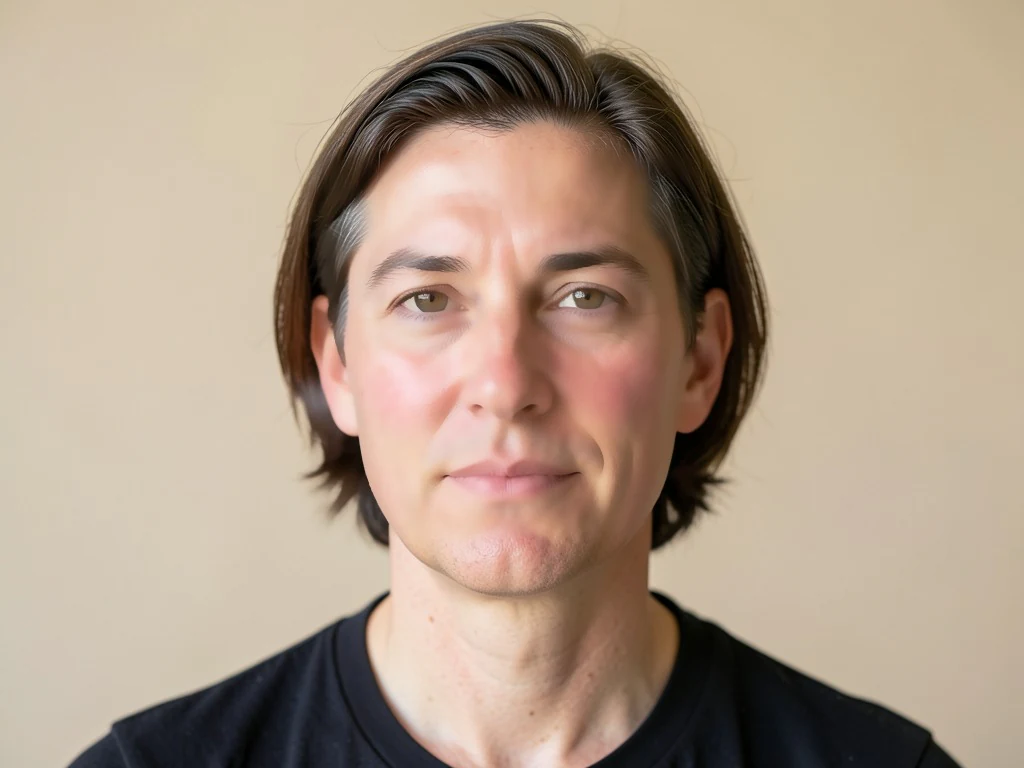
Harsh light and uneven tone? Skin is smoothed and evened in one tap while eyes, hair and edges stay sharp — a natural retouch in seconds.

  • 保留边缘的磨皮——眼睛和头发依旧清晰
  • 均匀肤色,淡化泛红与粗糙质感
  • Preview free · standard download after free signup · Premium adds higher usage

Works with JPG, PNG, WEBP · Free up to 20 MB, Premium 50 MB

Drop a selfie or portrait — get a naturally retouched version back

What you can do with 面部美颜工具

Everything this tool helps you accomplish — no learning curve, no setup.

  • Smooth skin on selfies and portraits
  • Even out uneven skin tone in one tap
  • Softly retouch faces for a natural look
  • Keep eyes, hair and edges sharp
  • Adjust how much smoothing to apply

Settings information

Every control in 面部美颜工具, explained — what it does and when to use it.

调整

磨皮强度SliderRange: 0–1 · 默认: 0.7
控制皮肤的磨皮程度,从“自然”到“魅力”——想要真实可信的专业形象照请保持低值,想要精修的社交媒体效果可调高。
文件在处理后自动删除通过 HTTPS 安全处理

常见问题

它会识别面部的皮肤区域,仅在这些区域应用保边平滑处理,从而淡化不均匀的质感和泛红,同时让眼睛、眉毛、嘴唇、头发和轮廓保持清晰锐利。这种局部精准处理避免了整体滤镜带来的模糊、塑料感。

quality

瑕疵去除工具专门清除痘痘、痤疮等局部瑕疵;面部美颜则整体磨平皮肤质感与肤色,呈现均匀精致的效果。两者搭配使用效果更佳——先去除瑕疵,再进行美颜。

features

可以——强度滑块可从几乎察觉不到的微妙修饰,调到更强的魅力质感。拍摄职业照或证件照时,建议调低强度,效果最自然真实。

features

Yes, free to preview; create a free account to download, and every free result downloads clean — nothing stamped on it. Premium lifts the daily cap and adds batch processing. Your photo is uploaded only to process and deleted automatically afterwards.

privacy

对于 LinkedIn 照片、简历或证件式肖像,将“平滑强度”滑块保持在“自然”附近,使皮肤纹理在近距离查看时仍然可信。对于随意的社交帖子,你可以把它推向“魅力”以获得更平滑、更精致的效果,实时预览会即时更新,你可以在下载前对比两者。

tips

Yes — Pixoate supports batch and bulk processing. Switch to Batch mode, add up to 100 photos, set your options once, and every photo is processed with the same settings before you download a single ZIP. Bulk processing is a Premium feature; the output uses the same quality and settings as single mode.

features

Yes — with bulk processing you configure the settings a single time and they apply to every item in the batch, up to 100 photos. There is no need to repeat the setup per item, and Temporary uploaded and generated files are processed securely and deleted automatically.

usage

面部美颜工具 如何助您完成任务

它每天都在解决真实的问题——服务企业、创作者和日常任务。找到适合您的用例,几秒即可开始。

社交媒体

依然像你本人的约会资料照片

把磨皮强度滑块保持在“自然”附近,为 Tinder、Hinge 或 Bumble 照片柔化倦容和泛红,又不会出现那种被判定为虚假资料的过度磨皮观感。

市场营销

网红与 UGC 内容润色

在发布前对赞助帖或商品照片进行磨皮,让品牌内容看起来精致,而无需完整的影棚修图流程。

房地产

房产经纪人挂牌头像

用较低的自然强度处理房产经纪人的头像,用于 MLS 房源、名片和门前招牌照片,既保留中介机构期望的精致而可信的形象,又不会因塑料感的过度磨皮而让经纪人的照片显得虚假。

职业与人力资源

为团队通讯录打造统一风格的企业形象照

以同样低强度的“自然”设置逐一处理每位员工的头像,让公司通讯录或 LinkedIn 页面呈现一致的精致感,同时避免全局模糊滤镜抹平任何一张照片上真实的皮肤纹理。

活动

交付客户前的婚礼与人像样片修图

在把样片发给情侣或客户之前,用较低的自然强度对拍摄中每张摆拍肖像的肤色和肤质进行磨皮,减少摄影师原本需要逐张手工完成的修图。






















