

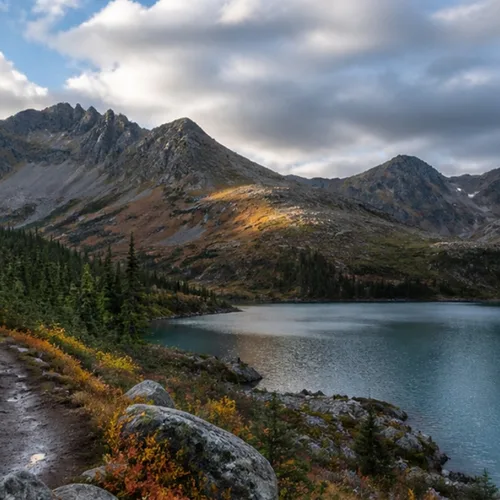
The same source image before and after applying ضباب بعمق جوي.
ضباب بعمق جوي photo effect applied to the same source image
Original source image before the ضباب بعمق جوي photo effect

مرشح عمق الضباب الجوي للصور عبر الإنترنت

Add soft atmospheric haze that grows with the estimated distance in your photo. Control the strength, compare the result, and download a finished image from your browser.

قم بتحميل صورة للتأثير ضباب بعمق جوي

ما يمكنك فعله بالتأثير ضباب بعمق جوي

قم بمراجعة إمكانيات التأثير المتاحة قبل البدء.

  • Apply the ضباب بعمق جوي effect to any photo
  • Fine-tune the effect strength to taste
  • Preview your photo live as you edit
  • Download your edited photo in high quality
  • Apply ضباب بعمق جوي to many photos at once

كيف تعمل

Atmospheric Depth Fog estimates how far each part of your photo is from the camera and cleans up tiny isolated depth specks. Farther areas then fade into soft, natural-looking haze, the way distant hills look paler on a hazy day, using one restrained haze color taken from your photo and kept close to neutral; the nearest areas stay exactly as photographed. Intensity changes how dense the haze really is instead of fading a finished image over the original. Each pixel is only blended in place with that one haze color: nothing is moved, copied, stretched, repainted, or generated, so faces, arms, objects, framing, and transparency stay exactly where they were. Larger uploads may be resized proportionally before depth analysis: free results are delivered at web size, and very large photos are scaled down first. The result is a lossless PNG.


جارٍ المعالجة

ضباب بعمق جوي يستخدم إجراء الذكاء الاصطناعي. يتم عرض أي بدل منفصل قبل بدء معالجة هذا التأثير.

الأفضل ل

المناظر الطبيعية والجبلية والواديّة، ومشاهد المدن متعددة الطبقات، والعمارة، والمشاهد الخارجية ذات الفصل الواضح من المقدمة إلى المسافة.

أقل ملاءمة ل: flat or close-up scenes, glass, mirrors, reflections, smoke, fine hair or foliage, and images where depth is hard to judge from one photo; a wrong depth estimate can place haze on the wrong surface even though nothing changes shape.

طرق الاستخدام ضباب بعمق جوي

    ضباب بعمق جوي أسئلة

    ماذا يمثل العمق المقدّر؟
    It is the estimated near-to-far order of things within this photograph, not measured distance or a rebuilt 3D scene. Areas estimated as farther receive more haze; the cleanup step removes tiny isolated depth mistakes but cannot resolve genuinely ambiguous glass, reflections, smoke, hair, foliage, or overlapping surfaces.
    هل يمكن للضباب إعادة تشكيل العنصر الأساسي أو تكراره؟
    No. The shape of everything stays the same: each pixel is only blended in place with one haze color. No face, arm, body, object, or background pixel is moved, copied elsewhere, stretched, repainted, or generated, and transparency is kept in the lossless PNG. A wrong depth estimate can change where haze appears, but it cannot deform a face or body.

    المزيد من التأثيرات العمق والأبعاد

    إعادة تركيز ذكية

    العمق والأبعادذكاء اصطناعي متقدم

    أبقِ عنصرًا رئيسيًا واحدًا يُكتشف تلقائيًا حادًا، مع تمويه نظيف للخلفية يراعي العمق

    افتح الصفحة

    إمالة التحول الديوراما

    العمق والأبعادذكاء اصطناعي متقدم

    حوّل الشوارع والمناظر المصوّرة من أعلى إلى مشاهد مصغرة بشريط تركيز نظيف مدعوم بالعمق

    افتح الصفحة

    ويجلجرام 3D

    العمق والأبعادذكاء اصطناعي متقدم

    Create a clean eight-frame depth loop where nearer and farther parts move by different amounts

    افتح الصفحة

    عمق ثلاثي الأبعاد بنظارات الأناغليف

    العمق والأبعادذكاء اصطناعي متقدم

    Create a comfortable red-cyan 3D view for standard glasses from the estimated depth of your photo

    افتح الصفحة

    انكسار الكريستال

    العمق والأبعادذكاء اصطناعي متقدم

    Refract only the background through bounded crystal facets while keeping the detected subject fixed

    افتح الصفحة

    ملصق انقطاع المنظر

    العمق والأبعادذكاء اصطناعي متقدم

    أنشئ خمس طبقات ورقية عريضة محاذية للمصدر من دون تكرار الأشخاص أو العناصر

    افتح الصفحة

    خطوط العمق الطبوغرافية

    العمق والأبعادذكاء اصطناعي متقدم

    Trace 18 clean depth contour bands over your photo without moving people or objects

    افتح الصفحة

    ديوراما عمق الورق

    العمق والأبعادذكاء اصطناعي متقدم

    Style the frame as up to seven layered paper sheets without duplicating people or objects

    افتح الصفحة

    نغمة الانقسام القريبة والبعيدة

    العمق والأبعادذكاء اصطناعي متقدم

    Apply cool-far and warm-near color grading from the estimated depth of your photo

    افتح الصفحة

    عالم لينسبول

    العمق والأبعاد

    اضغط المشهد واقلبه داخل كرة زجاجية محددة مع إبقاء كل بكسل خارجها دون تغيير

    افتح الصفحة

    طباعة العمق العدسي

    العمق والأبعادذكاء اصطناعي متقدم

    Interlace depth-shifted strips only across the background while keeping the detected subject fixed

    افتح الصفحة

    شاهد التأثيرات المميزة أثناء الحركة

    أقوى اللقطات ذات التأثير تتصدر هذا الحزام قبل بقية الكتالوج.



























