
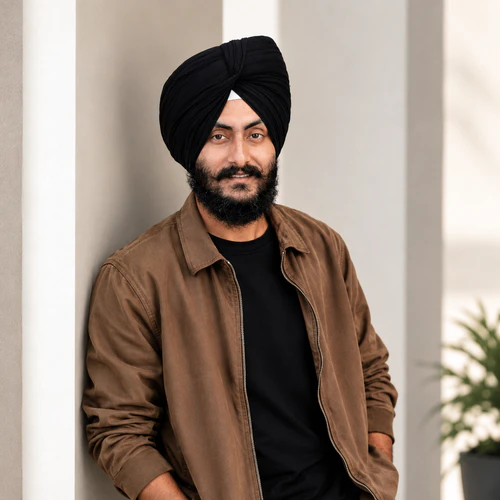
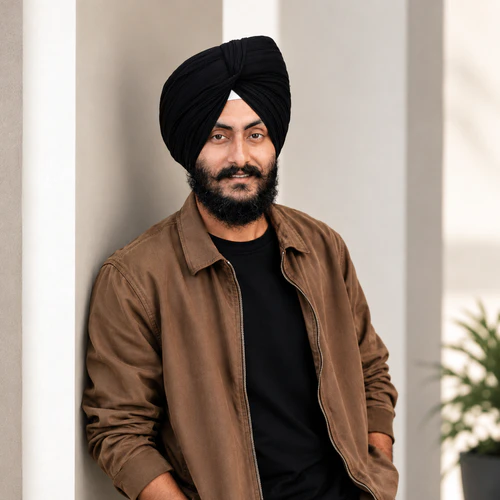
The same source image before and after applying Perawatan.
Perawatan photo effect applied to the same source image
Original source image before the Perawatan photo effect

Grooming — pertegas hanya alis dan rambut wajah yang sudah ada

Define only eyebrow and optional facial-hair detail already visible in your photo, inside verified zones—without inventing hair or changing the face.

Unggah foto untuk efek Perawatan

Apa yang dapat Anda lakukan dengan efek Perawatan

Tinjau kemampuan efek yang tersedia sebelum Anda mulai.

  • Apply the Perawatan effect to any photo
  • Fine-tune the effect strength to taste
  • Preview your photo live as you edit
  • Download your edited photo in high quality
  • Apply Perawatan to many photos at once

Cara kerjanya

Grooming does not generate, remove, extend, reshape, recolor, sharpen, blur, or patch hair or the portrait. It needs one complete, near-front face: the face is checked carefully and its full shape is mapped. The tool tells face skin apart from accessories only to set safe outer limits—never as proof that a dark pixel is facial hair. It first measures the brightness of bare skin on the verified forehead, then keeps only pixels clearly darker than that skin inside exactly two eyebrow outlines. It can also define facial hair that is already there inside one optional lower-face zone: that area must stay inside the face oval, below the nose, on verified face skin, away from the protected nose and lips, and be large and connected enough, with real fine hair detail nearby in the original. Smooth cast shadows cannot qualify. Very light, absent, or uncertain facial hair is left unchanged. The adjustment only darkens slightly, with a small fixed limit for brows and a slightly higher one for facial hair at full intensity; it adds no artificial strands, texture, edge sharpening, or color. Eyes, irises, nose, lips, inside of the mouth, skin outside the accepted brow and facial-hair detail, ears, scalp hair, turban or other headwear, face shape, expression, lighting, clothing, background, framing, transparency, and every pixel outside the two brow zones and optional facial-hair zone are copied unchanged into a lossless PNG. Side profiles, incomplete or tiny faces, unclear skin, obstructions, brows without enough visible dark detail, and uncertain facial hair are refused or left unchanged rather than redrawn.


Memproses

Perawatan menggunakan tindakan AI. Tunjangan terpisah apa pun ditampilkan sebelum efek ini mulai diproses.

Terbaik untuk

potret tajam dengan pencahayaan merata dan satu wajah lengkap yang hampir menghadap ke depan, alis alami yang terlihat jelas, serta detail kumis atau janggut yang sudah ada jika tersedia.

Kurang cocok untuk: wajah profil, wajah miring atau terpotong, kacamata, rambut atau tangan yang menutupi alis atau wajah bagian bawah, alis yang sangat terang atau sudah tegas, rambut wajah berkontras rendah, bayangan jatuh yang kuat, wajah yang terlalu kecil, blur gerak, dan foto grup.

Cara menggunakan Perawatan

  • Pertegas sedikit dua bentuk alis yang sudah ada tanpa mengisi, memanjangkan, atau membentuknya ulang.
  • Subtly define an already-present moustache or beard while keeping lips, nose, surrounding skin, headwear, hairline, and face shape exactly as photographed.
  • Use intensity to control darkening-only definition while every pixel outside the verified grooming zones stays unchanged.

pertanyaan Perawatan

Apakah Grooming akan menambahkan janggut atau membentuk ulang alis saya?
No. It only darkens detail already visible inside two verified eyebrow outlines and, when enough original evidence exists, one optional lower-face facial-hair zone. It cannot synthesize strands, fill gaps, extend outlines, remove hair, or change geometry.
Mengapa Grooming tidak diterapkan seperti virtual staging menyunting ruangan?
Virtual staging intentionally synthesizes large replaceable room regions. Brows, facial hair, lips, skin, and facial contours are identity-critical and touch at pixel scale. Grooming therefore measures your own pixels inside precisely located, verified zones, caps a darkening-only correction, and refuses uncertain evidence rather than asking a generator to redraw the person.

Lebih banyak efek Potret & Kecantikan

Lihat the featured effects in motion

The strongest effect picks lead Ini belt Sebelum the rest of the catalog.


















