
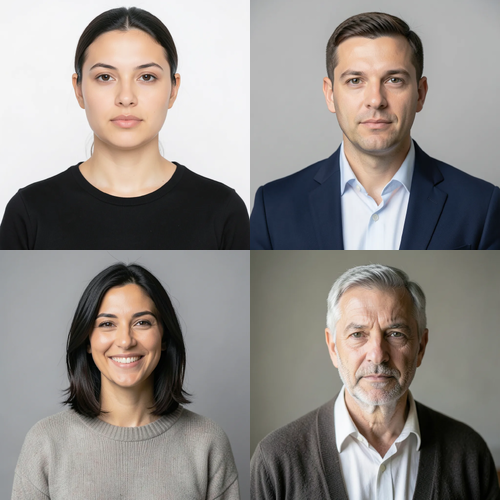
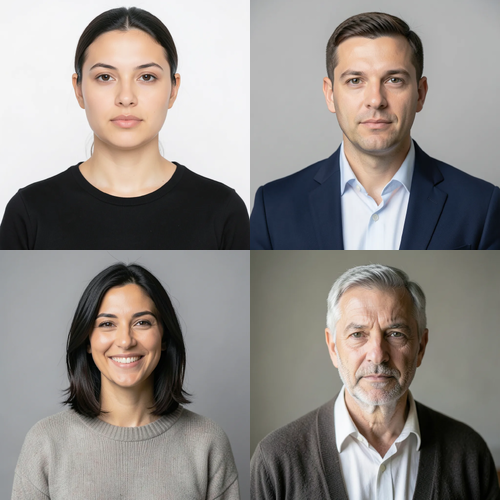
The same source image before and after applying Retouch Banyak Wajah.
Retouch Banyak Wajah photo effect applied to the same source image
Original source image before the Retouch Banyak Wajah photo effect

Multi-Face Retouch — poles dua wajah atau lebih tanpa menggambar ulang siapa pun

Terapkan polesan ringan yang sama dan tetap menjaga tekstur pada dua atau lebih wajah terverifikasi—tanpa menggambar ulang siapa pun atau menyentuh bagian foto lainnya.

Unggah foto untuk efek Retouch Banyak Wajah

Apa yang dapat Anda lakukan dengan efek Retouch Banyak Wajah

Tinjau kemampuan efek yang tersedia sebelum Anda mulai.

  • Apply the Retouch Banyak Wajah effect to any photo
  • Fine-tune the effect strength to taste
  • Preview your photo live as you edit
  • Download your edited photo in high quality
  • Apply Retouch Banyak Wajah to many photos at once

Cara kerjanya

Multi-Face Retouch is a localized group-portrait treatment, not a full-frame generator. It needs at least two complete, near-front faces. Each face is found and checked on its own: its full shape is mapped, and its skin is separated from hair, beard, body, clothing, accessories, background, and neighboring people. Exactly three bounded zones per accepted face cover safe skin on the forehead and both cheeks, and slightly enlarged protective areas keep every eye, iris, eyebrow, nose, and lip untouched. Each face is measured only against its own skin, so another person, background, hair, or beard cannot influence its correction. Only medium-sized patches of uneven tone and color are reduced; fine detail, pores, wrinkles, and age cues are kept. Even at full intensity, each brightness and color correction is capped at a small fixed amount. Eyes, irises, eyebrows, nose, lips, inside of the mouth, hair, beard, face shape, expression, bodies, clothing, lighting, background, collage grid or image edges, framing, transparency, and every pixel outside the accepted zones are copied unchanged into a lossless PNG. It never smooths a whole face, sharpens, reshapes, patches, or regenerates a person. Side profiles, incomplete or tiny faces, unclear skin, obstructions, and already-even faces are left unchanged; the request is refused when fewer than two faces remain safe.


Memproses

Retouch Banyak Wajah menggunakan tindakan AI. Tunjangan terpisah apa pun ditampilkan sebelum efek ini mulai diproses.

Terbaik untuk

potret grup yang tajam, foto profil profesional tim, kolase keluarga, serta foto acara dengan sedikitnya dua wajah lengkap, berpencahayaan baik, hampir menghadap ke depan, dan cukup besar untuk diverifikasi.

Kurang cocok untuk: potret tunggal, wajah profil, wajah miring atau terpotong, kacamata, rambut atau tangan yang menutupi fitur wajah, kerumunan di kejauhan, wajah yang terlalu kecil, blur gerak, riasan tebal, pencahayaan berwarna kuat, serta foto dengan kurang dari dua wajah yang memiliki kulit aman dan terlihat.

Cara menggunakan Retouch Banyak Wajah

  • Terapkan satu perlakuan konsisten dengan batas aman pada potret tim atau keluarga, sambil mengukur setiap wajah secara terpisah.
  • Seimbangkan variasi kecil pada dahi dan pipi tanpa mengubah identitas, penanda usia, ekspresi, rambut, pakaian, atau lingkungan siapa pun.
  • Retouch the safe faces in a collage while its seams, panels, typography, transparency, and any skipped faces stay exactly as uploaded.

pertanyaan Retouch Banyak Wajah

Apakah Multi-Face Retouch akan membuat semua orang tampak sama?
Tidak. Setiap wajah yang diterima diukur terhadap kulit sumbernya sendiri dan menerima batas koreksi ketat yang sama, bukan warna target atau wajah buatan yang sama. Identitas, penanda usia, ekspresi, geometri, dan wajah yang tidak diterima tetap berpijak pada unggahan.
Mengapa Multi-Face Retouch tidak diterapkan seperti virtual staging menyunting ruangan?
Virtual staging sengaja menyintesis area ruangan luas yang dapat diganti. Foto grup memuat beberapa wajah yang identitasnya sangat penting, berdekatan dengan rambut, pakaian, tangan, dan orang lain. Karena itu, Multi-Face Retouch memverifikasi serta memasker setiap wajah secara terpisah, membatasi koreksi lokal, dan menolak gambar dengan kurang dari dua wajah yang aman alih-alih meminta generator menggambar ulang grup tersebut.

Lebih banyak efek Potret & Kecantikan

Lihat the featured effects in motion

The strongest effect picks lead Ini belt Sebelum the rest of the catalog.


















