
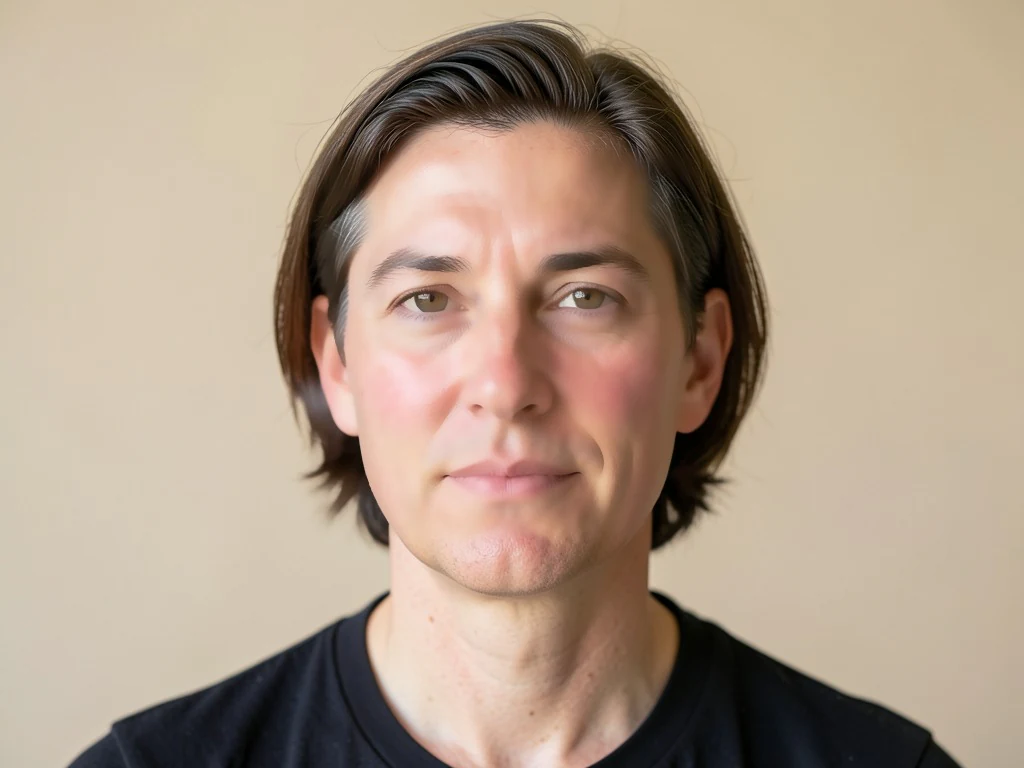

Làm đẹp khuôn mặt trực tuyến — Làm mịn da và chỉnh sửa ảnh
Hoạt động với JPG, PNG, WEBP
Ánh sáng gay gắt tìm thấy từng mảng không đều màu trên da bạn. Làm đều tông màu và kết cấu mà không bị mờ, trông như nhựa mà bộ lọc để lại.
- Làm mịn da bảo toàn đường nét — mắt và tóc vẫn sắc rõ
- Làm đều màu da, giảm vùng ửng đỏ và bề mặt thô ráp
- Nhìn giống em trong một ngày tốt lành, không giống một bộ lọc
Thả ảnh selfie hoặc chân dung vào — nhận lại phiên bản đã chỉnh sửa tự nhiên
Mẹo để có kết quả tốt nhất
• Giữ mức thấp để có vẻ tự nhiên nhất
• Trước tiên hãy xóa nốt mụn bằng công cụ Xóa Khuyết Điểm
• Dùng cường độ thấp cho ảnh chuyên nghiệp hoặc ảnh thẻ
Về Công Cụ Làm Đẹp Khuôn Mặt
Công cụ làm đẹp khuôn mặt phát hiện các vùng da trên khuôn mặt và chỉ áp dụng làm mịn giữ cạnh ở đó, làm đều kết cấu và tông màu trong khi vẫn giữ mắt, lông mày, môi, tóc và đường viền khuôn mặt sắc nét. Cách xử lý chọn lọc đó mang lại vẻ hoàn thiện, tự nhiên — không bị mờ nhòe, giả tạo như các bộ lọc phủ toàn ảnh.
Cách hoạt động
1. Tải lên ảnh selfie hoặc chân dung
2. AI xác định vùng da trên khuôn mặt
3. Da được làm mịn, đường nét vẫn sắc rõ
4. Điều chỉnh mức độ và tải xuống
Hoàn hảo cho
• Ảnh tự sướng và ảnh chân dung
• Ảnh hồ sơ và ảnh mạng xã hội
• Ảnh chân dung chuyên nghiệp
• Ảnh chân dung sự kiện và nhóm
Bạn có thể làm gì với Công Cụ Làm Đẹp Khuôn Mặt
Xem lại các khả năng chính trước khi bạn bắt đầu.
- Làm mịn da trong ảnh selfie và ảnh chân dung
- Cân bằng tông da không đều chỉ trong một chạm
- Chỉnh sửa khuôn mặt nhẹ nhàng để có vẻ ngoài tự nhiên
- Giữ mắt, tóc và các đường viền luôn sắc nét
- Điều chỉnh mức độ làm mượt
Tham khảo cài đặt
cài đặt 2
Các điều khiển có sẵn cho Công Cụ Làm Đẹp Khuôn Mặt.
- Chế độ xử lýCài đặt sẵn
- Xử lý một đầu vào hoặc chuyển sang chế độ theo lô của Premium để áp dụng cùng thiết lập cho nhiều đầu vào. Loại đầu vào được hỗ trợ tùy thuộc vào công cụ.Tùy chọn: Một ảnhHàng loạt
Điều chỉnh
- Mức độ làm mịnThanh trượtPhạm vi: 0–1 · Mặc định: 0.7
- Điều chỉnh mức làm mịn da, từ Tự nhiên đến Lộng lẫy — hãy giữ mức thấp để ảnh chân dung công sở trông thật, đẩy cao hơn để có vẻ ngoài bóng bẩy hợp mạng xã hội.
Các công cụ liên quan dành cho Công Cụ Làm Đẹp Khuôn Mặt
Công cụ dành cho các bước tiếp theo phổ biến sau Công Cụ Làm Đẹp Khuôn Mặt.
Studio chụp chân dung & chân dung
Xóa Khuyết Điểm Da
Giảm các nhược điểm, đốm và vết thâm có thể nhìn thấy trong khi xem xét tác động lên kết cấu da xung quanh.
Dùng thử ngay
Cải thiện ảnh
Công Cụ Nâng Cấp Ảnh AI
Điều chỉnh độ nhiễu, độ sắc nét, màu sắc và tỷ lệ trong một quy trình nâng cao, sau đó so sánh kết quả với bản gốc.
Dùng thử ngay
Cải thiện ảnh
Công cụ nâng cấp ảnh AI
Nâng cấp hình ảnh lên 2×, 3× hoặc 4× và xem lại kết quả nâng cao trước khi tải xuống.
Dùng thử ngayCâu hỏi thường gặp
Công Cụ Làm Đẹp Khuôn Mặt giúp bạn hoàn thành công việc như thế nào
Những vấn đề thực tế mà nó giải quyết hàng ngày — cho doanh nghiệp, người sáng tạo và các công việc hàng ngày. Tìm trường hợp sử dụng phù hợp với bạn và bắt đầu.
Ảnh hồ sơ hẹn hò vẫn giống bạn
Giữ thanh trượt cường độ Làm mịn gần mức Natural để làm dịu làn da mệt mỏi và ửng đỏ cho ảnh Tinder, Hinge hoặc Bumble mà không bị vẻ làm mịn quá mức khiến hồ sơ bị gắn cờ là giả.
Chỉnh sửa nội dung của người ảnh hưởng & UGC
Làm mịn da trên các bài đăng được tài trợ hoặc ảnh sản phẩm trước khi công bố, giữ cho nội dung thương hiệu trông chỉn chu mà không cần một quy trình chỉnh sửa studio đầy đủ.
Ảnh chân dung tin đăng của môi giới và đại lý
Chạy ảnh chân dung của một môi giới bất động sản qua một lượt xử lý cường độ Tự nhiên thấp cho các tin đăng MLS, danh thiếp và ảnh biển hiệu, giữ được vẻ chỉn chu-nhưng-đáng-tin mà các công ty môi giới mong đợi mà không bị làm mịn quá đà kiểu nhựa khiến ảnh môi giới trông giả tạo.
Ảnh chân dung doanh nghiệp đồng nhất cho danh bạ nhân sự
Xử lý từng ảnh chân dung nhân viên riêng lẻ với cùng một mức thấp, cài đặt cường độ Tự nhiên để danh bạ công ty hay trang LinkedIn trông chỉn chu đồng nhất, mà không có bộ lọc làm mờ toàn bộ khiến kết cấu da thật bị bệt trên bất kỳ tấm ảnh nào.
Chỉnh sửa ảnh thử cưới & chân dung trước khi giao cho khách
Làm mịn tông da và kết cấu trên mỗi bức chân dung tạo dáng từ một buổi chụp bằng một lượt xử lý cường độ Tự nhiên nhẹ trước khi gửi bản duyệt cho một cặp đôi hoặc khách hàng, cắt giảm việc chỉnh sửa thủ công từng ảnh mà một nhiếp ảnh gia lẽ ra phải làm bằng tay.
Ngắm nhìn từng vùng đất chuyển hóa
Mỗi bức ảnh đều vượt qua dấu gạch chéo và đi ra phía bên kia.























