
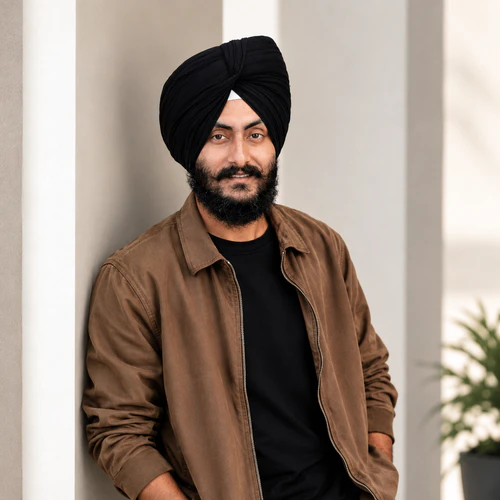
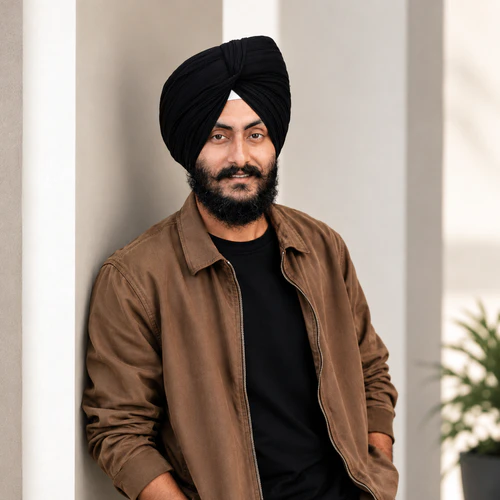
The same source image before and after applying chải chuốt.
chải chuốt photo effect applied to the same source image
Original source image before the chải chuốt photo effect

Grooming — chỉ làm rõ lông mày và râu hiện có

Define only eyebrow and optional facial-hair detail already visible in your photo, inside verified zones—without inventing hair or changing the face.

Tải ảnh lên để tạo hiệu ứng chải chuốt

Bạn có thể làm gì với hiệu ứng chải chuốt

Xem lại các khả năng hiệu ứng có sẵn trước khi bạn bắt đầu.

  • Apply the chải chuốt effect to any photo
  • Fine-tune the effect strength to taste
  • Preview your photo live as you edit
  • Download your edited photo in high quality
  • Apply chải chuốt to many photos at once

Cách hoạt động

Grooming does not generate, remove, extend, reshape, recolor, sharpen, blur, or patch hair or the portrait. It needs one complete, near-front face: the face is checked carefully and its full shape is mapped. The tool tells face skin apart from accessories only to set safe outer limits—never as proof that a dark pixel is facial hair. It first measures the brightness of bare skin on the verified forehead, then keeps only pixels clearly darker than that skin inside exactly two eyebrow outlines. It can also define facial hair that is already there inside one optional lower-face zone: that area must stay inside the face oval, below the nose, on verified face skin, away from the protected nose and lips, and be large and connected enough, with real fine hair detail nearby in the original. Smooth cast shadows cannot qualify. Very light, absent, or uncertain facial hair is left unchanged. The adjustment only darkens slightly, with a small fixed limit for brows and a slightly higher one for facial hair at full intensity; it adds no artificial strands, texture, edge sharpening, or color. Eyes, irises, nose, lips, inside of the mouth, skin outside the accepted brow and facial-hair detail, ears, scalp hair, turban or other headwear, face shape, expression, lighting, clothing, background, framing, transparency, and every pixel outside the two brow zones and optional facial-hair zone are copied unchanged into a lossless PNG. Side profiles, incomplete or tiny faces, unclear skin, obstructions, brows without enough visible dark detail, and uncertain facial hair are refused or left unchanged rather than redrawn.


Đang xử lý

chải chuốt sử dụng hành động AI. Mọi khoản phụ cấp riêng biệt đều được hiển thị trước khi hiệu ứng này bắt đầu xử lý.

Tốt nhất cho

chân dung sắc nét, đủ sáng đều, gần như chính diện, có một khuôn mặt hoàn chỉnh, lông mày tự nhiên nhìn thấy rõ và tùy chọn chi tiết ria hoặc râu vốn có.

Ít phù hợp hơn với: khuôn mặt nghiêng, khuôn mặt bị nghiêng hoặc cắt, kính, tóc hoặc bàn tay che lông mày hay nửa dưới khuôn mặt, lông mày quá nhạt hoặc vốn đã rõ, râu có độ tương phản thấp, bóng đổ mạnh, khuôn mặt quá nhỏ, nhòe chuyển động và ảnh nhóm.

Các cách sử dụng chải chuốt

  • Chỉ nhấn nhẹ hai dáng lông mày hiện có mà không tô đầy, kéo dài hay định hình lại.
  • Subtly define an already-present moustache or beard while keeping lips, nose, surrounding skin, headwear, hairline, and face shape exactly as photographed.
  • Use intensity to control darkening-only definition while every pixel outside the verified grooming zones stays unchanged.

Câu hỏi chải chuốt

Grooming có thêm râu hoặc định hình lại lông mày không?
No. It only darkens detail already visible inside two verified eyebrow outlines and, when enough original evidence exists, one optional lower-face facial-hair zone. It cannot synthesize strands, fill gaps, extend outlines, remove hair, or change geometry.
Tại sao không áp dụng Grooming theo cách dàn dựng nội thất ảo chỉnh sửa căn phòng?
Virtual staging intentionally synthesizes large replaceable room regions. Brows, facial hair, lips, skin, and facial contours are identity-critical and touch at pixel scale. Grooming therefore measures your own pixels inside precisely located, verified zones, caps a darkening-only correction, and refuses uncertain evidence rather than asking a generator to redraw the person.

Thêm hiệu ứng Chân dung & Sắc đẹp

Xem các hiệu ứng đặc trưng khi chuyển động

Lựa chọn có hiệu ứng mạnh nhất dẫn đầu đai này trước phần còn lại của danh mục.


















