Turn any photo into a watercolor painting
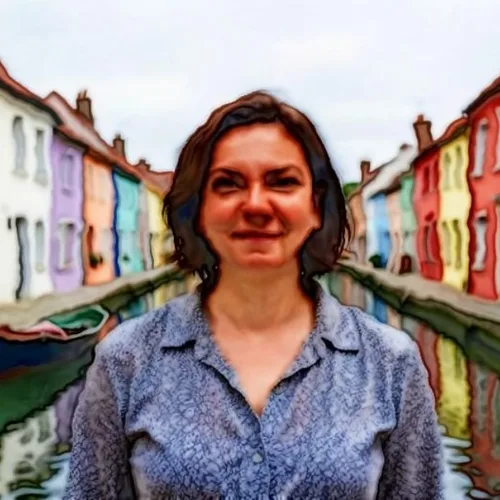
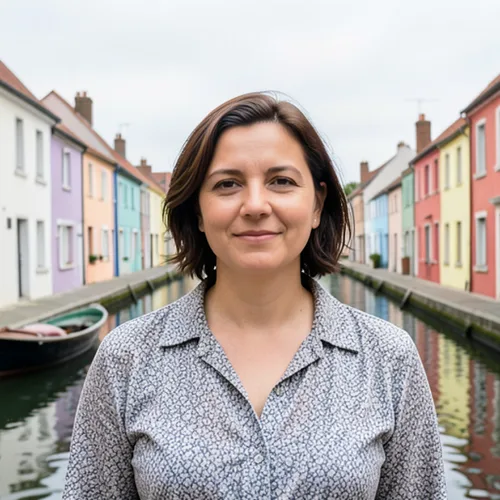
Custom watercolor portraits cost hundreds and take weeks. Get a soft, print-ready painting from any photo in seconds — made for wall art, cards, and gifts.

Drop a photo — get back a soft watercolor painting
What you can do with the Watercolor Generator effect
Everything this effect helps you accomplish — no learning curve, no setup.
- Apply the Watercolor Generator effect to any photo
- Fine-tune the effect strength to taste
- Preview your photo live as you edit
- Download your edited photo in high quality
- Apply Watercolor Generator to many photos at once
照片转水彩生成器
照片转水彩生成器
将您的照片转换为水彩画,呈现柔和的色彩晕染、轻柔的边缘线条和手绘艺术质感——非常适合装饰画和墙面艺术。
使用方法
上传照片,调整水彩强度,即刻下载您的水彩画作品。
为什么选择我们的水彩生成器?
水彩艺术
从任意照片生成水彩人像、彩绘风景画和艺术装饰画。
快速简便
Turns any photo into a watercolor painting in seconds — set the intensity, watch the live preview update, download the winner.
100% 安全
我们不存储您的数据。图片处理完成后自动删除。
What you can do with 水彩生成器
Everything this tool helps you accomplish — no learning curve, no setup.
- Turn photos into soft watercolor paintings
- Create watercolor portraits from your pictures
- Make artistic wall art and prints from a photo
- Dial in how strong the watercolor effect looks
- Convert a whole folder of photos in one batch
- Design painterly gifts and personalized keepsakes
Settings information
2 settings
Every control in 水彩生成器, explained — what it does and when to use it.
模式
- Single / Batch (ZIP)预设
- 选择“单张”可绘制一张照片;选择“批量(ZIP)”则可用相同的水彩设置一次处理多张照片,并打包成 ZIP 一起下载;批量处理需要 Premium 套餐。选项: 单张批量(ZIP)
效果
- 水彩强度SliderRange: 10–100% · 默认: 70%
- 控制色彩晕染和绘画式柔化的强度——低值(“轻微”)只在照片细节上覆盖淡淡一层,高值(“强”)则把图像变成大胆的油画笔触。
用完 水彩生成器 了?接下来试试这些
为您精选与 水彩生成器 搭配得当的工具。无需丢失文件,继续操作。
卡通生成器
A plain headshot blends into every feed. Turn your photo into cartoon art, a caricature, or a sticker-ready avatar in seconds — no artist, no waiting.
立即试用动漫生成器
Anime commissions take days and cost real money. Turn any selfie into an anime character or manga-style portrait in seconds, ready for avatars, posts, and profiles.
立即试用铅笔素描
Hand-drawn portraits cost money and take days. Convert your photo into a realistic pencil sketch, tune the shadow depth to taste, and download it in seconds. Free to start, no credit card.
立即试用照片转卡通
Plain selfies make forgettable profile pics. Convert any photo into cartoon or caricature styles, compare seven looks side by side, and download the winner in seconds. Free to start, no credit card.
立即试用像素艺术生成器
Drawing sprites pixel by pixel takes hours. Convert photos into 8-bit style art for game sprites, avatars, and profile pics in seconds.
立即试用照片滤镜与特效
Flat photos get scrolled past. Pick a cinematic, vintage, glitch, or beauty effect, preview every look instantly, and download the one you love in seconds. Free to start, no credit card.
立即试用常见问题
上传你的照片,水彩生成器会自动添加柔和的晕染和画意边缘。在实时预览中调整强度,可呈现淡雅的淡彩或梦幻的画感,然后下载你的水彩图片。
usage人像、花卉、宠物和风景都能制作出精美的水彩印刷品。使用高分辨率图片可保留更丰富的纹理,这一点在你打算将成品打印为墙面艺术或礼物时尤为重要。
tips可以。以全分辨率下载,如需更大的画幅或海报打印,可再用图片放大工具处理。水彩艺术放大效果良好,适合装裱礼物和家居装饰。
features是的,免费、无需注册、无水印。你的照片会被安全处理,并在应用水彩效果后自动删除。
privacyIt transforms a photo you upload - the generator adds soft color bleeds and painterly edges to your picture automatically. It is not a blank painting canvas or a tutorial, so start from a clear, well-lit photo for the best watercolor result.
usage“强度”滑块从 10% 到 100%,控制颜色晕染和绘画式边缘柔化的强弱。较低的值(约 20-40%)呈现淡淡的水洗效果,底下仍能看到照片细节,而较高的值(80-100%)则把图像完全抽象成大胆的手绘笔触。
features可以——从“单张”切换到“批量”模式,拖入你想转换的每张照片,相同的强度设置会应用到所有照片,然后将结果打包成一个 ZIP。批量模式需要 Premium 方案;单张照片转换保持免费且无限制。
features对于人像,请将强度保持在 40-60% 左右,让五官在油画质感下仍清晰可辨。对于风景和花卉,可将强度提高到 75-90%,营造更大胆、更具绘画感的笔触,此时损失一些细节反而会增强艺术效果。
tips没错——把喜欢的照片转换一下,预览它变成水彩画后的效果,再把结果当作练习时的参考。这是在动笔之前快速测试水彩创意和构图的好方法,对新手尤其有帮助。
tips调高水彩强度,可以得到更松散的色彩晕染和更柔和的边缘,呈现出更抽象的效果;选择色块鲜明的照片——天空、花朵、水面——最能呈现出抽象的水彩风格。降低强度则能让主体保持清晰可辨。
usageYes — Pixoate supports batch and bulk processing. Switch to Batch mode, add up to 100 photos, set your options once, and every photo is processed with the same settings before you download a single ZIP. Bulk processing is a Premium feature; the output uses the same quality and settings as single mode.
featuresYes — with bulk processing you configure the settings a single time and they apply to every item in the batch, up to 100 photos. There is no need to repeat the setup per item, and Temporary uploaded and generated files are processed securely and deleted automatically.
usage水彩生成器 如何助您完成任务
它每天都在解决真实的问题——服务企业、创作者和日常任务。找到适合您的用例,几秒即可开始。
水彩墙面艺术与印刷品
将人像和风景转化为水彩画,用于装裱印刷品和家居装饰
婚礼与周年纪念礼物
将婚纱照和情侣照转成柔美的水彩肖像,打造浪漫的个性化礼物
请柬与文具设计
用你自己的照片设计水彩风格的请柬、婚期预告卡和文具
艺术风格的社交媒体帖子
将日常照片变成富有画意的水彩作品,用于 Instagram、Pinterest 和博客
为客户照片图库批量制作水彩
摄影师和艺术家切换到批量模式,一次性用相同的强度设置处理整场拍摄,把一个有主题的水彩画廊以单个 ZIP 交付,而不是逐张转换照片。
宠物纪念与追思留念肖像
以 40-60% 的强度把爱宠的心爱照片变成柔和的水彩肖像,做成温柔的纪念品、装裱画作或纪念蜡烛礼物。
自出版书籍封面与博客头图
为素材图或个人照片施加高强度的水彩晕染(75-90%),打造带有手绘质感的独立书籍封面、诗集小册子或博客主图——无需插画师。
房产成交礼品和挂牌插图
将房源的外景或内景照片转换为柔和的水彩插画,作为难忘的成交日客户礼物,或用更淡的水彩效果作为别具一格的房源卡片图,让它从普通摄影中脱颖而出。
水彩入门参考图
对初学者来说,有参考图会让水彩练习容易得多:把自己的照片转换成水彩画,提前看清你想要的色彩晕染、明暗层次和柔和边缘,再动手临摹。
Pixoate