
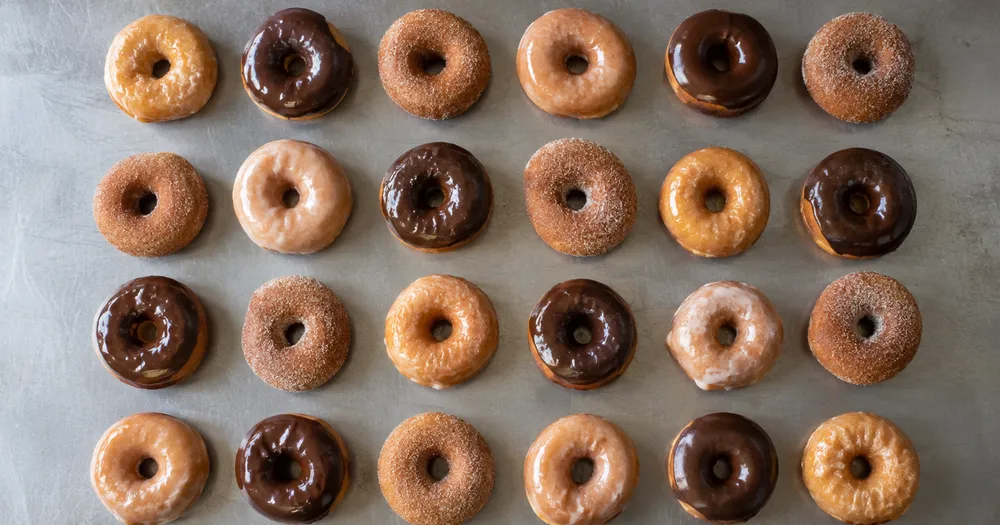
Hitung donat di nampan dari foto
Dapat digunakan dengan JPG, PNG, WEBP · Gratis hingga 20 MB, Premium 50 MB
Sebarkan donat setebal satu lapis di nampan atau permukaan datar lalu foto tepat dari atas — deteksi yang dihitung diberi titik untuk ditinjau. Dibuat untuk toko roti, katering, dan produsen makanan — tinjau dan koreksi setiap foto sebelum menambahkannya ke rekap CSV atau PDF.
- Tinjau foto, lalu hitung donat yang terlihat
- Upload a photo and get an automatic count
- Review the markers to catch donuts counted twice or missed
- Gratis digunakan · Tanpa perlu mendaftar · Tanpa tanda air
Unggah Gambar
Tips untuk hitungan yang akurat
• Gunakan foto yang terang dan merata, dengan seluruh donat berada di dalam bingkai
• Keep your donuts visible and avoid overlapping items
• Titik dan peta panas menunjukkan deteksi yang dipertahankan — tinjau dan perbaiki hasil hitungan
Tentang Penghitung Donat
The donuts counter counts visible donuts from your photo and marks detections for review. Counting starts automatically once the photo and item are ready. Visibility, overlap and similar-looking items can affect the total. Built for bakeries, caterers and food producers.
Cara Kerjanya
1. Foto donat milik Anda
2. Upload your photo to count donuts automatically
3. Review the markers and correct the tally if needed
4. Tambahkan ke lembar tally dan ekspor hitungan Anda sebagai CSV
Cocok Untuk
• Produksi dihitung setelah pelapisan dan pengisian
• Pemeriksaan pesanan massal dan acara sebelum pengiriman
• Menampilkan jumlah stok kotak selama servis
• Penghitungan stok dan limbah di akhir hari
Pertanyaan yang sering diajukan
- Apakah item perlu dipisahkan sebelum dihitung?
- Sentuhan ringan bisa berhasil, namun tumpang tindih penuh akan menyembunyikan item dan membuat hasilnya kurang dapat diandalkan. Sebarkan satu lapisan jauh di bawah cahaya merata, tandai contoh yang jelas, dan tinjau setiap penanda hasil.
- Bagaimana jika foto juga memuat objek selain donat?
- The counter automatically looks for donuts in your photo. Similar-looking distractors can still affect the result, so review every marker before using the total.
- Bisakah saya menghitung beberapa foto menjadi satu total?
- Yes — count each photo and add every reviewed result to the tally sheet as a labelled row. Export the tally as CSV or a PDF report, or save it to your account.
- Apakah ini gratis dan privat?
- Ya. Anda dapat menghitung, meninjau, dan mengunduh hasil gratis tanpa akun. Unduhan gratis tanpa watermark. Tidak perlu mendaftar. Foto yang diproses di server dienkripsi selama pengiriman dan dihapus sesuai Kebijakan Keamanan kami.
Apa yang dapat Anda lakukan dengan Penghitung Inventaris AI
Tinjau kemampuan utama sebelum Anda mulai.
- Hitung rak, tumpukan, peti dan palet dari foto
- Tinjau dan perbaiki rekap foto sebelum diekspor
- Ekspor inventarisasi Anda ke file CSV
- Jalankan audit penuh rak demi rak
- Opsional: tandai satu item untuk menargetkan satu SKU
- Gabungkan foto massal menjadi satu total inventaris
- Abaikan deteksi kecil yang menyimpang untuk akurasi
Referensi pengaturan
15 pengaturan
Kontrol yang tersedia untuk Penghitung Inventaris AI.
Unggah
- Foto tunggal / Audit MassalPreset
- Pilih jumlah foto tunggal atau audit massal Premium. Tinjau setiap hasil.Opsi: Foto tunggalAudit Massal
Jumlah
- Penanda yang disertakanPenggeserJangkauan: 0–1 · Bawaan: 0.21
- Dimulai dari 21%; geser ke Show more untuk menyertakan penanda yang lebih samar, atau Only strongest untuk menyembunyikannya.
- Gaya hamparanPreset
- Pilih titik, peta panas, keduanya, atau pratinjau bersih.Opsi: KeduanyatitikPanasTidak Ada
- Apa yang harus dihitungMasukan teks
- Enter the item to count, then press Enter or leave the field to start automatically. Review every result marker.
Lanjutan
- Overlay hasiltarik-turun
- Choose how count markers appear in the on-screen preview; the download keeps its own markers.Opsi: Titik + heatmapHanya titikPeta panas saja
Rekap
- Tambah ke tallySatu klik
- Add this count to the tally sheet under the name of the object that was counted. Signed-in accounts add finished counts automatically unless that is turned off under Account settings; in bulk mode every photo also has its own Add to tally button.
- LabelMasukan teks
- Rename a tally row. Edits and removals wait until you choose Save changes, so you can fix several rows at once.
- JumlahMasukan angka
- Correct a row's count; totals, the chart and exports follow once the change is saved.
- Save changesSatu klik
- Apply every edited or removed tally row in one step, or choose Discard changes to leave the sheet as it was.
Chart
- By objectPreset
- The chart is the same in every counting tool and covers the tallies of all of them. By object draws a separate line chart for each tally name, such as pipes and people. By tool draws a chart for each counting tool.Opsi: By objectBy tool
- PeriodePreset
- Choose how far back the chart looks. Days without a count appear as zero.Opsi: 7 days30 days90 days12 months
History
- Counting setupGaleri
- Keep comparable counts together. A first setup is created for you, so the first count can be saved straight away.
- Observed atMasukan teks
- The date and time of the count, shown as a date and a time field.
- NotMasukan teks
- Starts with every detected object and its count, one per line, such as Pipes - 11. Edit it before saving.
- Save countSatu klik
- Save the count to your account history. Open a saved count later to correct it or download its source photo.
Alat terkait untuk Penghitung Inventaris AI
Alat untuk langkah umum selanjutnya setelah Penghitung Inventaris AI.

Penghitungan & Inventaris
Penghitung Objek
Perkirakan jumlah objek dari sebuah foto. Tinjau dan koreksi penanda bernomor sebelum menggunakan jumlahnya.
Coba sekarang
Penghitungan & Inventaris
Penghitung Objek Langsung
Arahkan ponsel Anda ke item yang terpisah dan terlihat sepenuhnya, lalu tinjau penanda detektor saat hitungan diperbarui secara real time.
Coba sekarang
Penghitungan & Inventaris
Penghitung Botol
Hitung botol di rak, dalam krat, atau di ruang pendingin dari satu foto, dengan deteksi yang dihitung ditandai untuk ditinjau.
Coba sekarangBagaimana Penghitung Inventaris AI membantu Anda menyelesaikannya
Masalah nyata yang dipecahkannya setiap hari — untuk bisnis, kreator, dan tugas sehari-hari. Temukan kasus penggunaan yang cocok untuk Anda dan mulailah.
Penghitungan Siklus Ritel Multi-Lokasi
Managers Dapat Gunakan Audit massal to run Objek terpisah mode across Setiap shelf foto, Tinjau Setiap tally, and Simpan each store's corrected session separately.
Audit Penerimaan Barang Masuk Gudang
Staf gudang memfoto setiap palet, menandai 1-3 contoh barang di Contoh — satu per SKU dalam foto — lalu mengekspor rekap yang sudah ditinjau sebagai CSV untuk dicocokkan dengan pesanan pembelian.
Jejak Peninjauan Stok Terkontrol Apotek
Pharmacies Dapat Buat a shelf-by-shelf AI draft by marking 1-3 example items in Examples — Satu per SKU — Lalu have a qualified Orang Tinjau and Perbaiki it under the required Manual Procedure. The export supports Tinjau but is not a compliance record by itself.
Pemeriksaan Acak Pencegahan Kerugian & Penyusutan
Manajer toko dapat membandingkan hasil foto hitungan yang telah ditinjau dan diperbaiki dari waktu ke waktu sebagai pemeriksaan awal susut stok, lalu memverifikasi selisihnya secara langsung sebelum mengambil tindakan.
Penghitungan Suku Cadang Produsen Kecil & Bengkel
Bengkel mesin memfoto wadah berisi sekrup, pengencang, atau gasket dan menandai 1-3 contoh suku cadang di pengaturan Contoh — satu per jenis suku cadang dalam nampan campuran — sebelum menghitung untuk perencanaan produksi atau pemesanan ulang.
Saksikan setiap transformasi selesai
Setiap foto crosses the slash untouched and comes out the other side finished.























