
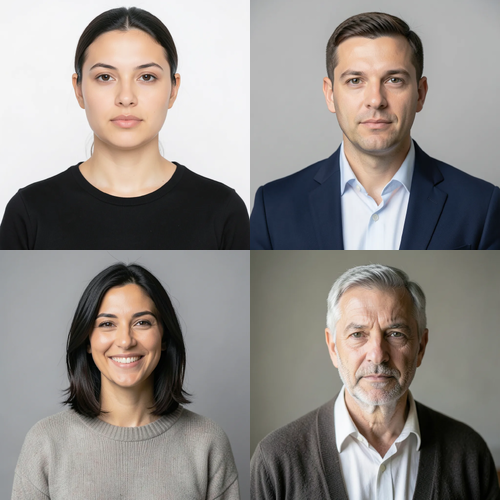
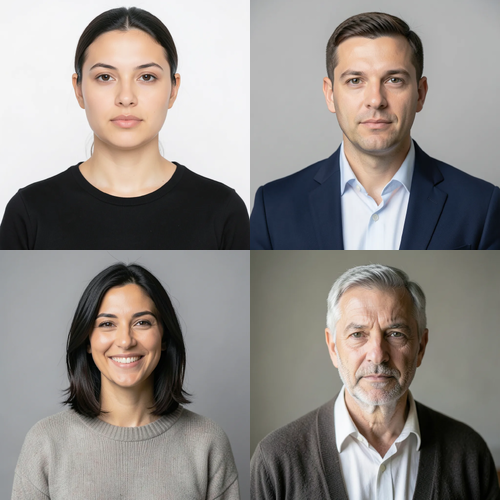
The same source image before and after applying Multi-顔 Retouch.
Multi-顔 Retouch photo effect applied to the same source image
Original source image before the Multi-顔 Retouch photo effect

複数顔補正 — 誰も描き直さず、2人以上の顔を整えます

検証済みの2つ以上の顔に、質感を保つ同じ控えめな肌補正を適用します。人物を描き直したり、写真のほかの部分を変更したりしません。

Multi-顔 Retouch エフェクト用の写真をアップロードしてください

Multi-顔 Retouch エフェクトでできること

始める前に、利用可能なエフェクト機能を確認してください。

  • Apply the Multi-顔 Retouch effect to any photo
  • Fine-tune the effect strength to taste
  • Preview your photo live as you edit
  • Download your edited photo in high quality
  • Apply Multi-顔 Retouch to many photos at once

使い方

Multi-Face Retouch is a localized group-portrait treatment, not a full-frame generator. It needs at least two complete, near-front faces. Each face is found and checked on its own: its full shape is mapped, and its skin is separated from hair, beard, body, clothing, accessories, background, and neighboring people. Exactly three bounded zones per accepted face cover safe skin on the forehead and both cheeks, and slightly enlarged protective areas keep every eye, iris, eyebrow, nose, and lip untouched. Each face is measured only against its own skin, so another person, background, hair, or beard cannot influence its correction. Only medium-sized patches of uneven tone and color are reduced; fine detail, pores, wrinkles, and age cues are kept. Even at full intensity, each brightness and color correction is capped at a small fixed amount. Eyes, irises, eyebrows, nose, lips, inside of the mouth, hair, beard, face shape, expression, bodies, clothing, lighting, background, collage grid or image edges, framing, transparency, and every pixel outside the accepted zones are copied unchanged into a lossless PNG. It never smooths a whole face, sharpens, reshapes, patches, or regenerates a person. Side profiles, incomplete or tiny faces, unclear skin, obstructions, and already-even faces are left unchanged; the request is refused when fewer than two faces remain safe.


処理中

Multi-顔 Retouchは AI アクションを使用します。このエフェクトの処理が開始される前に、個別の許容値が表示されます。

こんな方に最適

検証できる大きさの、完全で明るく照らされたほぼ正面向きの顔が2つ以上ある、鮮明なグループポートレート、チームの顔写真、家族コラージュ、イベント写真.

以下にはあまり適していません: 1人だけのポートレート、横顔、傾いた顔や切れた顔、眼鏡、顔の各部を覆う髪や手、遠くの群衆、小さすぎる顔、モーションブラー、濃いメイク、強い色付き照明、安全に処理できる皮膚が見える顔が2つ未満の写真.

Multi-顔 Retouchの使い方

  • チームや家族のポートレートで顔ごとに個別に測定し、安全範囲を設けた一貫した補正を適用します。
  • 本人らしさ、年齢の特徴、表情、髪、衣服、周囲を変えずに、額と頬の小さな色むらを整えます。
  • Retouch the safe faces in a collage while its seams, panels, typography, transparency, and any skipped faces stay exactly as uploaded.

選択した Multi-顔 Retouch 効果についてのよくある質問

複数顔補正で全員が同じ見た目になりますか?
いいえ。採用された各顔は、それぞれの元画像の皮膚を基準に測定され、同じ目標色や生成された顔ではなく、同じ厳格な補正上限が適用されます。本人らしさ、年齢の特徴、表情、形状、採用されなかった顔はアップロード画像を基準としたままです。
複数顔補正を、室内のバーチャルステージングと同じ方法で処理しないのはなぜですか?
バーチャルステージングでは、置き換え可能な室内の広い領域を意図的に生成します。一方、グループ写真には、髪、衣服、手、ほかの人物に隣接して、本人らしさに不可欠な顔が複数あります。そのため、複数顔補正では各顔を個別に検証してマスクし、局所補正に上限を設けます。安全に処理できる顔が2つ未満の場合、生成 AI にグループを描き直させず拒否します。

その他のポートレート&ビューティー効果

注目の効果を動画で確認

特に効果の高い候補を先に表示し、その後に残りのカタログが続きます。


















