
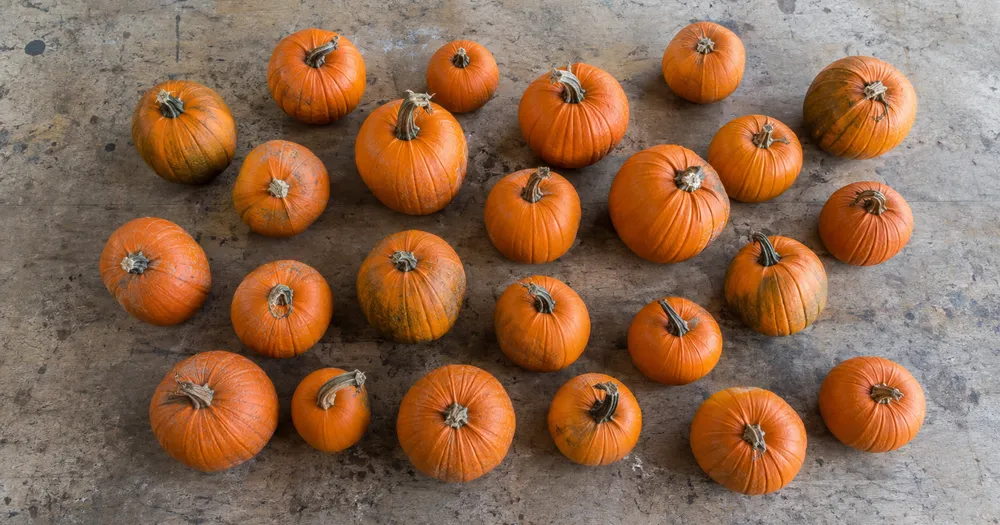
Policz dynie na polu lub w skrzyni ze zdjęcia
Działa z JPG, PNG, WEBP · Bezpłatnie do 20 MB, Premium 50 MB
Rozłóż obiekty dynie tak, aby jak najmniej na siebie zachodziły — najlepiej w jednej warstwie — i sfotografuj je z góry przy równomiernym oświetleniu. Narzędzie powstało z myślą o grupie gospodarstwa rolne, pakowalnie i hurtownie produktów — sprawdź i popraw każde zdjęcie przed dodaniem go do zestawienia CSV lub PDF.
- Sprawdź zdjęcie, a następnie policz widoczne obiekty dynie
- Upload a photo and get an automatic count
- Review the markers to catch pumpkins counted twice or missed
- Bezpłatne korzystanie · Bez rejestracji · Bez znaku wodnego
Prześlij obraz
Wskazówki dla dokładnego zliczania
• Użyj równomiernie oświetlonego zdjęcia, na którym obiekt dynie w całości mieści się w kadrze
• Keep your pumpkins visible and avoid overlapping items
• Kropki i mapa cieplna pokazują zachowane wykrycia — sprawdź i popraw wynik liczenia
O liczniku Dynie
The pumpkins counter counts visible pumpkins from your photo and marks detections for review. Counting starts automatically once the photo and item are ready. Visibility, overlap and similar-looking items can affect the total. Built for farms, packhouses and produce wholesalers.
Jak to działa
1. Sfotografuj swój obiekt: dynie
2. Upload your photo to count pumpkins automatically
3. Review the markers and correct the tally if needed
4. Dodaj do arkusza zliczeń i wyeksportuj wynik jako CSV
Idealne do
• Przedsezonowe szacunki plonów na grządce dyni
• Zbiory liczą się w momencie napełniania i ładowania skrzyń
• Kontrole zapasów w krótkim oknie sprzedaży o dużym wolumenie
• Wysyłka hurtowa jest zgodna z zamówieniem
Najczęściej zadawane pytania
- Czy działa na luźnym stosie?
- Może zaznaczyć tylko widoczną warstwę. Rozłóż elementy na głębokość jednej warstwy, zaznacz wyraźny przykład oraz przejrzyj i popraw znaczniki wyników. Traktuj liczbę widocznych twarzy na dużym stosie jako szacunkową i używaj tego samego kadrowania pomiędzy kontrolami.
- Co zrobić, jeśli na zdjęciu znajdują się nie tylko obiekty dynie?
- The counter automatically looks for pumpkins in your photo. Similar-looking distractors can still affect the result, so review every marker before using the total.
- Czy mogę zliczyć kilka zdjęć w jeden łączny wynik?
- Yes — count each photo and add every reviewed result to the tally sheet as a labelled row. Export the tally as CSV or a PDF report, or save it to your account.
- Czy to jest za darmo i prywatne?
- Tak. Możesz policzyć, sprawdzić i pobrać bezpłatny wynik bez konta. Pobieranie jest bezpłatne i bez znaku wodnego. Rejestracja nie jest wymagana. Zdjęcia przetwarzane na serwerze są szyfrowane podczas przesyłania i usuwane zgodnie z zasadami bezpieczeństwa.
Co możesz zrobić za pomocą Licznik owoców
Zanim zaczniesz, przejrzyj główne możliwości.
- Licz owoce w skrzynkach, tacach i pojemnikach na zbiory
- Policz jabłka, pomarańcze, mango i nie tylko
- Sprawdź każdy znacznik policzonego owocu przed oszacowaniem plonu
- Śledź sumę zbiorów w oznakowanych pojemnikach
- Zlicz wiele skrzynek wsadowo podczas audytu zbiorczego
- Opcjonalnie oznacz owoc, aby doprecyzować liczenie w gęstych kupkach
Odniesienie do ustawień
14 ustawień
Dostępne elementy sterujące dla Licznik owoców.
Prześlij
- Pojedyncze zdjęcie / Audyt masowyUstawienia gotowe
- Wybierz liczbę pojedynczych zdjęć lub audyt zbiorczy Premium. Przejrzyj każdy wynik.Opcje: Pojedyncze zdjęcieAudyt masowy
Liczba
- Uwzględnione znacznikiSuwakZasięg: 0–1 · Domyślne: 0.21
- Starts at 21%; slide toward Show more to include weaker markers or Only strongest to hide them.
- Styl nakładkiUstawienia gotowe
- Wybierz kropki, mapę cieplną, oba lub czysty podgląd.Opcje: ObaKropkiCiepłoBrak
Zaawansowane
- Nakładka wynikuLista rozwijana
- Choose how count markers appear in the on-screen preview; the download keeps its own markers.Opcje: Kropki + mapa cieplnaTylko kropkiTylko mapa cieplna
Zliczenie
- Dodaj do zliczeńJedno kliknięcie
- Add this count to the tally sheet under the name of the object that was counted. Signed-in accounts add finished counts automatically unless that is turned off under Account settings; in bulk mode every photo also has its own Add to tally button.
- EtykietaWprowadzanie tekstu
- Rename a tally row. Edits and removals wait until you choose Save changes, so you can fix several rows at once.
- LiczbaWprowadzanie numeru
- Correct a row's count; totals, the chart and exports follow once the change is saved.
- Save changesJedno kliknięcie
- Apply every edited or removed tally row in one step, or choose Discard changes to leave the sheet as it was.
Chart
- By objectUstawienia gotowe
- The chart is the same in every counting tool and covers the tallies of all of them. By object draws a separate line chart for each tally name, such as pipes and people. By tool draws a chart for each counting tool.Opcje: By objectBy tool
- OkresUstawienia gotowe
- Choose how far back the chart looks. Days without a count appear as zero.Opcje: 7 days30 days90 days12 months
History
- Counting setupGaleria
- Keep comparable counts together. A first setup is created for you, so the first count can be saved straight away.
- Observed atWprowadzanie tekstu
- The date and time of the count, shown as a date and a time field.
- NutyWprowadzanie tekstu
- Starts with every detected object and its count, one per line, such as Pipes - 11. Edit it before saving.
- Save countJedno kliknięcie
- Save the count to your account history. Open a saved count later to correct it or download its source photo.
Powiązane narzędzia dla Licznik owoców
Narzędzia do typowych kolejnych kroków po Licznik owoców.

Liczenie i magazyn
Licznik obiektów
Oszacuj liczbę obiektów na zdjęciu. Przed użyciem wyniku sprawdź i popraw ponumerowane znaczniki.
Wypróbuj teraz
Liczenie i magazyn
Licznik obiektów na żywo
Skieruj telefon na oddzielone, w pełni widoczne przedmioty i przeglądaj znaczniki detektora, gdy liczba będzie aktualizowana w czasie rzeczywistym.
Wypróbuj teraz
Liczenie i magazyn
Licznik butelek
Licz butelki na półkach, w skrzynkach lub w chłodniach z jednego zdjęcia, a wykryte obiekty są oznaczone do sprawdzenia.
Wypróbuj terazJak Licznik owoców pomaga Ci osiągnąć cel
Prawdziwe problemy, które rozwiązuje każdego dnia — dla firm, twórców i codziennych zadań. Znajdź przypadek użycia, który Ci odpowiada i zacznij.
Śledzenie plonów w dniu zbiorów
Otwórz audyt zbiorczy, aby uruchomić tryb odrębnych obiektów na każdym zdjęciu skrzynki, a następnie przejrzyj każdy wynik przed porównaniem bieżącej sumy z zeszłym sezonem.
Zapasy na targu rolnym i przydrożnym straganie
Uruchom tryb Podobne przedmioty dla jednego rodzaju owoców przed otwarciem i ponownie przy zamknięciu, a następnie sprawdź i popraw oba wyniki, zanim wykorzystasz ich różnicę jako szacunek sprzedaży.
Próbkowanie sadów do szacowania plonów
Sfotografuj dobrze oświetlony fragment korony drzewa i pozwól AI policzyć widoczne owoce jako metoda próbkowania, korzystając z suwaka Czułość wykrywania, aby dostroić rozpoznawanie częściowo ukrytych owoców przy szacowaniu plonu całego sadu.
Sortowanie i kontrola skrzynek w hali pakowania
Przykład owocu Mark 1-3 w ustawieniach Przykłady — po jednym z każdej odmiany w skrzyni — i użyj wyniku Podobne przedmioty jako szkicu przed zamknięciem skrzyni. Następnie sprawdź fizyczną skrzynię i popraw braki lub duplikaty przed zatwierdzeniem w magazynie.
Weryfikacja liczby dostaw hurtowych
Wykorzystaj oznaczone zdjęcie, aby sprawdzić wstępny wynik dostawy uzyskany z pomocą AI, porównaj go z wykwalifikowanym liczeniem ręcznym lub fizycznym, a następnie zapisz poprawione zestawienie razem ze standardową dokumentacją dostawy. Samo zdjęcie nie stanowi dowodu ilości.
Liczenie plonów z przydomowego ogrodu
Sfotografuj koszyk domowych pomidorów, jabłek lub jagód w czasie zbioru, aby uzyskać szacunkową liczbę plonów, a następnie sprawdź i popraw znaczniki, zanim dodasz wiersz zliczania na dany sezon.
Obejrzyj each transformation li
Every zdjęcie crosses the slash untouched i comes out the other side finished.























