

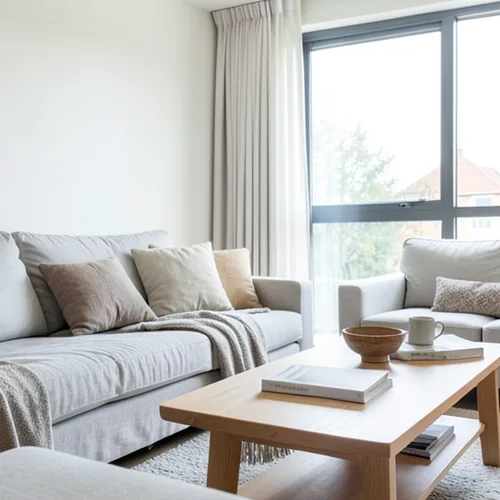
The same source image before and after applying 纸深度立体模型.
纸深度立体模型 photo effect applied to the same source image
Original source image before the 纸深度立体模型 photo effect

纸深度立体模型照片滤镜在线

Style the frame as up to seven layered paper sheets without duplicating people or objects. Control the strength, compare the result, and download a finished image from your browser.

上传纸深度立体模型效果照片

您可以利用 纸深度立体模型 效果做什么

在开始之前查看可用的效果功能。

  • Apply the 纸深度立体模型 effect to any photo
  • Fine-tune the effect strength to taste
  • Preview your photo live as you edit
  • Download your edited photo in high quality
  • Apply 纸深度立体模型 to many photos at once

使用流程

Paper Depth Diorama estimates how far each part of your photo is from the camera, smooths that depth, cleans up small stray patches, and divides the frame into up to seven broad paper layers. One reliably detected main person, pet, product, or object is kept on one single sheet instead of being sliced apart at uneven depth edges. Each nearer sheet gets a narrow warm cut-edge highlight and casts a soft lower-right shadow only onto a sheet behind it, and no shadow can wrap around from the opposite edge of the frame. The light and dark detail of your photo is simplified into a warm paper palette, and intensity changes the real palette, shadow distance, softness, strength, and cut-edge highlight. Nothing is moved, copied, stretched, repainted, or generated: every color change stays exactly in place, framing stays fixed, and transparency is kept in the lossless PNG. Larger uploads may be resized proportionally before this step: free results are delivered at web size, and very large photos are scaled down before depth analysis. If one reliable main subject cannot be isolated, the effect stops safely instead of guessing.


处理中

纸深度立体模型使用 AI 动作。任何单独的余量都会在该效果开始处理之前显示。

最适合

简单人像、宠物、产品、贺卡、故事插画、室内场景、前景与背景分离清晰的风景,以及手工艺风格印刷品.

不太适合: 合影、相互重叠或同样突出的主体、玻璃、镜子、反射、烟雾、细发丝或枝叶、扁平场景,以及相对深度或主要主体边界不明确的杂乱构图.

使用方法纸深度立体模型

    关于 纸深度立体模型 效果的常见问题与解答

    什么是纸艺立体景观?
    A real shadow box uses separate paper cutouts at different depths. This effect illustrates that look directly on your photo: up to seven sheets based on estimated relative depth, warm paper color, highlights along the nearer cut edges, and soft shadows on the layers behind. It does not measure real depth or physically rebuild a 3D scene.
    它会复制主体或改变主体形状吗?
    No. No part of your photo is moved or copied to another place. One reliably detected main subject is kept on one paper layer, so its face, arms, body, or object outline cannot break into shifted copies. The color is deliberately restyled, and a photo whose main subject cannot be separated reliably is refused safely.

    更多深度和尺寸效果

    智能重新对焦

    深度和尺寸高级 AI

    自动检测一个主体并保持清晰,以干净的深度感知背景虚化突出主体

    打开页面

    移轴立体模型

    深度和尺寸高级 AI

    借助干净的深度辅助焦点带,将俯拍街道和风景变成微缩场景

    打开页面

    摆动图 3D

    深度和尺寸高级 AI

    Create a clean eight-frame depth loop where nearer and farther parts move by different amounts

    打开页面

    深度浮雕 3D

    深度和尺寸高级 AI

    Create a comfortable red-cyan 3D view for standard glasses from the estimated depth of your photo

    打开页面

    水晶折射

    深度和尺寸高级 AI

    Refract only the background through bounded crystal facets while keeping the detected subject fixed

    打开页面

    视差剪纸海报

    深度和尺寸高级 AI

    构建五个与源图对齐的宽幅纸张平面,不复制人物或物体

    打开页面

    地形深度线

    深度和尺寸高级 AI

    Trace 18 clean depth contour bands over your photo without moving people or objects

    打开页面

    大气深度雾

    深度和尺寸高级 AI

    Add soft atmospheric haze that grows with the estimated distance in your photo

    打开页面

    近远分离音

    深度和尺寸高级 AI

    Apply cool-far and warm-near color grading from the estimated depth of your photo

    打开页面

    镜头球世界

    深度和尺寸

    仅在限定的玻璃球内压缩并翻转场景,同时保持球外每个像素不变

    打开页面

    光栅深度打印

    深度和尺寸高级 AI

    Interlace depth-shifted strips only across the background while keeping the detected subject fixed

    打开页面

    查看运动中的特色效果

    最强的效果选择在目录的其余部分之前领先于这条腰带。




























