
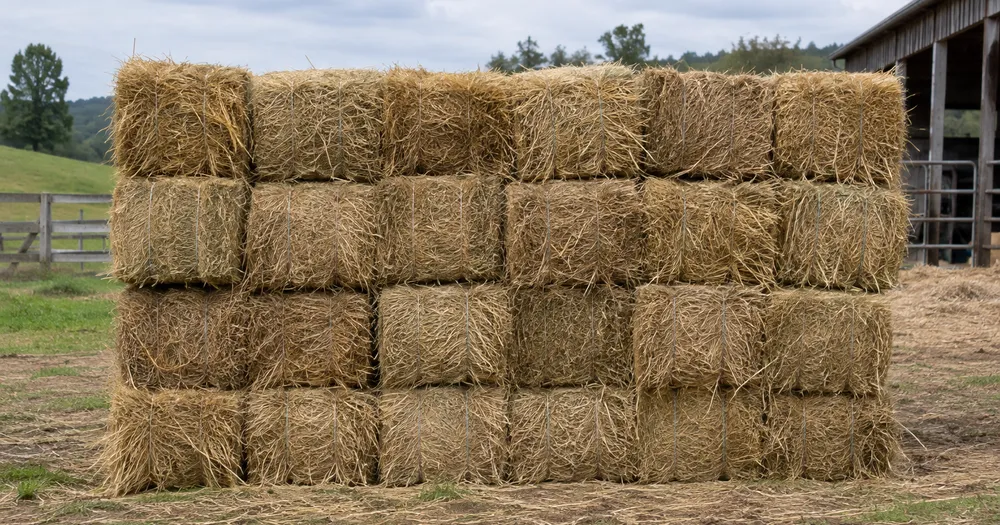
写真から積み重ねられた干し草の俵を数えます
JPG、PNG、WEBP の各画像形式に対応 · 無料プランは 20 MB まで、Premium プランは 50メガバイト まで処理できます
積み重ねやパレットの見える面を正面から撮影します。AI が見えている干し草ベールを推定するため、各面を確認・修正してから列を合算してください。農家、牧場主、家畜市場向けです。CSV または PDF の集計に追加する前に各写真を確認・修正してください。
- 写真を確認して、見えている干し草ベールを数えてください
- Upload a photo and get an automatic count
- Review the markers to catch hay bales counted twice or missed
- 無料で利用可能 · 登録不要 · 透かしなし
画像をアップロード
正確にカウントするためのコツ
• 干し草ベール全体がフレーム内に収まる、明るさが均一な写真を使用してください
• Keep your hay bales visible and avoid overlapping items
• ドットとヒートマップで採用された検出結果を表示 — 集計を確認・修正してください
干し草ロールカウンターについて
The hay bales counter counts visible hay bales from your photo and marks detections for review. Counting starts automatically once the photo and item are ready. Visibility, overlap and similar-looking items can affect the total. Built for farmers, ranchers and livestock markets.
使い方
1. 干し草ベールを撮影します
2. Upload your photo to count hay bales automatically
3. Review the markers and correct the tally if needed
4. 集計シートに追加し、カウント結果を CSV でエクスポート
こんな用途に最適
• 梱包後の納屋と畑のスタック数
• 販売メモまたは運送メモと照らし合わせて荷物をチェックする
• 残りのスタック量からの冬期飼料計画
• 保険在庫のベール番号を記録する
よくある質問
- 一部のアイテムが隠れていても、スタック全体を数えられますか?
- 推定できるのは、写真に写っている範囲のみです。規則的な積み重ねの場合は、アクセスできる各面を撮影して確認し、集計を修正してください。奥行きを掛け合わせた数値はあくまで推定として扱ってください。マーク付き画像は確認の助けにはなりますが、実際の物理的な数量を証明するものではありません。
- 写真に干し草ベール以外のものが写っている場合はどうなりますか?
- The counter automatically looks for hay bales in your photo. Similar-looking distractors can still affect the result, so review every marker before using the total.
- 複数の写真を1つの合計にまとめて数えられますか?
- Yes — count each photo and add every reviewed result to the tally sheet as a labelled row. Export the tally as CSV or a PDF report, or save it to your account.
- 無料ですか?また、プライバシーは守られますか?
- はい。アカウントなしで人数を数え、結果を確認して無料でダウンロードできます。ダウンロードは無料で透かしもなく、登録も不要です。サーバーで処理する写真は転送時に暗号化され、セキュリティポリシーに従って削除されます。
家畜カウンター でできること
始める前に、主な機能を確認してください。
- 写真から牛、羊、ヤギ、家禽を数えます
- フィールドで迅速な群れチェックを実行する
- 画像から市場のロットと販売ペンを集計する
- 特定の種類を対象にしたい場合は、動物を任意でマークしてください
- オーバーレイでカウントされた各動物マーカーを確認
- 複数の現場写真を 1 つの実行集計に追加します
- 微小な検出を除外してから、残ったマーカーを確認してください
設定リファレンス
14 設定
家畜カウンター で使用可能なコントロール。
アップロード
- 写真1枚 / 一括集計プリセット
- 写真の枚数を 1 枚にするか、プレミアム一括監査を選択します。すべての結果を確認します。オプション: 単一の写真一括監査
数
- 含まれるマーカースライダーレンジ: 0–1 · デフォルト: 0.21
- 21%から開始します。「さらに表示」側にスライドすると弱いマーカーも含め、「最も強いもののみ」側にスライドすると非表示にできます。
- オーバーレイスタイルプリセット
- ドット、ヒートマップ、その両方、またはクリーンなプレビューを選択します。オプション: 両方ドット熱なし
詳細設定
- 結果オーバーレイドロップダウン
- Choose how count markers appear in the on-screen preview; the download keeps its own markers.オプション: ドット+ヒートマップドットのみヒートマップのみ
集計
- 集計に追加ワンクリック
- Add this count to the tally sheet under the name of the object that was counted. Signed-in accounts add finished counts automatically unless that is turned off under Account settings; in bulk mode every photo also has its own Add to tally button.
- ラベルテキスト入力
- Rename a tally row. Edits and removals wait until you choose Save changes, so you can fix several rows at once.
- 数数値入力
- Correct a row's count; totals, the chart and exports follow once the change is saved.
- Save changesワンクリック
- Apply every edited or removed tally row in one step, or choose Discard changes to leave the sheet as it was.
Chart
- By objectプリセット
- The chart is the same in every counting tool and covers the tallies of all of them. By object draws a separate line chart for each tally name, such as pipes and people. By tool draws a chart for each counting tool.オプション: By objectBy tool
- 期間プリセット
- Choose how far back the chart looks. Days without a count appear as zero.オプション: 7 days30 days90 days12 months
History
- Counting setupギャラリー
- Keep comparable counts together. A first setup is created for you, so the first count can be saved straight away.
- Observed atテキスト入力
- The date and time of the count, shown as a date and a time field.
- 音符テキスト入力
- Starts with every detected object and its count, one per line, such as Pipes - 11. Edit it before saving.
- Save countワンクリック
- Save the count to your account history. Open a saved count later to correct it or download its source photo.
家畜カウンター の関連ツール
家畜カウンター の後の一般的な次のステップのためのツール。
家畜カウンターでできること
ビジネス、クリエイター、日常業務など、実際の問題を毎日解決します。自分に合ったユースケースを見つけて始めましょう。
群れの日次頭数カウント
毎朝、囲いや放牧地を撮影して頭数の概算を推定してください。行動を起こす前に、マーカーを確認し、いなくなった、または迷い出たように見える動物がいないか実際に確認してください。
買い手と売り手のための取引ロット確認
家畜取引の双方が、それぞれ別々のAI支援ドラフトを使用し、取引を成立させる前に実際のロットと照合して共同で確認・修正できます。マーキングされた画像はその確認作業を補助しますが、それ単独で検証済みの販売記録となるわけではありません。
輸送マニフェストの点検
マーク付きの結果は、輸送の予備的な概算として使用してください。そのうえで有資格スタッフが必要な実地確認と積荷目録の照合を行い、集計を修正してください。AI画像だけでは、コンプライアンスや積載の記録にはなりません。
大規模なドローンによる牧草地調査
開けた牧草地の上空をドローンで真上から飛行して撮影し、広範囲の推定値を求めます。マーカーを確認し、例外は現地で目視確認したうえで、その集計を群れに関する判断に役立ててください。
複数種の家畜インベントリ
Set Counting mode to Distinct objects on a mixed paddock of cattle, sheep or poultry so each animal is boxed; for a species-by-species farm inventory, mark one example of each species in Similar items and read Found per example.
変換結果を一つずつ確認
すべての写真はスラッシュをそのまま通過し、反対側が完成して出てきます。























