
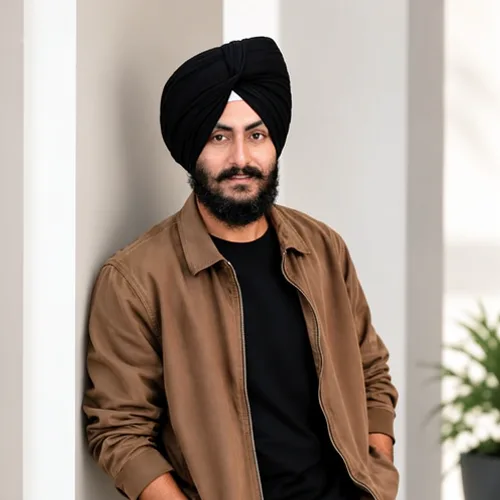
The same source image before and after applying Wijziging van AI-expressie.
Wijziging van AI-expressie applied to the same source image
Original source image before Wijziging van AI-expressie

AI Expression Change — Choose a New Expression for One Face

Pick the expression you want and keep everything else in the photo as it was.

Upload een foto voor het Wijziging van AI-expressie-effect

Wat je kunt doen met het Wijziging van AI-expressie-effect

Bekijk de beschikbare effectmogelijkheden voordat je begint.

  • Apply the Wijziging van AI-expressie effect to any photo
  • Fine-tune the effect strength to taste
  • Preview your photo live as you edit
  • Download your edited photo in high quality
  • Apply Wijziging van AI-expressie to many photos at once

Hoe het werkt

Choose the target expression, then upload a photo with one clear face. The face is regenerated with that expression and placed back onto your original inside an automatic face-and-skin area, so hair, clothing, background, framing and resolution come from your upload. If the result would not visibly differ from the original, the tool tells you instead of charging for an unchanged image.


Verwerken

Wijziging van AI-expressie gebruikt een AI-actie. Eventuele afzonderlijke toeslagen worden weergegeven voordat dit effect wordt verwerkt.

Beste voor

sharp portraits with the whole face visible, such as headshots, profile photos and family snapshots; in a group photo every clear face gets the expression.

Minder geschikt voor: side profiles, faces covered by hands, hair or sunglasses, very small faces in a wide shot, and heavy motion blur.

Manieren om Wijziging van AI-expressie te gebruiken

  • Turn a neutral headshot into a warm, approachable smile for a profile.
  • Try a calm or serious look for a formal document photo without a reshoot.
  • Compare several expressions from one sitting before choosing the final portrait.

Wijziging van AI-expressie vragen

Will it change my face shape or identity?
No. Only the expression is regenerated, and the rest of the face structure is asked to stay the same. Compare the result with the original before downloading and keep the original if any detail looks off.
Why was my photo refused?
The tool needs at least one clear face turned towards the camera to isolate a safe area. Side profiles, covered faces and very small faces are refused rather than guessed. In a group photo, faces that cannot be isolated are left untouched.

Meer AI-transformatie en -reparatie-effecten

Bekijk de aanbevolen effecten in beweging

De krachtigste effectkeuzes staan vooraan in deze strook, vóór de rest van de catalogus.


















