
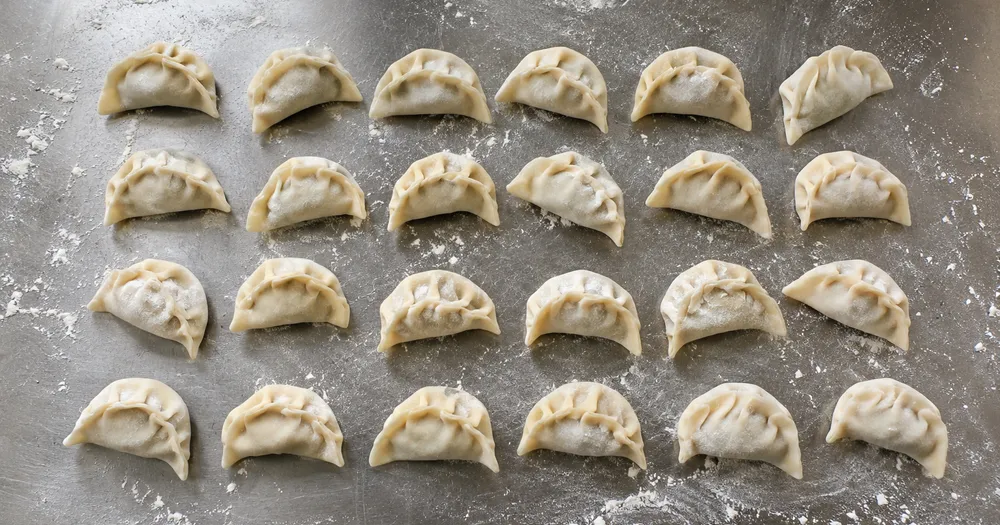
Compter les raviolis sur un plateau à partir d'une photo
Fonctionne avec JPG, PNG, WEBP · Gratuit jusqu'à 20 MB, Premium 50 MO
Étalez les raviolis sur une seule couche, sur un plateau ou une surface plane, puis photographiez-les directement d’en haut ; les détections comptées reçoivent un point de vérification. Conçu pour boulangeries, traiteurs et producteurs alimentaires — vérifiez et corrigez chaque photo avant de l’ajouter à un relevé CSV ou PDF.
- Vérifiez la photo, puis comptez les raviolis visibles
- Upload a photo and get an automatic count
- Review the markers to catch dumplings counted twice or missed
- Utilisation gratuite · Aucune inscription requise · Sans filigrane
Importer une image
Conseils pour un comptage précis
• Utilisez une photo uniformément éclairée où le raviolis apparaît entièrement dans le cadre
• Keep your dumplings visible and avoid overlapping items
• Les points et la carte de densité affichent les détections retenues — vérifiez et corrigez le décompte
À propos du compteur de Raviolis
The dumplings counter counts visible dumplings from your photo and marks detections for review. Counting starts automatically once the photo and item are ready. Visibility, overlap and similar-looking items can affect the total. Built for bakeries, caterers and food producers.
Comment ça marche
1. Photographiez votre raviolis
2. Upload your photo to count dumplings automatically
3. Review the markers and correct the tally if needed
4. Ajoutez à la feuille de pointage et exportez votre comptage en CSV
Idéal pour
• La préparation de la cuisine compte avant une période de service
• Décompte des lots congelés avant emballage
• Les commandes en gros sont vérifiées par rapport au bon d'expédition.
• Planification des portions à partir de plateaux de préparation comptés
Foire aux questions
- Les objets doivent-ils être séparés avant le comptage ?
- Un léger effleurement peut fonctionner, mais des chevauchements complets masquent les éléments et rendent le résultat moins fiable. Étalez-les en une couche profonde sous une lumière uniforme, marquez un exemple clair et examinez chaque marqueur de résultat.
- Que se passe-t-il si la photo contient autre chose que des raviolis ?
- The counter automatically looks for dumplings in your photo. Similar-looking distractors can still affect the result, so review every marker before using the total.
- Puis-je compter plusieurs photos en un seul total ?
- Yes — count each photo and add every reviewed result to the tally sheet as a labelled row. Export the tally as CSV or a PDF report, or save it to your account.
- Est-ce gratuit et confidentiel ?
- Oui. Vous pouvez compter, vérifier et télécharger gratuitement un résultat sans compte. Les téléchargements sont gratuits et sans filigrane. Aucune inscription n’est nécessaire. Les photos traitées sur le serveur sont chiffrées pendant leur transfert et supprimées conformément à notre politique de sécurité.
Ce que vous pouvez faire avec Compteur d'inventaire par IA
Passez en revue les principales fonctionnalités avant de commencer.
- Comptez rayonnages, piles, caisses et palettes à partir de photos
- Vérifiez et corrigez les comptages photo avant l'export
- Exportez votre inventaire dans un fichier CSV
- Réalisez un audit complet, rayon par rayon
- Marquez éventuellement un élément pour cibler une seule UGS
- Regroupez des photos en lot pour obtenir un total d'inventaire unique
- Ignore les petites détections parasites pour plus de précision
Référence des paramètres
15 paramètres
Contrôles disponibles pour Compteur d'inventaire par IA.
Importer
- Photo unique / Audit en massePréréglages
- Choisissez un décompte d’une seule photo ou un audit groupé Premium. Examinez chaque résultat.Possibilités: Photo uniqueAudit en masse
Nombre
- Marqueurs inclusCurseurPlage: 0–1 · Par défaut: 0.21
- Commence à 21 % ; faites glisser vers Afficher davantage pour inclure les marqueurs moins prononcés, ou vers Uniquement les plus forts pour les masquer.
- Style de superpositionPréréglages
- Choisissez des points, une carte thermique, les deux ou un aperçu clair.Possibilités: Les deuxPointsChaleurAucun
- Quoi compterSaisie de texte
- Enter the item to count, then press Enter or leave the field to start automatically. Review every result marker.
Avancé
- Superposition du résultatListe déroulante
- Choose how count markers appear in the on-screen preview; the download keeps its own markers.Possibilités: Points + carte de chaleurPoints seulementCarte thermique uniquement
Pointage
- Ajouter au pointageEn un clic
- Add this count to the tally sheet under the name of the object that was counted. Signed-in accounts add finished counts automatically unless that is turned off under Account settings; in bulk mode every photo also has its own Add to tally button.
- ÉtiquetteSaisie de texte
- Rename a tally row. Edits and removals wait until you choose Save changes, so you can fix several rows at once.
- NombreChamp numérique
- Correct a row's count; totals, the chart and exports follow once the change is saved.
- Save changesEn un clic
- Apply every edited or removed tally row in one step, or choose Discard changes to leave the sheet as it was.
Chart
- By objectPréréglages
- The chart is the same in every counting tool and covers the tallies of all of them. By object draws a separate line chart for each tally name, such as pipes and people. By tool draws a chart for each counting tool.Possibilités: By objectBy tool
- PériodePréréglages
- Choose how far back the chart looks. Days without a count appear as zero.Possibilités: 7 days30 days90 days12 months
History
- Counting setupGalerie
- Keep comparable counts together. A first setup is created for you, so the first count can be saved straight away.
- Observed atSaisie de texte
- The date and time of the count, shown as a date and a time field.
- RemarquesSaisie de texte
- Starts with every detected object and its count, one per line, such as Pipes - 11. Edit it before saving.
- Save countEn un clic
- Save the count to your account history. Open a saved count later to correct it or download its source photo.
Outils associés pour Compteur d'inventaire par IA
Outils pour les prochaines étapes courantes après Compteur d'inventaire par IA.

Comptage & Inventory
Compteur d'objets
Estimez le nombre d’objets sur une photo. Vérifiez et corrigez les repères numérotés avant d’utiliser le résultat.
Essayez maintenant
Comptage & Inventory
Compteur d'objets en direct
Dirigez votre téléphone vers des éléments séparés et entièrement visibles et examinez les marqueurs du détecteur à mesure que le décompte se met à jour en temps réel.
Essayez maintenant
Comptage & Inventory
Compteur de bouteilles
Comptez les bouteilles sur les étagères, dans les caisses ou en chambre froide à partir d'une seule photo, avec les détections comptées marquées pour vérification.
Essayez maintenantComment Compteur d'inventaire par IA vous aide à mener à bien vos tâches
De vrais problèmes qu'il résout chaque jour, pour les entreprises, les créateurs et les tâches quotidiennes. Trouvez le cas d’utilisation qui vous convient et lancez-vous.
Inventaires tournants de commerces multi-sites
Les responsables peuvent utiliser l'Audit en masse pour appliquer le mode Objets distincts à toutes les photos de rayons, vérifier chaque total et enregistrer séparément la session corrigée de chaque magasin.
Audits de réception des marchandises en entrepôt
Le personnel d’entrepôt photographie chaque palette, marque 1 à 3 articles exemples dans Exemples — un par SKU visible — puis exporte le total vérifié en CSV pour le rapprocher du bon de commande.
Pistes de vérification des stocks contrôlés en pharmacie
Les pharmacies peuvent créer un brouillon IA rayon par rayon en marquant 1 à 3 articles exemples dans Exemples — un par SKU —, puis faire vérifier et corriger le résultat par une personne qualifiée selon la procédure manuelle requise. L’export facilite la vérification, mais ne constitue pas à lui seul un enregistrement de conformité.
Contrôles ponctuels de prévention des pertes et de la démarque
Les responsables de magasin peuvent comparer dans le temps des décomptes photo vérifiés et corrigés comme premier indicateur de démarque, puis contrôler physiquement les écarts avant d'agir.
Comptage de pièces pour petits fabricants et ateliers
Machine shops photograph bins de screws, fasteners ou gaskets et mark 1-3 exemple parts dans le Exemples réglage — un per part type dans un mixed tray — avant comptage pour build planning ou reordering.
Voyez chaque transformation prendre forme
Chaque photo franchit la séparation intacte et ressort finalisée.























