Turn any photo into a watercolor painting
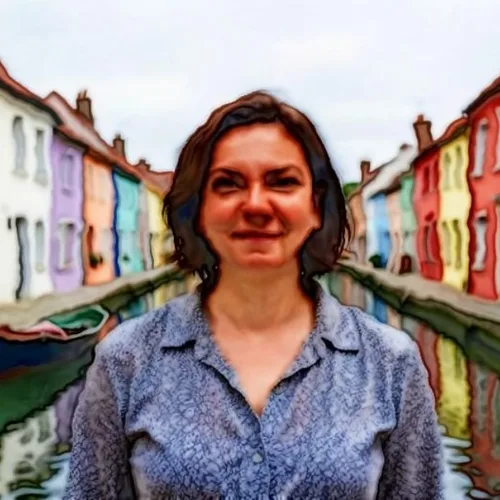
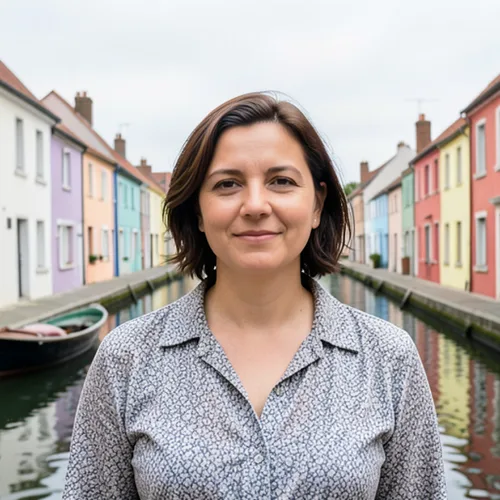
Custom watercolor portraits cost hundreds and take weeks. Get a soft, print-ready painting from any photo in seconds — made for wall art, cards, and gifts.

Drop a photo — get back a soft watercolor painting
What you can do with the Watercolor Generator effect
Everything this effect helps you accomplish — no learning curve, no setup.
- Apply the Watercolor Generator effect to any photo
- Fine-tune the effect strength to taste
- Preview your photo live as you edit
- Download your edited photo in high quality
- Apply Watercolor Generator to many photos at once
写真から水彩ジェネレーター
写真から水彩ジェネレーター
写真を柔らかな色のにじみ、繊細なエッジ、手描き風の芸術的な仕上がりの水彩画に変換 — プリントやウォールアートに最適。
使い方
写真をアップロードし、水彩強度を調整して、水彩画を即座にダウンロード。
なぜ私たちの水彩ジェネレーターを使うのか?
水彩アート
どんな写真からでも水彩ポートレート、絵画風景、芸術的プリントを作成。
高速&かんたん
Turns any photo into a watercolor painting in seconds — set the intensity, watch the live preview update, download the winner.
100%安全
データは保存しません。画像は処理後に自動的に削除されます。
What you can do with 水彩ジェネレーター
Everything this tool helps you accomplish — no learning curve, no setup.
- Turn photos into soft watercolor paintings
- Create watercolor portraits from your pictures
- Make artistic wall art and prints from a photo
- Dial in how strong the watercolor effect looks
- Convert a whole folder of photos in one batch
- Design painterly gifts and personalized keepsakes
Settings information
2 settings
Every control in 水彩ジェネレーター, explained — what it does and when to use it.
モード
- Single / Batch (ZIP)プリセット
- 「単一」を選ぶと1枚の写真を水彩画に仕上げます。「一括処理(ZIP)」を選ぶと、同じ水彩設定を複数の写真にまとめて適用し、ZIP でまとめてダウンロードできます。一括処理にはプレミアムプランが必要です。オプション: 単一一括処理(ZIP)
効果
- 水彩強度SliderRange: 10–100% · デフォルト: 70%
- 色のにじみと絵画的なぼかしの強さを調整します — 低い値(弱)では写真のディテールの上に淡い色がのる程度に、高い値(強)では画像が大胆な筆致の絵画に変わります。
水彩ジェネレーターが終わったら、次はこちらを
水彩ジェネレーターと相性のよい厳選ツール。ファイルをそのままに、作業を続けられます。
カートゥーンジェネレーター
A plain headshot blends into every feed. Turn your photo into cartoon art, a caricature, or a sticker-ready avatar in seconds — no artist, no waiting.
今すぐ試すアニメジェネレーター
Anime commissions take days and cost real money. Turn any selfie into an anime character or manga-style portrait in seconds, ready for avatars, posts, and profiles.
今すぐ試す鉛筆スケッチ
Hand-drawn portraits cost money and take days. Convert your photo into a realistic pencil sketch, tune the shadow depth to taste, and download it in seconds. Free to start, no credit card.
今すぐ試す写真をカートゥーンに
Plain selfies make forgettable profile pics. Convert any photo into cartoon or caricature styles, compare seven looks side by side, and download the winner in seconds. Free to start, no credit card.
今すぐ試すピクセルアートジェネレーター
Drawing sprites pixel by pixel takes hours. Convert photos into 8-bit style art for game sprites, avatars, and profile pics in seconds.
今すぐ試す写真フィルター・エフェクト
Flat photos get scrolled past. Pick a cinematic, vintage, glitch, or beauty effect, preview every look instantly, and download the one you love in seconds. Free to start, no credit card.
今すぐ試すよくある質問
写真をアップロードすると、水彩ジェネレーターが柔らかなにじみと絵画的な輪郭を自動で加えます。ライブプレビューで強度を調整して、控えめな淡彩から夢のような絵画調まで仕上げ、水彩画像をダウンロードできます。
usageポートレート、花、ペット、風景は美しい水彩プリントに仕上がります。高解像度の画像を使うと豊かな質感を保てるため、ウォールアートやギフトとしてプリントする予定なら特に重要です。
tipsはい。フル解像度でダウンロードでき、より大きなキャンバスやポスター印刷が必要な場合は画像アップスケーラーにかけられます。水彩アートは拡大しても美しく、額装ギフトやインテリアに最適です。
featuresはい、無料で登録不要、透かしもありません。写真は安全に処理され、水彩エフェクトの適用後に自動で削除されます。
privacyIt transforms a photo you upload - the generator adds soft color bleeds and painterly edges to your picture automatically. It is not a blank painting canvas or a tutorial, so start from a clear, well-lit photo for the best watercolor result.
usage強度スライダー(10%〜100%)は、色のにじみと絵画的なエッジのぼかしの強さを制御します。低い値(20〜40%程度)は、下地の写真的なディテールが残る薄い水彩調を与え、高い値(80〜100%)は、画像を大胆な手描きの筆致に完全に抽象化します。
featuresはい。Single から Batch モードに切り替えて、変換したいすべての写真をドロップすると、結果が1つのZIPにまとめられる前に、同じ強度設定がすべてに適用されます。Batch モードにはPremiumプランが必要です。単一写真の変換は無料かつ無制限のままです。
featuresポートレートでは、強度を40〜60%程度に抑えると、絵の具の質感の下でも顔立ちが分かるように保てます。風景や花の写真では75〜90%まで上げると、より大胆で絵画的な塗りになり、細部が失われることでかえって芸術的な印象が強まります。
tipsはい——お気に入りの写真を水彩画に変換すれば、仕上がりのイメージを事前に確認でき、その結果を練習の参考にできます。筆を紙に下ろす前に水彩画のアイデアや構図を手早く試せる方法で、特に初心者の方に役立ちます。
tips水彩の強度を上げると、色のにじみが大きくエッジも柔らかくなり、より抽象的な仕上がりになります。空、花、水面など色面の強い写真を選ぶと、もっとも抽象的な水彩風になります。強度を下げれば、被写体をはっきりと認識できる状態を保てます。
usageYes — Pixoate supports batch and bulk processing. Switch to Batch mode, add up to 100 photos, set your options once, and every photo is processed with the same settings before you download a single ZIP. Bulk processing is a Premium feature; the output uses the same quality and settings as single mode.
featuresYes — with bulk processing you configure the settings a single time and they apply to every item in the batch, up to 100 photos. There is no need to repeat the setup per item, and Temporary uploaded and generated files are processed securely and deleted automatically.
usage水彩ジェネレーターでできること
ビジネス、クリエイター、日々の作業で毎日役立つ、実際の課題を解決します。あなたに合う使い方を見つけて、数秒で始めましょう。
水彩ウォールアートとプリント
ポートレートや風景を水彩画に変換し、額装プリントやインテリアに活用
結婚・記念日のギフト
結婚式やカップルの写真から柔らかな水彩ポートレートを作り、ロマンチックなオリジナルギフトに
招待状・ステーショナリーデザイン
自分の写真から水彩風の招待状・セーブザデート・ステーショナリーをデザイン
アート風のSNS投稿
日常の写真を絵画のような水彩コンテンツに変換し、Instagram、Pinterest、ブログで活用
クライアント向け写真ギャラリーの水彩加工を一括処理
写真家やアーティストは「バッチ」モードに切り替えて、撮影全体を同じ強さの設定で一度に処理し、写真を1枚ずつ変換する代わりに、テーマ性のある水彩ギャラリーを1つのZIPとして納品できます。
ペットの供養・思い出の記念ポートレート
お気に入りのペットの写真を、強度40〜60%で柔らかな水彩画のポートレートに変え、優しい追悼の記念品、額装プリント、メモリーキャンドルの贈り物にします。
自費出版の本の表紙・ブログのヘッダー
ストック写真や自分の写真に高強度の水彩ウォッシュ(75-90%)を適用すれば、インディーズ書籍の表紙、詩の小冊子、手描き風のブログのヒーロー画像などを、イラストレーターに頼まずに作れます。
不動産クロージングギフト&物件イラスト
物件の外観や内観の写真を柔らかな水彩イラストに変換し、印象に残る引き渡し日のクライアントギフトにしたり、より薄いタッチのものを標準的な写真とは一線を画す物件カードのグラフィックとして使ったりできます。
初心者向け水彩画リファレンス
初心者が水彩画を練習するなら、お手本があると上達が早まります。自分の写真を水彩画に変換すれば、実際に手で描く前に、目指すべき色のにじみ、明暗、柔らかいエッジを確認できます。
Pixoate