
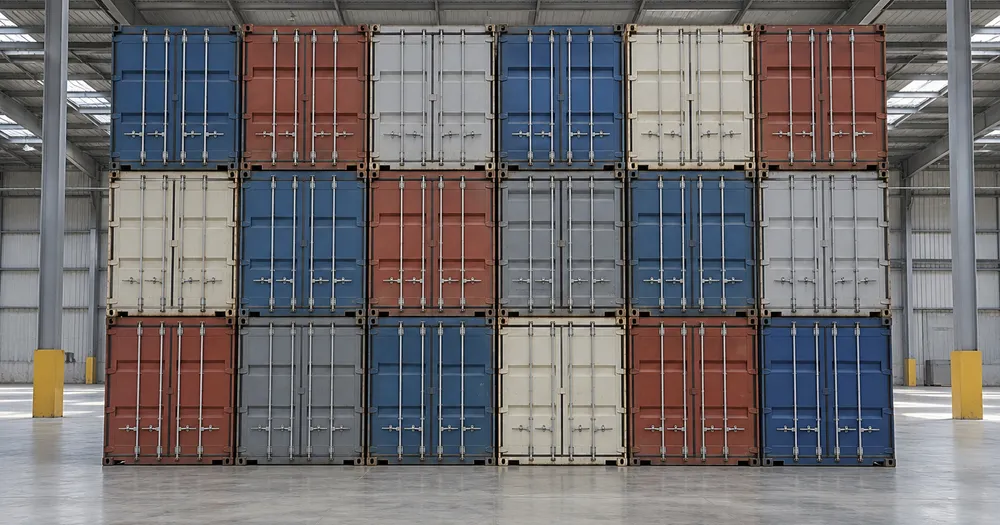
写真からヤード内の輸送コンテナを数える
JPG、PNG、WEBP の各画像形式に対応 · 無料プランは 20 MB まで、Premium プランは 50メガバイト まで処理できます
積み重ねやパレットの見える面を正面から撮影します。AI が見えている輸送コンテナを推定するため、各面を確認・修正してから列を合算してください。倉庫、運送業者、物流ヤード向けです。CSV または PDF の集計に追加する前に各写真を確認・修正してください。
- 写真を確認して、見えている輸送コンテナを数えてください
- Upload a photo and get an automatic count
- Review the markers to catch shipping containers counted twice or missed
- 無料で利用可能 · 登録不要 · 透かしなし
画像をアップロード
正確にカウントするためのコツ
• 輸送コンテナ全体がフレーム内に収まる、明るさが均一な写真を使用してください
• Keep your shipping containers visible and avoid overlapping items
• ドットとヒートマップで採用された検出結果を表示 — 集計を確認・修正してください
海上コンテナカウンターについて
The shipping containers counter counts visible shipping containers from your photo and marks detections for review. Counting starts automatically once the photo and item are ready. Visibility, overlap and similar-looking items can affect the total. Built for warehouses, hauliers and logistics yards.
使い方
1. 輸送コンテナを撮影します
2. Upload your photo to count shipping containers automatically
3. Review the markers and correct the tally if needed
4. 集計シートに追加し、カウント結果を CSV でエクスポート
こんな用途に最適
• 高い見晴らしの良い場所からヤードとターミナルのスタックを数えます
• ヤードシステムと照らし合わせて到着と出発を確認する
• ユニットをさらに受け入れる前に倉庫の容量をチェック
• 最終調整のための数値草案
よくある質問
- 一部のアイテムが隠れていても、スタック全体を数えられますか?
- 推定できるのは、写真に写っている範囲のみです。規則的な積み重ねの場合は、アクセスできる各面を撮影して確認し、集計を修正してください。奥行きを掛け合わせた数値はあくまで推定として扱ってください。マーク付き画像は確認の助けにはなりますが、実際の物理的な数量を証明するものではありません。
- 写真に輸送コンテナ以外のものが写っている場合はどうなりますか?
- The counter automatically looks for shipping containers in your photo. Similar-looking distractors can still affect the result, so review every marker before using the total.
- 複数の写真を1つの合計にまとめて数えられますか?
- Yes — count each photo and add every reviewed result to the tally sheet as a labelled row. Export the tally as CSV or a PDF report, or save it to your account.
- 無料ですか?また、プライバシーは守られますか?
- はい。アカウントなしで人数を数え、結果を確認して無料でダウンロードできます。ダウンロードは無料で透かしもなく、登録も不要です。サーバーで処理する写真は転送時に暗号化され、セキュリティポリシーに従って削除されます。
箱・カートンカウンター でできること
始める前に、主な機能を確認してください。
- パレットや積み重ねの箱・カートンを数える
- トラックの積み荷や入荷の推定をすばやく確認
- カウントされたカートンの各マーカーを確認し、合計を修正
- 倉庫の写真セット全体で一括監査を実行
- 複数の山を1つの累計に追加
- 精度を高めるため、小さな誤検出を無視します
設定リファレンス
14 設定
箱・カートンカウンター で使用可能なコントロール。
アップロード
- 写真1枚 / 一括集計プリセット
- 写真の枚数を 1 枚にするか、プレミアム一括監査を選択します。すべての結果を確認します。オプション: 単一の写真一括監査
数
- 含まれるマーカースライダーレンジ: 0–1 · デフォルト: 0.21
- 21%から開始します。「さらに表示」側にスライドすると弱いマーカーも含め、「最も強いもののみ」側にスライドすると非表示にできます。
- オーバーレイスタイルプリセット
- ドット、ヒートマップ、その両方、またはクリーンなプレビューを選択します。オプション: 両方ドット熱なし
詳細設定
- 結果オーバーレイドロップダウン
- Choose how count markers appear in the on-screen preview; the download keeps its own markers.オプション: ドット+ヒートマップドットのみヒートマップのみ
集計
- 集計に追加ワンクリック
- Add this count to the tally sheet under the name of the object that was counted. Signed-in accounts add finished counts automatically unless that is turned off under Account settings; in bulk mode every photo also has its own Add to tally button.
- ラベルテキスト入力
- Rename a tally row. Edits and removals wait until you choose Save changes, so you can fix several rows at once.
- 数数値入力
- Correct a row's count; totals, the chart and exports follow once the change is saved.
- Save changesワンクリック
- Apply every edited or removed tally row in one step, or choose Discard changes to leave the sheet as it was.
Chart
- By objectプリセット
- The chart is the same in every counting tool and covers the tallies of all of them. By object draws a separate line chart for each tally name, such as pipes and people. By tool draws a chart for each counting tool.オプション: By objectBy tool
- 期間プリセット
- Choose how far back the chart looks. Days without a count appear as zero.オプション: 7 days30 days90 days12 months
History
- Counting setupギャラリー
- Keep comparable counts together. A first setup is created for you, so the first count can be saved straight away.
- Observed atテキスト入力
- The date and time of the count, shown as a date and a time field.
- 音符テキスト入力
- Starts with every detected object and its count, one per line, such as Pipes - 11. Edit it before saving.
- Save countワンクリック
- Save the count to your account history. Open a saved count later to correct it or download its source photo.
箱・カートンカウンター の関連ツール
箱・カートンカウンター の後の一般的な次のステップのためのツール。



箱・カートンカウンターでできること
ビジネス、クリエイター、日常業務など、実際の問題を毎日解決します。自分に合ったユースケースを見つけて始めましょう。
積荷目録と照合してトラック積載分を検品
各パレットを撮影すると、カートンの集計案が作成されます。実際の積み荷を確認し、マーカーを修正したうえで、入荷承認の前に通常のマニフェストチェックを完了してください。
スマホから倉庫の循環棚卸を実行
スマートフォンのカメラで各棚の山を撮影しながら通路を歩き、すべての数をタリーシートに追加し、巡回の最後にサイクルカウント全体をCSVまたはブランド入りPDFとして書き出せます。
複数拠点への出荷を1回のバッチで数える
「一括監査」を開いてすべてのパレットの写真に「個別の対象物」モードを実行し、出荷数の合計を使う前にすべての結果を確認してください。
混在したパレットから1つのSKUを切り出す
特定の種類を数える場合は、「例」で対象全体が見える例をマークしてからカウントを実行してください。結果のマーカーを確認し、必要に応じて集計を修正します。
確認済みのカウントを入荷担当に引き継ぐ
実際の在庫と照らし合わせて集計結果を確認・修正したら、保存して閲覧専用リンクを共有し、入荷担当の責任者が確認できるようにしてください。マーキングされた画像だけでは数量の証明にはなりません。
出荷前に卸売の発送注文を確認
梱包済みのカートンを撮影すると集計案が作成されます。実際の注文内容を確認し、マーカーを修正したうえで、出荷前に通常の出荷チェックを完了してください。
変換結果を一つずつ確認
すべての写真はスラッシュをそのまま通過し、反対側が完成して出てきます。























