
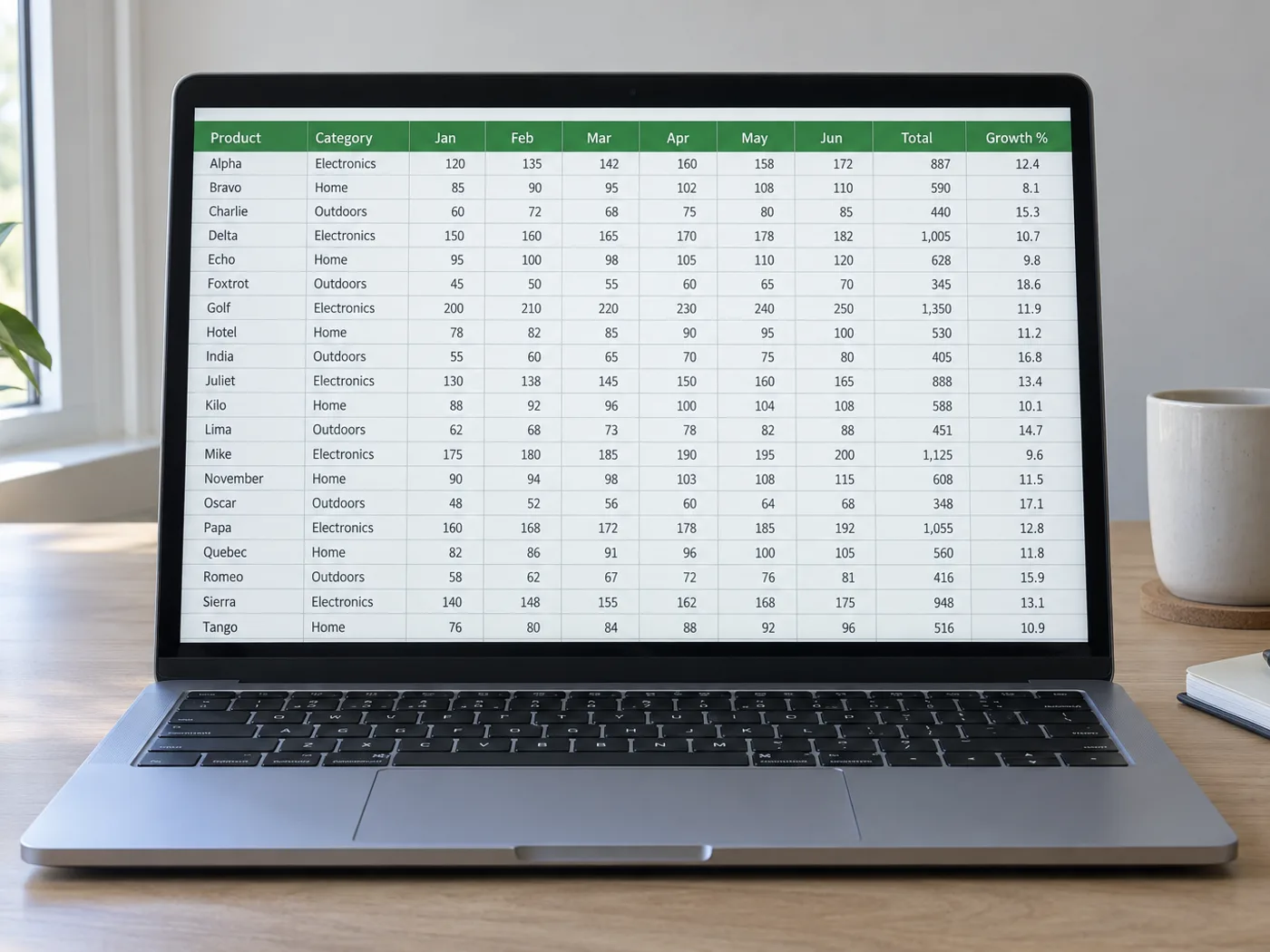
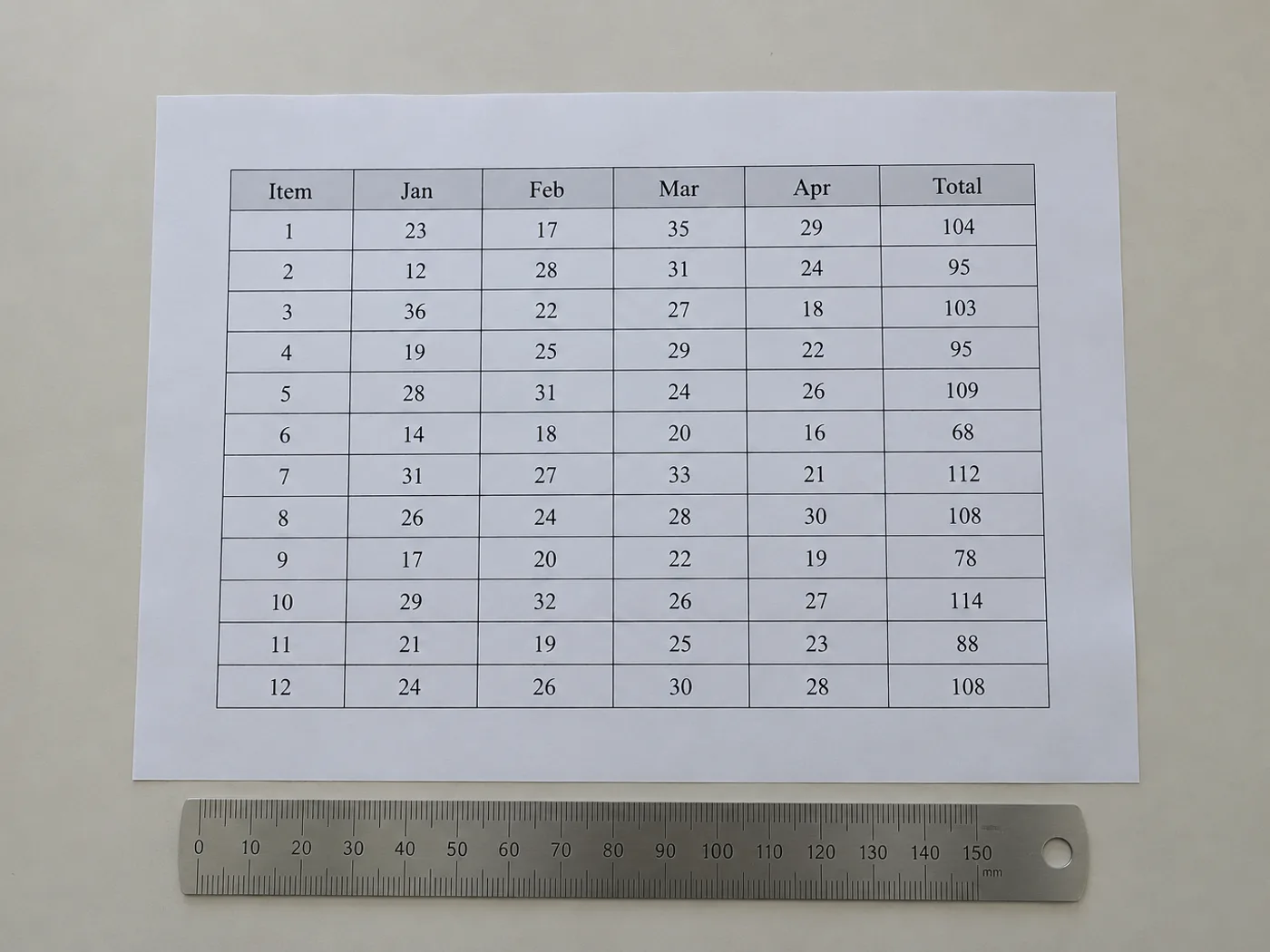
Một bảng tính không có sổ làm việc nguồn vẫn cần các ô có thể sử dụng
Khôi phục nội dung nhìn thấy trong các ô bảng khi chỉ có hình ảnh. Lưới kiểm tra cho phép sửa cấu trúc đã nhận dạng trước khi xuất, đặc biệt hữu ích với các cột không có đường viền và tiêu đề trải trên nhiều trường.
Các bảng tham chiếu đã công bố
Tạo bản sao có thể chỉnh sửa của bảng báo cáo để tự tính toán, đồng thời giữ lại nguồn gốc và nhãn đơn vị.
Bảng không có đường kẻ ô
Kiểm tra xem các giá trị được căn bằng khoảng trắng đã vào đúng cột chưa trước khi dùng làm dữ liệu bảng tính.
Dựng lại cấu trúc bảng trước khi dùng số liệu
- Cắt chỉ còn một bảng và giữ lại chú thích hoặc đơn vị cần thiết để hiểu các giá trị trong bảng.
- Đối chiếu các cột và hàng được phát hiện với hình ảnh; sửa những ô lưới bị thiếu hoặc thừa.
- Xuất các ô đã kiểm tra và dựng lại mọi định dạng dành riêng cho bản trình bày trong Excel.
Cột không viền, tiêu đề đã gộp và hàng bị thiếu
- Ảnh bảng có cần đường lưới hiển thị rõ để trích xuất sang Excel không?
- Đường căn chỉnh rõ ràng cũng có thể cho biết các cột. Bố cục không viền cần được kiểm tra kỹ hơn vì chữ xuống dòng và khoảng cách không đều có thể làm lệch ranh giới được phát hiện.
- Các ô tiêu đề đã gộp có được giữ nguyên trạng thái gộp trong Excel không?
- Đừng dựa vào việc tái tạo chính xác bố cục. Hãy kiểm tra các tiêu đề đã trích xuất và gộp hoặc tách ô trong Excel để phù hợp với ý nghĩa của bảng.
- Nếu ảnh bảng có chú thích cuối trang thì sao?
- Giữ lại chú thích cuối trang để cung cấp ngữ cảnh, nhưng xóa những chú thích bị nhận nhầm thành hàng trong bảng dữ liệu. Khi cần, lưu nội dung của chúng trong ghi chú riêng.
- Làm thế nào để sửa một hàng bị thiếu trước khi xuất XLSX?
- Dùng bảng kiểm tra có thể chỉnh sửa để thêm hoặc sửa các hàng, rồi đối chiếu số hàng với hình ảnh trước khi tải xuống sổ làm việc.


























