Desain lemari dengan AI
Hasil AI generatif dapat bervariasi; tinjau seluruh hasil sebelum dipublikasikan.
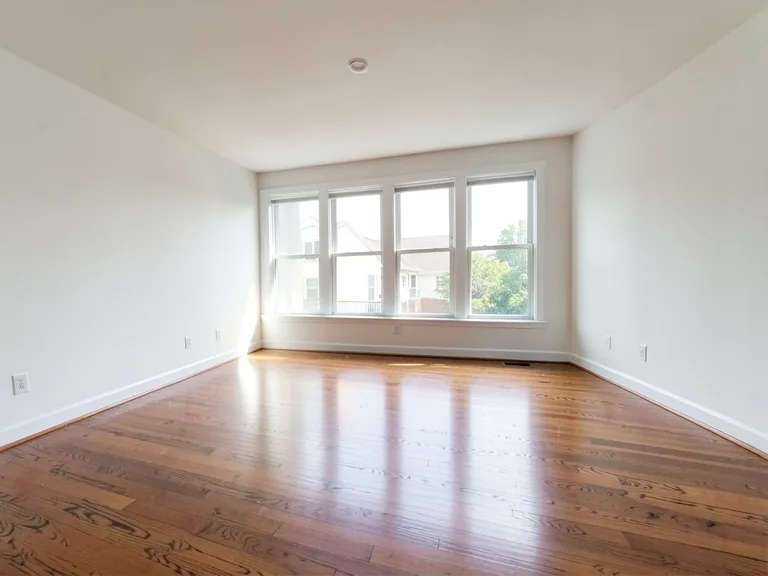
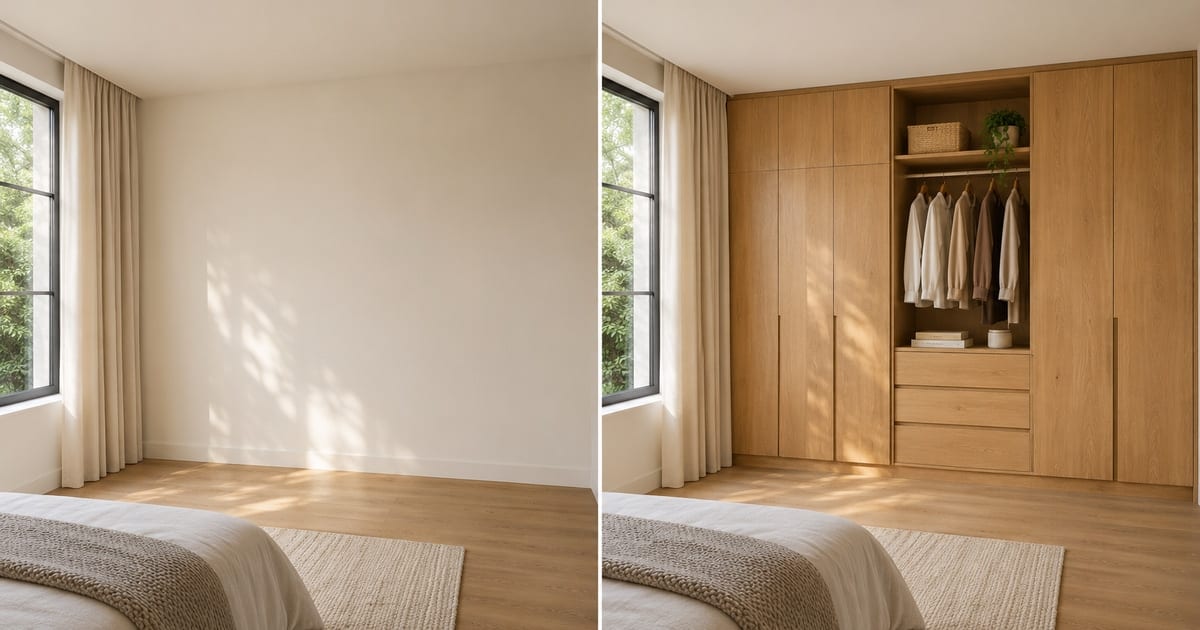
A wardrobe is usually the largest piece of storage a household ever buys, and it is usually chosen from a showroom sample or a catalog render of somebody else's bedroom. This designer places a wardrobe on a photo of your own room: floor-to-ceiling built-ins, sliding doors for a tight space, a walk-in closet, or a corner unit. Change the finish, add mirror doors, LED lighting or loft storage with one tap, and see whether the design suits the wall before a carpenter takes a measurement.
- Prepared Wardrobe Designer AI direction
- Prompt yang bisa disunting
- Peninjauan hasil lengkap wajib dilakukan
Choose a source image for Wardrobe Designer AI
JPG, PNG, WebP, HEIC, dan format lain yang didukung. Untuk alat ini, batas unggahan paket Free adalah 20 MB; Premium dan paket yang lebih tinggi hingga 50 MB.
Siapkan untuk Desain lemari dengan AI
Pengaturan yang sudah disiapkan
- Titik awal
- Unggah satu gambar sumber
- Halaman terbuka pada alur kerja penyuntingan yang tepat; Anda hanya perlu mengunggah untuk memulai.
- Alur kerja yang disiapkan
- Prepared Wardrobe Designer AI staging direction
- Wardrobe Designer AI opens with the Wardrobe Designer AI direction preselected, so there is no need to find the operation manually.
- Format keluaran
- Sama seperti unggahan Anda
- Hasil mengikuti bentuk gambar yang Anda unggah.
- Tinjau aturan
- Periksa hasil lengkap yang dibuat sebelum digunakan
- Hasil gambar AI dapat bervariasi; hasil akhir tetap menunggu persetujuan pengguna sebelum diunduh.
Penggunaan yang paling sesuai
- Compare sliding-door and hinged-door wardrobes on one wall
- Show a carpenter or interior designer the look you want
- Decide between a walk-in closet and a built-in before ordering
Pertanyaan yang sering diajukan
- Can I use this picture to order the wardrobe?
- Use it to settle the design: the style, finish, door type and what goes inside. It is a concept at plausible scale, not a measured drawing. Hand it to your carpenter or supplier as the look you want, and let them measure the wall, check the door swing and confirm the real dimensions.
- Which wardrobe suits a small room?
- Sliding doors save the swing space a hinged door needs, and floor-to-ceiling units use height instead of floor area. Try both on the same photo and look at how much floor remains in each version, which is the number that matters in a small room.
- Can I add mirror doors, lights and a dressing table?
- Yes. The "Add to your result" buttons include mirror doors, LED strip lighting, a shoe rack, drawers, loft storage and a dressing table. Combine as many as you like and add your own wording in the custom instructions box.
- What should the photo show?
- The whole wall where the wardrobe will go, floor to ceiling, shot from a few steps back and held level. Clear the wall of boxes and hanging clothes so the AI places the design on bare wall rather than around clutter.
Apa yang dapat Anda lakukan dengan Penataan Ruang dengan AI
Tinjau kemampuan utama sebelum Anda mulai.
- Paket complete-room Furnitur placement secara otomatis
- Ubah gaya ruang tamu, kamar tidur, kantor, dan ruang makan
- Pertahankan Tetap Arsitektur and Kamera perspective
- Proses Properti sets in Massal Premium mode
Referensi pengaturan
5 pengaturan
Kontrol yang tersedia untuk Penataan Ruang dengan AI.
Alur kerja
- Satu gambar atau gambar MassalPreset
- Proses Satu gambar, or Gunakan Massal Premium gambar to Terapkan the same Otomatis recipe to a Atur and unduhan Satu ZIP.Opsi: Gambar tunggalGambar massal
Gaya
- Preset sekali ketukPreset
- Pick a ready-made Arahan with Satu tap; pembuatan uses the dipilih preset secara otomatis.Opsi: Ruang tamu modernSkandinaviaInterior mewahKantor rumahKamar tidurRuang makanBohemianIndustrialMid-century modernGaya FarmhousePesisirKamar anak
- Instruksi khusus (opsional)Masukan teks
- Jelaskan perubahan yang diminta, material relevan, pencahayaan, perspektif, dan detail yang tidak boleh diubah.
Pilihan
- Pilihan ukuran kuasPenggeserJangkauan: 4–160px · Bawaan: 32px
- Otomatis pilihan is the default. Buka Refine area secara Manual and Atur Ini Kuas Lebar Saja when the gambar needs a tighter Edit boundary.
Keluaran
- Ask AI to Pertahankan Subjek identity and Produk DetailHidup / Mati
- Menambahkan instruksi eksplisit untuk mempertahankan subjek utama, bentuk, merek, label, dan teks yang dapat dibaca kecuali permintaan mengubahnya.
Alat terkait untuk Desain lemari dengan AI
Alat untuk langkah umum selanjutnya setelah Desain lemari dengan AI.
Penataan Virtual & Properti
Editor Foto Properti dengan AI
Edit foto real estat dengan AI: tambahkan furnitur atau TV, cat dinding, hilangkan kekacauan, ganti langit, perbaiki lanskap, dan ciptakan eksterior senja.
Coba sekarang
Penataan Virtual & Properti
Penataan Ruang Virtual dengan AI
Tata ruangan kosong secara virtual dengan furnitur AI untuk listing properti. Buat konsep ruang tamu, kamar tidur, kantor, ruang makan, dan interior mewah.
Coba sekarang
foto Enhancement
Peningkat Kualitas Foto AI
Sesuaikan noise, ketajaman, warna, dan skala dalam satu alur kerja penyempurnaan, lalu bandingkan hasilnya dengan aslinya.
Coba sekarangPanduan untuk alat ini
- How to Create Furnishing Proposals for Interior Design Clients with AICreate AI furnishing proposals for interior design clients with Pixoate. Compare room concepts and assemble clear presentation PDFs for discussion.
- Beautifully Staged, Believably Sized: Why Virtual Furniture Must Fit the RoomVirtual furniture needs believable proportions. Explore room-scale reviews and Pixoate comparisons that keep attractive staging concepts grounded in reality.
Saksikan setiap transformasi selesai
Setiap foto crosses the slash untouched and comes out the other side finished.