
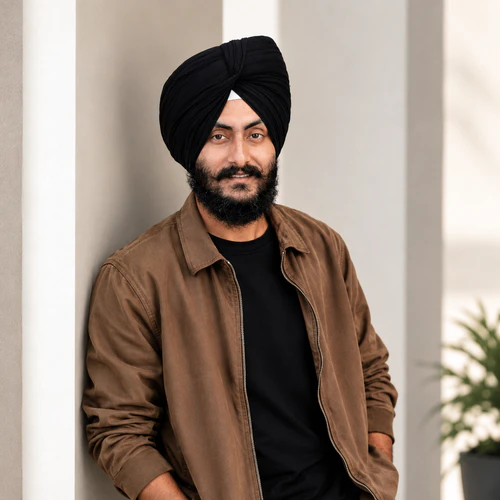
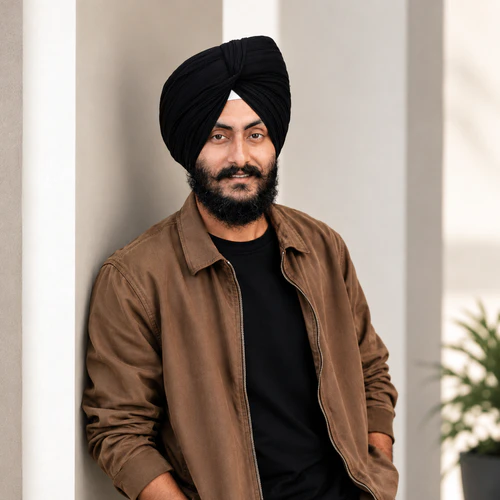
The same source image before and after applying Styling.
Styling photo effect applied to the same source image
Original source image before the Styling photo effect

Grooming – nur vorhandene Augenbrauen und Gesichtsbehaarung betonen

Define only eyebrow and optional facial-hair detail already visible in your photo, inside verified zones—without inventing hair or changing the face.

Laden Sie ein Foto für den Styling-Effekt hoch

Was Sie mit dem Styling-Effekt machen können

Überprüfen Sie die verfügbaren Effektmöglichkeiten, bevor Sie beginnen.

  • Apply the Styling effect to any photo
  • Fine-tune the effect strength to taste
  • Preview your photo live as you edit
  • Download your edited photo in high quality
  • Apply Styling to many photos at once

So funktioniert's

Grooming does not generate, remove, extend, reshape, recolor, sharpen, blur, or patch hair or the portrait. It needs one complete, near-front face: the face is checked carefully and its full shape is mapped. The tool tells face skin apart from accessories only to set safe outer limits—never as proof that a dark pixel is facial hair. It first measures the brightness of bare skin on the verified forehead, then keeps only pixels clearly darker than that skin inside exactly two eyebrow outlines. It can also define facial hair that is already there inside one optional lower-face zone: that area must stay inside the face oval, below the nose, on verified face skin, away from the protected nose and lips, and be large and connected enough, with real fine hair detail nearby in the original. Smooth cast shadows cannot qualify. Very light, absent, or uncertain facial hair is left unchanged. The adjustment only darkens slightly, with a small fixed limit for brows and a slightly higher one for facial hair at full intensity; it adds no artificial strands, texture, edge sharpening, or color. Eyes, irises, nose, lips, inside of the mouth, skin outside the accepted brow and facial-hair detail, ears, scalp hair, turban or other headwear, face shape, expression, lighting, clothing, background, framing, transparency, and every pixel outside the two brow zones and optional facial-hair zone are copied unchanged into a lossless PNG. Side profiles, incomplete or tiny faces, unclear skin, obstructions, brows without enough visible dark detail, and uncertain facial hair are refused or left unchanged rather than redrawn.


Verarbeitung

Styling verwendet eine KI-Aktion. Eine eventuelle gesonderte Zulage wird angezeigt, bevor dieser Effekt mit der Verarbeitung beginnt.

Am besten für

scharfe, gleichmäßig beleuchtete, annähernd frontale Porträts mit einem vollständigen Gesicht, klar sichtbaren natürlichen Augenbrauen und optional vorhandenen Schnurr- oder Vollbartdetails.

Weniger geeignet für: Seitenprofile, geneigte oder beschnittene Gesichter, Brillen, von Haaren oder Händen verdeckte Augenbrauen oder untere Gesichtspartien, sehr helle oder bereits markante Augenbrauen, kontrastarme Gesichtsbehaarung, starke Schlagschatten, winzige Gesichter, Bewegungsunschärfe und Gruppenfotos.

Möglichkeiten zur Verwendung von Styling

  • Betonen Sie die beiden vorhandenen Augenbrauenformen dezent, ohne sie aufzufüllen, zu verlängern oder umzuformen.
  • Subtly define an already-present moustache or beard while keeping lips, nose, surrounding skin, headwear, hairline, and face shape exactly as photographed.
  • Use intensity to control darkening-only definition while every pixel outside the verified grooming zones stays unchanged.

Styling Fragen

Fügt Grooming einen Bart hinzu oder formt es meine Augenbrauen um?
No. It only darkens detail already visible inside two verified eyebrow outlines and, when enough original evidence exists, one optional lower-face facial-hair zone. It cannot synthesize strands, fill gaps, extend outlines, remove hair, or change geometry.
Warum wird Grooming nicht wie virtuelles Staging für Räume angewendet?
Virtual staging intentionally synthesizes large replaceable room regions. Brows, facial hair, lips, skin, and facial contours are identity-critical and touch at pixel scale. Grooming therefore measures your own pixels inside precisely located, verified zones, caps a darkening-only correction, and refuses uncertain evidence rather than asking a generator to redraw the person.

Weitere Porträt & Schönheit-Effekte

Sehen Sie die vorgestellten Effekte in Aktion

Die stärksten Effekte stehen in dieser Leiste vor dem restlichen Katalog.


















