

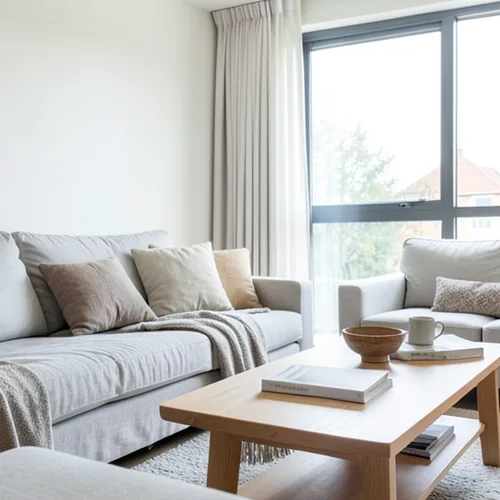
The same source image before and after applying Diorama papierowej głębi.
Diorama papierowej głębi photo effect applied to the same source image
Original source image before the Diorama papierowej głębi photo effect

Filtr fotograficzny Diorama z głębią papieru online

Style the frame as up to seven layered paper sheets without duplicating people or objects. Control the strength, compare the result, and download a finished image from your browser.

Prześlij zdjęcie dla efektu Diorama papierowej głębi

Co można zrobić z efektem Diorama papierowej głębi

Zanim zaczniesz, przejrzyj dostępne możliwości efektów.

  • Apply the Diorama papierowej głębi effect to any photo
  • Fine-tune the effect strength to taste
  • Preview your photo live as you edit
  • Download your edited photo in high quality
  • Apply Diorama papierowej głębi to many photos at once

Jak to działa

Paper Depth Diorama estimates how far each part of your photo is from the camera, smooths that depth, cleans up small stray patches, and divides the frame into up to seven broad paper layers. One reliably detected main person, pet, product, or object is kept on one single sheet instead of being sliced apart at uneven depth edges. Each nearer sheet gets a narrow warm cut-edge highlight and casts a soft lower-right shadow only onto a sheet behind it, and no shadow can wrap around from the opposite edge of the frame. The light and dark detail of your photo is simplified into a warm paper palette, and intensity changes the real palette, shadow distance, softness, strength, and cut-edge highlight. Nothing is moved, copied, stretched, repainted, or generated: every color change stays exactly in place, framing stays fixed, and transparency is kept in the lossless PNG. Larger uploads may be resized proportionally before this step: free results are delivered at web size, and very large photos are scaled down before depth analysis. If one reliable main subject cannot be isolated, the effect stops safely instead of guessing.


Przetwarzanie

Diorama papierowej głębi wykorzystuje akcję AI. Każdy oddzielny dodatek jest pokazywany przed rozpoczęciem przetwarzania tego efektu.

Najlepsze dla

proste portrety, zwierzęta, produkty, kartki okolicznościowe, ilustracje opowieści, wnętrza, krajobrazy z wyraźnym oddzieleniem pierwszego planu od tła oraz wydruki w stylu rękodzieła.

Mniej pasuje do: zdjęcia grupowe, nakładające się lub równie wyeksponowane motywy, szkło, lustra, odbicia, dym, delikatne włosy lub listowie, płaskie sceny oraz zatłoczone kompozycje, w których odległość względna albo granica głównego motywu jest niejednoznaczna.

Sposoby użycia Diorama papierowej głębi

    Pytania Diorama papierowej głębi

    Czym jest papierowa diorama?
    A real shadow box uses separate paper cutouts at different depths. This effect illustrates that look directly on your photo: up to seven sheets based on estimated relative depth, warm paper color, highlights along the nearer cut edges, and soft shadows on the layers behind. It does not measure real depth or physically rebuild a 3D scene.
    Czy efekt może powielić lub zmienić kształt mojego głównego motywu?
    No. No part of your photo is moved or copied to another place. One reliably detected main subject is kept on one paper layer, so its face, arms, body, or object outline cannot break into shifted copies. The color is deliberately restyled, and a photo whose main subject cannot be separated reliably is refused safely.

    Więcej efektów Głębokość i wymiar

    Inteligentna zmiana ostrości

    Głębokość i wymiarZaawansowana AI

    Zachowaj ostrość jednego automatycznie wykrytego głównego obiektu dzięki czystemu rozmyciu tła zależnemu od głębi

    Otwórz stronę

    Diorama z efektem tilt-shift

    Głębokość i wymiarZaawansowana AI

    Zmień ulice i krajobrazy sfotografowane z góry w miniaturowe sceny dzięki czystemu pasowi ostrości wspomaganemu głębią

    Otwórz stronę

    Ruchomy obraz 3D

    Głębokość i wymiarZaawansowana AI

    Create a clean eight-frame depth loop where nearer and farther parts move by different amounts

    Otwórz stronę

    Anaglif głębi 3D

    Głębokość i wymiarZaawansowana AI

    Create a comfortable red-cyan 3D view for standard glasses from the estimated depth of your photo

    Otwórz stronę

    Załamanie kryształu

    Głębokość i wymiarZaawansowana AI

    Refract only the background through bounded crystal facets while keeping the detected subject fixed

    Otwórz stronę

    Plakat z wycięciem paralaksy

    Głębokość i wymiarZaawansowana AI

    Utwórz pięć szerokich płaszczyzn papieru wyrównanych ze źródłem, bez powielania osób ani obiektów

    Otwórz stronę

    Topograficzne linie głębi

    Głębokość i wymiarZaawansowana AI

    Trace 18 clean depth contour bands over your photo without moving people or objects

    Otwórz stronę

    Atmosferyczna mgła głębinowa

    Głębokość i wymiarZaawansowana AI

    Add soft atmospheric haze that grows with the estimated distance in your photo

    Otwórz stronę

    Separacja tonu blisko–daleko

    Głębokość i wymiarZaawansowana AI

    Apply cool-far and warm-near color grading from the estimated depth of your photo

    Otwórz stronę

    Świat Lensballa

    Głębokość i wymiar

    Skompresuj i odwróć scenę wewnątrz ograniczonej szklanej kuli, pozostawiając każdy piksel na zewnątrz bez zmian

    Otwórz stronę

    Druk głębi lentikularnej

    Głębokość i wymiarZaawansowana AI

    Interlace depth-shifted strips only across the background while keeping the detected subject fixed

    Otwórz stronę

    Zobacz wyróżnione efekty w ruchu

    Najmocniejsze propozycje efektów są wyświetlane na początku tego pasa, przed resztą katalogu.




























