

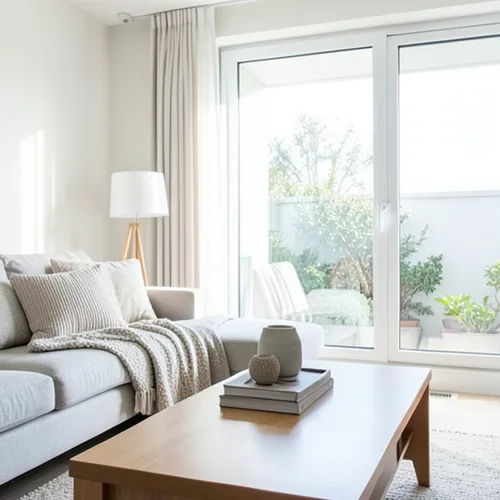
The same source image before and after applying Near–Far Tono dividido.
Near–Far Tono dividido photo effect applied to the same source image
Original source image before the Near–Far Tono dividido photo effect

Filtro de fotos de tono dividido cercano y lejano en línea

Apply cool-far and warm-near color grading from the estimated depth of your photo. Control the strength, compare the result, and download a finished image from your browser.

Sube una foto para el efecto Near–Far Tono dividido

Qué puedes hacer con el efecto Near–Far Tono dividido

Revisa las capacidades de efectos disponibles antes de comenzar.

  • Apply the Near–Far Tono dividido effect to any photo
  • Fine-tune the effect strength to taste
  • Preview your photo live as you edit
  • Download your edited photo in high quality
  • Apply Near–Far Tono dividido to many photos at once

Cómo funciona

Near–Far Split Tone estimates relative—not measured—depth, ignores the most extreme near and far readings, and cleans up tiny isolated specks. It then cools the colors of farther areas and warms the colors of nearer areas, with no overlap between the two, around a neutral middle band left exactly as photographed. Intensity directly controls how strong the color shift is; brightness is not deliberately changed, and already saturated colors are shifted more gently so they do not clip to flat color. Each pixel is only recolored in place: nothing is moved, copied, stretched, repainted, or generated, framing stays fixed, and transparency is kept in the lossless PNG. Larger uploads may be resized proportionally first: free results are delivered at web size, and very large photos are scaled down before depth analysis.


Procesando

Near–Far Tono dividido utiliza una acción de IA. Cualquier asignación por separado se muestra antes de que este efecto comience a procesarse.

Lo mejor para

retratos con el sujeto claramente separado, fotogramas cinematográficos, interiores, fotos de viajes, productos y carteles que se beneficien de una dirección de color moderada, cálida en primer plano y fría en la distancia.

Menos adecuado para: escenas planas, cristal, espejos, reflejos, humo, cabello fino o follaje, superficies superpuestas, colores ya saturados y fotografías donde el color original exacto deba permanecer sin cambios; una profundidad relativa dudosa puede teñir la superficie equivocada sin moverla.

Formas de utilizar Near–Far Tono dividido

    Preguntas sobre Near–Far Tono dividido

    ¿Puede mover, duplicar o remodelar el sujeto?
    No. It only changes the color of each pixel where it already is. It never moves, copies, stretches, repaints, or generates a face, arm, body, object, or background pixel, and transparency is kept in the lossless PNG. A mistaken depth estimate can color the wrong surface, but it cannot deform a face or body.
    ¿Puedo intercambiar los lados cálido y frío?
    No. The direction is deliberately fixed to warm-near and cool-far so the control stays predictable. Intensity changes only the strength of that real perceptual color shift; it cannot swap or reverse the two grades. Strongly saturated colors receive a gentler shift so they do not clip to flat color.

    Más efectos Profundidad y dimensión

    Reenfoque inteligente

    Profundidad y dimensiónIA avanzada

    Mantén nítido un sujeto principal detectado automáticamente con un desenfoque de fondo limpio que tiene en cuenta la profundidad

    Abrir página

    Diorama con efecto tilt-shift

    Profundidad y dimensiónIA avanzada

    Convierte calles y paisajes vistos desde arriba en escenas en miniatura mediante una franja de enfoque limpia asistida por profundidad

    Abrir página

    Wigglegrama 3D

    Profundidad y dimensiónIA avanzada

    Create a clean eight-frame depth loop where nearer and farther parts move by different amounts

    Abrir página

    Anaglifo 3D con profundidad

    Profundidad y dimensiónIA avanzada

    Create a comfortable red-cyan 3D view for standard glasses from the estimated depth of your photo

    Abrir página

    Refracción de cristal

    Profundidad y dimensiónIA avanzada

    Refract only the background through bounded crystal facets while keeping the detected subject fixed

    Abrir página

    Póster recortado con paralaje

    Profundidad y dimensiónIA avanzada

    Crea cinco amplios planos de papel alineados con la imagen original sin duplicar personas ni objetos

    Abrir página

    Líneas topográficas de profundidad

    Profundidad y dimensiónIA avanzada

    Trace 18 clean depth contour bands over your photo without moving people or objects

    Abrir página

    Diorama de papel con profundidad

    Profundidad y dimensiónIA avanzada

    Style the frame as up to seven layered paper sheets without duplicating people or objects

    Abrir página

    Atmospheric Depth Niebla

    Profundidad y dimensiónIA avanzada

    Add soft atmospheric haze that grows with the estimated distance in your photo

    Abrir página

    Mundo Lensball

    Profundidad y dimensión

    Comprime e invierte la escena dentro de una esfera de vidrio delimitada, manteniendo intactos todos los píxeles exteriores

    Abrir página

    Impresión lenticular con profundidad

    Profundidad y dimensiónIA avanzada

    Interlace depth-shifted strips only across the background while keeping the detected subject fixed

    Abrir página

    Mira los efectos destacados en movimiento

    Esta selección reúne primero los efectos más potentes antes que el resto del catálogo.




























