

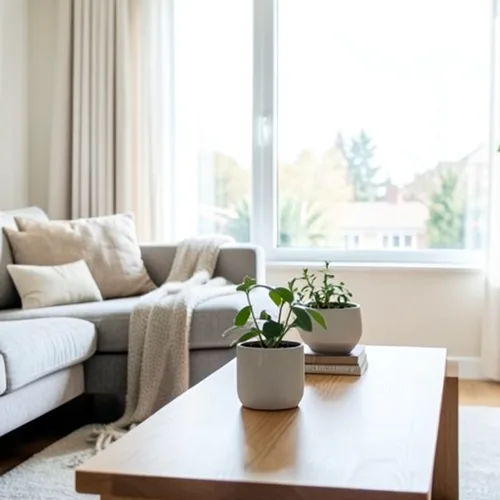
The same source image before and after applying Wigglegram-3D.
Wigglegram-3D photo effect applied to the same source image
Original source image before the Wigglegram-3D photo effect

Fotofilter für bewegte 3D-Bilder online

Create a clean eight-frame depth loop where nearer and farther parts move by different amounts. Control the strength, compare the result, and download a finished image from your browser.

Laden Sie ein Foto für den Wigglegram-3D-Effekt hoch

Was Sie mit dem Wigglegram-3D-Effekt machen können

Überprüfen Sie die verfügbaren Effektmöglichkeiten, bevor Sie beginnen.

  • Apply the Wigglegram-3D effect to any photo
  • Fine-tune the effect strength to taste
  • Preview your photo live as you edit
  • Download your edited photo in high quality
  • Apply Wigglegram-3D to many photos at once

So funktioniert's

Wigglegram 3D estimates which parts of your photo are nearer or farther and keeps one plane near the center of the composition steady. Eight frames then move nearer and farther surfaces sideways by different amounts in a smooth back-and-forth rhythm; intensity changes how far they really move instead of fading a still copy over every frame. Nearer surfaces stay in front where things overlap, edges stay clean, and the narrow gaps that open beside foreground objects are filled by continuing the background behind them. At full strength, movement is capped at 2% of the image width and fades to nothing at the side edges. The unchanged center view appears twice so the loop plays seamlessly, and image and transparency move together in a lossless animated WebP. Very large photos are scaled down proportionally to 1.75 megapixels so all eight lossless frames stay small enough to download.


Verarbeitung

Wigglegram-3D verwendet eine KI-Aktion. Eine eventuelle gesonderte Zulage wird angezeigt, bevor dieser Effekt mit der Verarbeitung beginnt.

Am besten für

zentrierte Porträts, Haustiere, Produkte, Stillleben, Innenräume, Architektur und Szenen mit klarer Trennung von Vordergrund, mittlerer Entfernung und Hintergrund.

Weniger geeignet für: flache Szenen, außermittige Motive, sehr feine Haare oder Blattwerk, transparente oder reflektierende Objekte, bewegte Ausgangsfotos und große Perspektivänderungen, für die im Originalfoto verborgene Flächen benötigt würden.

Möglichkeiten zur Verwendung von Wigglegram-3D

    Wigglegram-3D Fragen

    Was ist ein Wigglegramm?
    Ein Stereobild, das als schneller Wechsel zwischen zwei oder mehr Blickwinkeln statt durch eine Brille dargestellt wird. Die Bewegung selbst vermittelt Tiefe, weshalb sie auf jedem Bildschirm ohne spezielle Ausrüstung funktioniert.
    Was macht ein gutes Wigglegram aus?
    Place the main subject near the centre and include recognisable detail both in front of and behind it. The central depth stays most stable while other layers move relative to it. One photo cannot reveal surfaces hidden from the camera, so the tool limits motion and continues only the farther visible background across narrow gaps; complex hair, glass, reflections, and wide separations can still reveal imperfect edges. Lower the intensity when that happens.

    Weitere Tiefe und Dimension-Effekte

    Intelligente Nachfokussierung

    Tiefe und DimensionErweiterte KI

    Ein automatisch erkanntes Hauptmotiv mit sauberer, tiefenabhängiger Hintergrundunschärfe scharf halten

    Seite öffnen

    Tilt-Shift-Diorama

    Tiefe und DimensionErweiterte KI

    Straßen und Landschaften aus erhöhter Perspektive mit einem sauberen, tiefengestützten Schärfebereich in Miniaturszenen verwandeln

    Seite öffnen

    Tiefen-Anaglyph-3D

    Tiefe und DimensionErweiterte KI

    Create a comfortable red-cyan 3D view for standard glasses from the estimated depth of your photo

    Seite öffnen

    Kristallbrechung

    Tiefe und DimensionErweiterte KI

    Refract only the background through bounded crystal facets while keeping the detected subject fixed

    Seite öffnen

    Parallax-Freisteller-Poster

    Tiefe und DimensionErweiterte KI

    Fünf großflächige, am Quellbild ausgerichtete Papierebenen erstellen, ohne Personen oder Objekte zu duplizieren

    Seite öffnen

    Topografische Tiefenlinien

    Tiefe und DimensionErweiterte KI

    Trace 18 clean depth contour bands over your photo without moving people or objects

    Seite öffnen

    Papier-Tiefendiorama

    Tiefe und DimensionErweiterte KI

    Style the frame as up to seven layered paper sheets without duplicating people or objects

    Seite öffnen

    Atmosphärischer Tiefennebel

    Tiefe und DimensionErweiterte KI

    Add soft atmospheric haze that grows with the estimated distance in your photo

    Seite öffnen

    Nah-Fern-Split-Tonung

    Tiefe und DimensionErweiterte KI

    Apply cool-far and warm-near color grading from the estimated depth of your photo

    Seite öffnen

    Lensball-Welt

    Tiefe und Dimension

    Komprimieren und invertieren Sie die Szene innerhalb einer begrenzten Glaskugel, während jedes Pixel außerhalb unverändert bleibt

    Seite öffnen

    Linsenraster-Tiefendruck

    Tiefe und DimensionErweiterte KI

    Interlace depth-shifted strips only across the background while keeping the detected subject fixed

    Seite öffnen

    Sehen Sie die vorgestellten Effekte in Aktion

    Die stärksten Effekte stehen in dieser Leiste vor dem restlichen Katalog.




























