
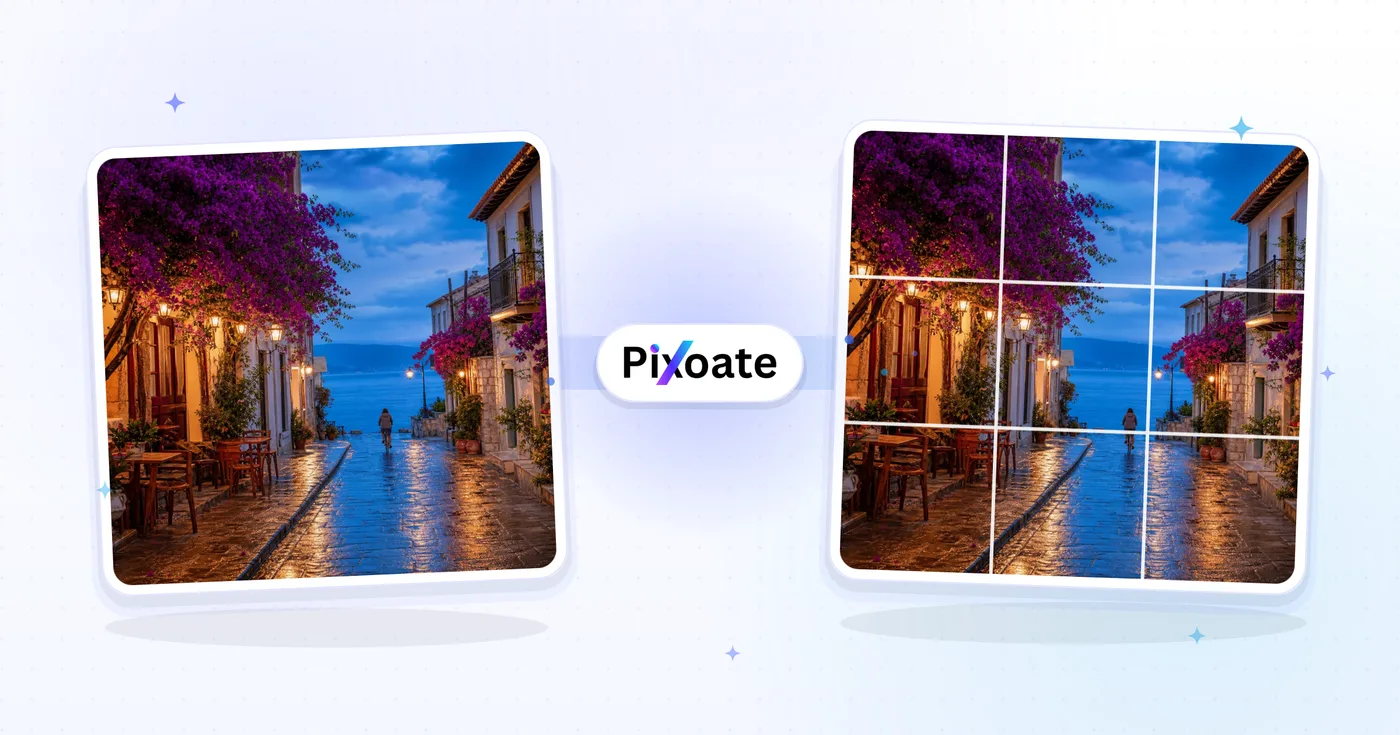
Instagram Grid Maker — Split a Photo Into an Instagram Grid
Slice one photo into a 3×3 grid, a 3×1 panorama or any rows × columns. Every tile is cut to the 3:4 shape of your profile grid, so nothing gets cropped.
Drop a photo — get evenly cut grid tiles back
Split a photo into a grid of 3:4 tiles for Instagram
This Instagram grid maker and photo splitter cuts one photo into tiles, such as a 3×3 mural, a 3×1 panorama or any number of rows and columns up to 10 by 10. Every tile is cut to 3:4, the shape Instagram shows on your profile grid, so each post appears in full and the pieces line up. You choose which part of the photo becomes the grid, then download the tiles in one ZIP.
Split a photo into a 3×3 grid in 5 steps
A 3×3 grid starts from 3 columns and 3 rows, which gives 9 tiles. Upload the photo and a box appears on it with the cut lines drawn inside, so you can see the split before anything runs. Drag the box to choose which part of the photo becomes the grid, and use the Grid area buttons to resize it. The box keeps the grid's own shape, so every tile comes out 3:4.
- Upload the photo you want to split.
- Set Columns and Rows, or tap 3×3, 3×1 or 2×2.
- Drag the grid area box over the part of the photo to use.
- Select Split my photo.
- Download the ZIP of tiles from the result page.
How to split landscape photo into two for Instagram
For a connected set or a panorama across your profile, use a single row. Set Rows to 1 and Columns to 2 for 2 posts, or tap 3×1 for 3. A 3:2 camera photo matches a 2×1 grid exactly, so nothing is left out, and a wide panorama or banner suits 3×1, so it also serves as an Instagram banner splitter. Each file name ends with its row and column, such as r1_c1 and r1_c2, so the tiles stay in order.
Grid layouts from 4×3 and 5×2 up to 10×10
Columns and Rows each take 1 to 10, typed into the field or set with the − and + buttons, and the preview redraws the cut lines at once. The grid area keeps the shape of the grid you chose, so a 4×3 grid uses a wider box than a 3×4 one. A photo that is too small for the grid you chose is refused with a message instead of a poor result.
Tile size and posting order for an Instagram grid
Tiles are up to 1080 × 1440 pixels and are never enlarged beyond your photo's own resolution, so a smaller photo gives smaller tiles. Instagram shows the newest post first, so post the last tile first and the first tile last: for a 3×3 grid, start with the bottom-right tile. If Instagram offers to crop a tile when you post it, keep the original shape.
Cutting one photo apart or combining several photos
As an image splitter for Instagram, this page cuts one photo apart. If you want to put several photos together instead, make a photo collage with a grid, side-by-side or strip layout. To fit a single image to a post size without splitting it, use the Instagram photo resizer.
Before you post the tiles
- Check that no face or text sits on a cut line in the preview.
- Unzip the download; each tile is a JPG named by row and column.
- Post the tiles in reverse order so the grid assembles on your profile.
- Tiles are 3:4 on purpose, so there is no 1:1 or 4:5 tile option.
- Keep the original photo in case you want a different grid later.
Getting full-size tiles from your photo
Tiles are never enlarged beyond your photo's own resolution, so a three-column grid needs a source about 3240 px wide for full 1080 px tiles; enlarge a smaller photo with AI first. For a single post rather than a grid, fit the whole photo to a 1080×1350 portrait post, or go the other way and join several photos into one collage.
What you can do with Instagram Grid Splitter
Review the main capabilities before you begin.
- Slice one image into a seamless Instagram grid
- Cut every tile to the 3:4 shape of your profile grid
- Build a classic 3×3 feed layout from a single photo
- Create a 3×1 panorama that spans your profile
- Set custom rows and columns for any grid size
- Download every tile ready to post in order
Settings reference
5 settings
Available controls for Instagram Grid Splitter.
- Processing modePresets
- Process one input, or switch to Premium batch mode to process multiple inputs with shared settings. Available input types depend on the tool.Options: Single imageBatch
Grid
- ColumnsNumber inputRange: 1–10 · Default: 3
- Sets how many vertical slices the image is cut into; use 3 for a standard Instagram profile grid or panorama carousel.
- RowsNumber inputRange: 1–10 · Default: 3
- Sets how many horizontal slices the image is cut into; combine with Columns for layouts from 1×1 up to 10×10.
- GridPresets
- Quick presets that set Columns and Rows to popular Instagram layouts: 3×3 profile mural, 3×1 panorama, or 2×2 four-tile block.Options: 3×33×12×2
- Grid areaOne-click
- Drag the box on your photo, or press − and +, to choose which part becomes the grid; every tile keeps the 3:4 shape of the Instagram profile grid.
Related tools for Instagram Grid Splitter
Tools for common next steps after Instagram Grid Splitter.
Social Publishing
Instagram Resize
Fit a full photo to Instagram dimensions using blurred or solid-color padding when needed.
Try it now
Creative & Design
Photo Collage Maker
Arrange photos in a grid, side-by-side layout or stacked strip with adjustable spacing and borders.
Try it now
Photo Editing & Utilities
Crop Image
Drag to crop an image. Choose a preset ratio or enter exact dimensions.
Try it nowFrequently Asked Questions
How Instagram Grid Splitter helps you get it done
Real problems it solves every day — for businesses, creators, and everyday tasks. Find the use case that fits you and start.
Brand Launch & Product Reveal Grids
Brands launch new product lines and rebrands with a 3 × 3 grid that assembles into a billboard-style hero image on the profile, driving profile visits and follower growth
Photographer Portfolio Hero Grids
Wedding, fashion and travel photographers split signature shots into 3 × 1 panoramas and 3 × 3 grids that turn the Instagram profile into a curated portfolio gallery
Real Estate Property Showcases
Real-estate agents split a wide panoramic shot of a listing into a 3 × 1 row so the entire property frontage appears as a single seamless visual across three posts
Travel Diary Panoramas
Travel creators split sunrise panoramas, mountain ranges and skyline shots into 3 × 1 horizontal grids that read as continuous landscapes on the profile feed
Restaurant Menu & Food Spreads
Restaurants showcase a full menu spread, brunch table or seasonal collection across a 3 × 2 grid that previews the experience before a follower clicks through to the website
Quote & Typography Grids
Authors, coaches and motivational creators split a 3-line typography quote across three posts so the message reads as a billboard when followers visit the profile
Album & Single Release Cover Reveals
Musicians and labels split new album artwork into a 3×3 grid drop, posting tile-by-tile so the full cover art assembles on the profile as fans refresh it on release day.
Milestone Countdown Grids
Turn a birthday, anniversary or launch date into a day-by-day countdown by setting a custom Rows/Columns split and posting one tile per day leading up to the big reveal.
Conference & Event Sponsor Walls
Event organizers split a sponsor-logo board or speaker lineup graphic into a grid so each sponsor gets individual visibility across a run of posts instead of one crowded image.
Serialized Comic Strip & Story Grids
Comic artists and visual storytellers slice one wide strip or multi-panel story into a custom Rows/Columns split so each panel posts individually but still reads as one continuous strip when a follower scrolls through the profile grid.
Watch each transformation land
Every photo crosses the slash untouched and comes out the other side finished.























