
Product images
Prepare backgrounds, improve presentation and finish catalog assets.
Explore product photography →Pixoate newsroom
Product facts, practical review materials and a direct route to the Pixoate team for journalists and independent reviewers.
Pixoate brings image editing, visual design, PDF work, file conversion, text extraction and visual counting into one browser-based workspace. People can start with a focused tool or combine related steps to finish a visual or document task.
Editorial resource
A cleaner background is only one part of a useful product image. This worksheet helps reviewers compare labels, construction, material, color, scale and the final export.
This is a practical review resource. It does not report measured tool accuracy or sales results.
Read the worksheet and download the PDF →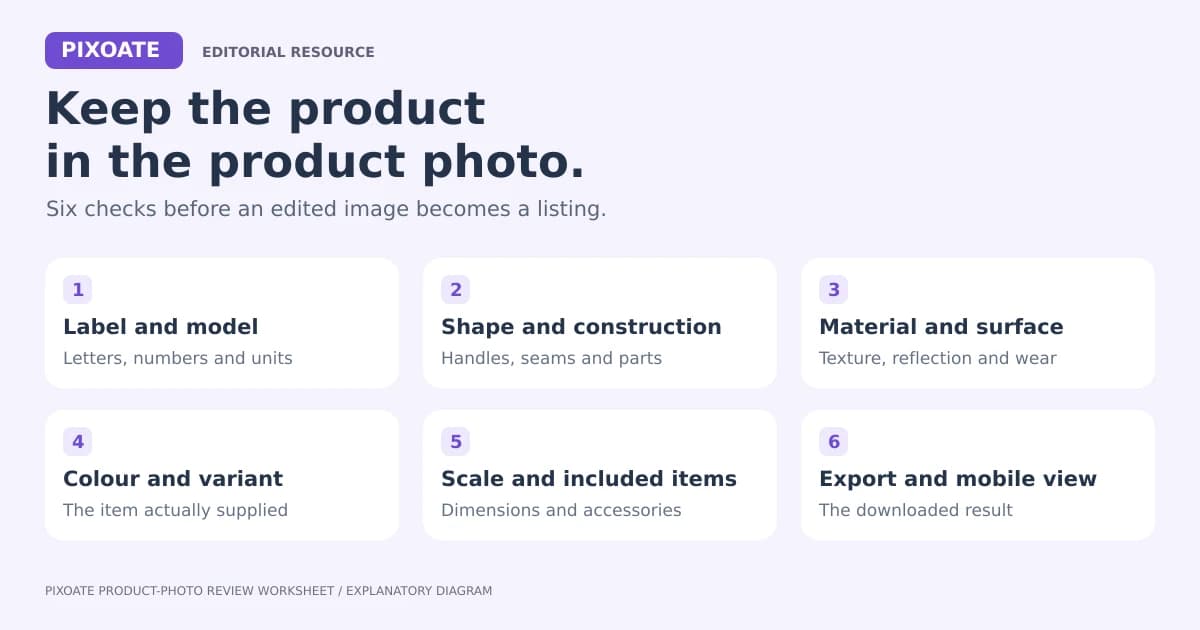
Prepare backgrounds, improve presentation and finish catalog assets.
Explore product photography →Combine photos, text, visual elements and layouts in the browser.
Open the Photo Editor →Extract a photographed table into a spreadsheet you can review.
Try Image to Excel →Extract receipt fields and review them against the source.
Explore Receipt Extractor →Edit, prepare and share documents through focused workflows.
Open the PDF Editor →Explore furnishing ideas and compare each concept with the actual room.
Explore Virtual Staging AI →Use the contact form to tell us your publication, the workflow you want to examine and your deadline. The team will confirm available access and usage terms. You can also ask for factual clarification or an editorial asset.
Send a media inquiry →The editorial kit includes a fact sheet, review worksheet, source diagram, sample document files and asset credits. Demonstration files are clearly labelled; they are not customer records.
Every photo crosses the slash untouched and comes out the other side finished.























