


Beautify Face Online — Smooth Skin and Retouch Photos
Works with JPG, PNG, WEBP
Harsh light found every uneven patch on your skin. Even out tone and texture without the blurred, plastic look a filter leaves behind.
- Edge-preserving skin smoothing — eyes and hair stay crisp
- Evens skin tone and softens redness and texture
- Look like you on a good day, not like a filter
Drop a selfie or portrait — get a naturally retouched version back
Tips for the best result
• Keep it low for the most realistic look
• Remove spots first with the Blemish Remover
• Use low strength for professional or ID photos
About the Face Beautifier
The face beautifier detects the skin areas of the face and applies edge-preserving smoothing only there, evening out texture and tone while keeping eyes, eyebrows, lips, hair and the silhouette sharp. That selective approach gives a polished, natural finish — not the blurry, plastic look of all-over filters.
How It Works
1. Upload a selfie or portrait
2. AI finds the facial skin
3. Skin is smoothed, edges stay crisp
4. Adjust strength and download
Perfect For
• Selfies and portrait photos
• Profile and social media photos
• Professional headshots
• Event and group portraits
Beautify face online: smooth skin and even out tone naturally
This face beautifier smooths skin and evens out tone in a selfie or portrait while eyes, brows, lips, hair and the outline of the face stay crisp. Upload a photo, set a smoothing strength, select Beautify and compare the result with your original. It is built for a polished but natural finish, so look at the face at full size before you download.
Face smooth online: smooth skin in a selfie or portrait
Use a sharp photo in which the face is large, evenly lit and turned toward the camera. Nothing is processed until you select Beautify, so set Smoothing strength first. The slider runs from Natural to Glam and starts nearer Glam, so lower it toward Natural before the first run if you want a light finish. Changing the slider after a result clears that result, and you select Beautify again to apply the new strength.
- Upload a selfie or portrait with the whole face in view.
- Set Smoothing strength, starting toward Natural for a light finish.
- Select Beautify and wait for the preview.
- Select See result and compare it with your original.
- Download the JPG, or change the strength and select Beautify again.
Keep a headshot or profile photo looking natural
A lower strength keeps pores and fine texture believable, which matters for a work profile, a resume photo or any picture people will view up close. Raise it only for casual posts. After each run, check the cheeks, forehead, jawline and hairline: skin should still look like skin, and the edge of the face should not look soft against the hair. For a passport or ID photo, the issuing authority's requirements decide whether any retouching is acceptable, so read them before you edit.
Smooth skin, clear spots or fix the light: which tool
Smoothing evens the overall texture and tone of facial skin. It is not a spot eraser, so remove pimples and marks first and smooth afterward. A photo with harsh shadows across the face needs help with light rather than smoothing, so ease the shadows with relighting before you retouch, and a soft or noisy picture is better served by a one-click enhance.
What happens with group photos and small faces
The tool finds faces and smooths the skin inside them, then blends the edge so no patch shows. In a group photo each face it detects gets the same strength. A very small, turned or covered face may be missed, and when no face is found the smoothing can fall back to skin-toned areas elsewhere in the picture, so check hands, arms and the background. There is no brush for choosing regions.
Before you download the smoothed photo
- Start from the sharpest original, because a compressed screenshot gives the smoother less detail to preserve.
- View the result at full size, not only in the preview.
- Compare it with your original so the face still reads as you.
- For passport, visa or ID photos, check the issuing authority's rules on retouching first.
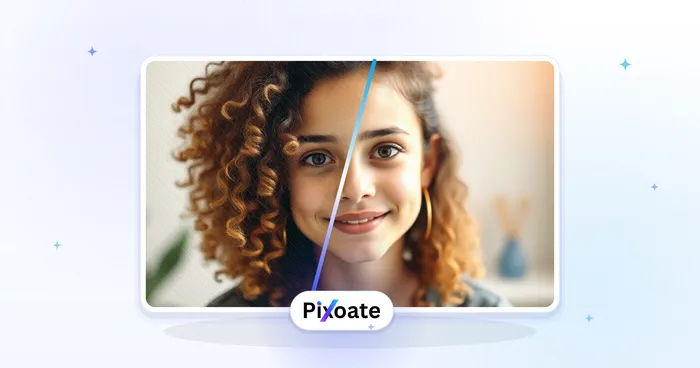
Before and after smoothing skin
Small pimples respond better to removing spots first, and dull light across the whole frame to an enhancement pass for noise and tone. Once retouched, compare the result with the original on a slider to check the face still looks like you, then make it a round profile picture.
What you can do with Face Beautifier
Review the main capabilities before you begin.
- Smooth skin on selfies and portraits
- Even out uneven skin tone in one tap
- Softly retouch faces for a natural look
- Keep eyes, hair and edges sharp
- Adjust how much smoothing to apply
Settings reference
2 settings
Available controls for Face Beautifier.
- Processing modePresets
- Process one input, or switch to Premium batch mode to process multiple inputs with shared settings. Available input types depend on the tool.Options: Single imageBatch
Adjust
- Smoothing strengthSliderRange: 0–1 · Default: 0.7
- Controls how much skin is smoothed, from Natural to Glam — keep it low for believable professional headshots, push it higher for a polished social-media finish.
Related tools for Face Beautifier
Tools for common next steps after Face Beautifier.
Portrait & Headshot Studio
Blemish Remover
Reduce visible blemishes, spots and dark marks while reviewing the effect on surrounding skin texture.
Try it now
Photo Enhancement
AI Photo Enhancer
Adjust noise, sharpness, color and scale in one enhancement workflow, then compare the result with the original.
Try it now
Photo Enhancement
AI Image Upscaler
Upscale an image by 2×, 3×, or 4× and review the enhanced result before download.
Try it nowFrequently Asked Questions
How Face Beautifier helps you get it done
Real problems it solves every day — for businesses, creators, and everyday tasks. Find the use case that fits you and start.
Dating Profile Photos That Still Look Like You
Keep the Smoothing strength slider near Natural to soften tired skin and redness for Tinder, Hinge or Bumble photos without the over-smoothed look that gets a profile flagged as fake.
Influencer & UGC Content Touch-Ups
Smooth skin on sponsored posts or product photos before publishing, keeping brand content looking polished without a full studio retouching workflow.
Realtor & Agent Listing Headshots
Run a real estate agent's headshot through a low, Natural-strength pass for MLS listings, business cards and yard-sign photos, keeping the polished-but-credible look brokerages expect without the plastic over-smoothing that makes an agent photo look fake.
Consistent Corporate Headshots for the Team Directory
Process each employee headshot individually with the same low, Natural-strength setting so the company directory or LinkedIn page reads as consistently polished, without an all-over blur filter flattening real skin texture on any one photo.
Wedding & Portrait Proof Retouching Before Client Delivery
Smooth skin tone and texture on each posed portrait from a shoot with a light, Natural-strength pass before sending proofs to a couple or client, trimming the manual per-photo retouching a photographer would otherwise do by hand.
Watch each transformation land
Every photo crosses the slash untouched and comes out the other side finished.























