

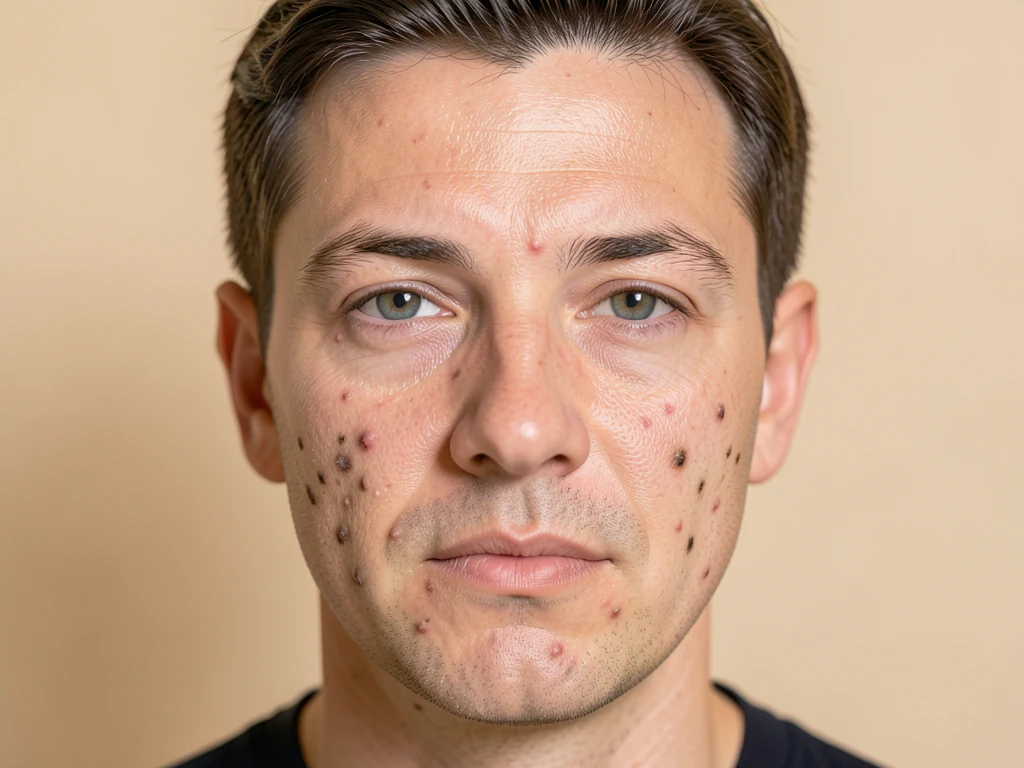
Blemish Remover — Remove Pimples and Acne from Photos Online
Works with JPG, PNG, WEBP
Soften small pimples and spots in a clear portrait while keeping facial features and surrounding skin texture.
- Auto-detects and heals pimples, acne, spots and dark marks
- Protects eyes, lips and facial hair
- Works best with the complete face visible
Drop a portrait with the full face visible
Tips for the best result
• Include the full forehead, eyes and chin; cheek close-ups and collages are not supported
• Raise Retouch strength and Max spot size gradually for remaining small spots
• Compare the result before downloading; deep scars and broad redness may remain
About the Blemish Remover
The blemish remover detects small dark, red or bright spots on facial skin and blends them with nearby skin. Eyes, lips and facial hair are protected. Upload a sharp portrait with the complete face visible. If no safe visible repair is possible, the tool explains this before creating a download.
How It Works
1. Upload a selfie or portrait
2. AI detects the skin and the blemishes
3. Spots are healed with nearby clean skin
4. Adjust strength and download
Perfect For
• Selfies and portrait photos
• Profile and dating photos
• Headshots and ID photos
• Well-lit faces with small, isolated spots
How to remove pimples and acne marks from a photo with AI
This blemish remover online finds small spots on the skin of a face photo, such as pimples, acne marks and dark spots, and blends each one with the skin around it. Eyes, brows, lips, nose and facial hair are protected, and the rest of the skin is left as it was. You set how strong the retouch is, review the result and download it.
Remove acne from pictures: pimples, acne marks and dark spots
To remove acne from a selfie or portrait, the tool finds the face, maps the skin and the features it must protect, and looks for small, round spots that are darker, redder or brighter than the skin around them. Each spot is filled from nearby clean skin, so pores and texture stay in place around it. When no safe spot can be found you get a message explaining why instead of an unchanged download. The free preview is a web-size result you can check before deciding on Premium.
- Upload a sharp portrait or selfie with the whole face in view.
- Set Retouch strength low to start; it runs from Light to Strong.
- Select Retouch and look closely at the cheeks, forehead and chin.
- Raise the strength a little if small spots remain, then retouch again.
- Select See result and download the JPG.
Fine-tune the retouch so skin keeps its texture
Three sliders sit under Fine-tune. Heal intensity runs from Natural to Full: lower keeps more real skin texture and higher gives a cleaner patch. Max spot size sets the largest mark the tool will touch, from Small only to Large. Feature protection widens the safety margin around eyes, eyebrows, lips and nose, so raise it toward Maximum if a feature looks touched.
What counts as a blemish and what stays
Spots are picked by size, shape and contrast, not by what they are, so a small mole or freckle can be treated like a pimple. Deep scars, broad redness and marks larger than Max spot size can remain. Wrinkles, hairs and lip lines are rejected as spots, and facial hair is shielded, so a beard is not shaved. Compare with the original if you want to keep a beauty mark.
What the blemish remover handles on a portrait
The job is to heal a small spot and leave the pores around it. The tool works on a portrait you upload, finds the face first and treats only small compact marks. Use it on a selfie before you post or print it, to get rid of pimples in pictures where the face is clear and sharp.
Smooth skin or fix marks that are not on a face
For an overall even finish, even out skin tone at a low smoothing strength. Marks that sit on the photo itself, such as dust, stains or scratches on a scanned print, are not skin, so paint over the damaged area and repair it instead. A dull or grainy portrait improves with one-click clean-up of noise, light and sharpness.
Before you retouch a portrait
- Include the full forehead, eyes and chin; cheek close-ups and collages are not supported.
- Use a sharp, evenly lit photo with the face turned toward the camera.
- Compare the result with the original before you download, since deep scars and broad redness may remain.
- For passport and ID photos, the issuing authority's requirements decide whether any retouching is acceptable.
Finishing a portrait after removing blemishes
With the spots softened, even out skin tone at a low smoothing strength for a natural finish, then blur the background so the face stands out. For a work profile, generate a polished headshot with directed clothing and lighting from the same clear portrait.
What you can do with Blemish Remover
Review the main capabilities before you begin.
- Remove pimples, acne and spots from face photos
- Clear up dark marks and blemishes automatically
- Keep natural skin texture, not a plastic look
- Dial in how much retouching to apply
- Protect eyes, lips and key facial features
- Limit healing to small blemishes only
Settings reference
5 settings
Available controls for Blemish Remover.
- Processing modePresets
- Process one input, or switch to Premium batch mode to process multiple inputs with shared settings. Available input types depend on the tool.Options: Single imageBatch
Adjust
- Retouch strengthSliderRange: 0–1 · Default: 0.7
- Controls how aggressively blemishes are removed, from Light to Strong — start low and raise it only if pimples or marks are still visible.
Fine-tune
- Heal intensitySliderRange: 0–1 · Default: 0.9
- Sets how fully each blemish is replaced, from Natural to Full — lower keeps more real skin texture, higher gives a cleaner patch.
- Max spot sizeSliderRange: 0–1 · Default: 0.5
- The largest spot the tool will remove, from Small only to Large — raise it to clear big blemishes, lower it to touch only tiny marks.
- Feature protectionSliderRange: 0–1 · Default: 0.8
- Widens the safety margin around eyes, eyebrows, lips and nose so they are never edited — raise it from Standard toward Maximum if a facial feature looks touched.
Related tools for Blemish Remover
Tools for common next steps after Blemish Remover.
Portrait & Headshot Studio
Beautify Face
Apply adjustable skin smoothing and tone correction while reviewing facial detail and edges.
Try it now
Photo Enhancement
AI Photo Enhancer
Adjust noise, sharpness, color and scale in one enhancement workflow, then compare the result with the original.
Try it now
Photo Enhancement
AI Image Upscaler
Upscale an image by 2×, 3×, or 4× and review the enhanced result before download.
Try it nowFrequently Asked Questions
How Blemish Remover helps you get it done
Real problems it solves every day — for businesses, creators, and everyday tasks. Find the use case that fits you and start.
Yearbook & Graduation Photo Clean-Up
Clear temporary breakouts before a yearbook or graduation photo deadline — raise Max spot size for larger acne and keep Feature protection high so eyes and eyebrows stay untouched.
Dating Profile Skin Touch-Ups That Stay Believable
Use a light Retouch strength and Heal intensity setting to fade a pimple or dark mark without erasing real skin texture, keeping profile photos honest and natural.
Model & Talent Casting Submissions
Clean up blemishes on comp cards or casting submission photos before sending them to an agency, while Feature protection keeps facial proportions accurate for casting decisions.
Wedding Party Portraits Before Delivery
Heal last-minute breakouts or blemishes on the bridal party in posed shots before handing off the final gallery, without the plastic look of a blanket blur filter.
Watch each transformation land
Every photo crosses the slash untouched and comes out the other side finished.























