
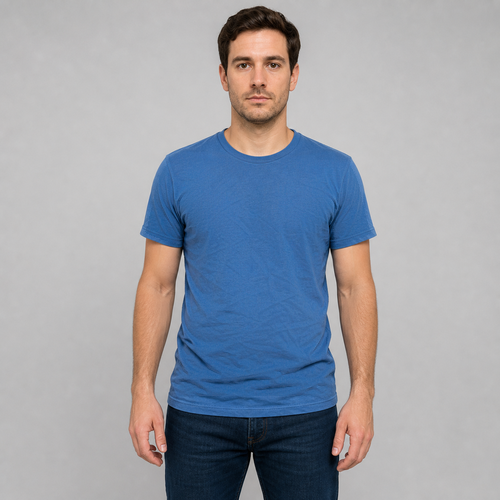
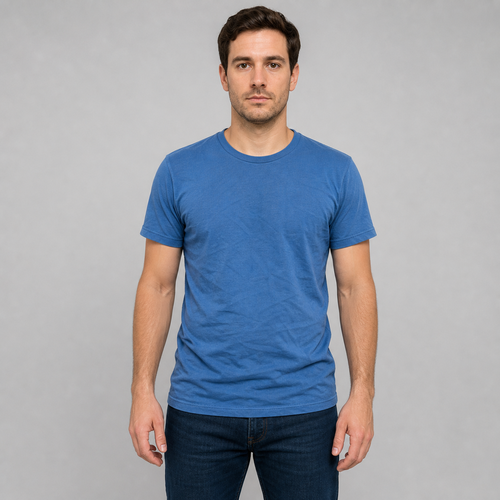
The same source image before and after applying Clothes Smooth.
Clothes Smooth applied to the same source image
Original source image before Clothes Smooth

Clothes Smooth — Soften Shirt Wrinkles Without Regenerating the Person

Reduce verified wrinkle relief only inside one central upper garment while keeping the person, clothing outline, fine fabric texture, lower body, background, and alpha unchanged.

Upload a photo for the Clothes Smooth effect

What you can do with the Clothes Smooth effect

Review the available effect capabilities before you begin.

  • Apply the Clothes Smooth effect to any photo
  • Fine-tune the effect strength to taste
  • Preview your photo live as you edit
  • Download your edited photo in high quality
  • Apply Clothes Smooth to many photos at once

How it works

Clothes Smooth does not regenerate the portrait or blur the full image. It requires one clear front-facing person, then cross-checks mirrored MoveNet Thunder shoulders and hips against separate face detection. MediaPipe six-class portrait segmentation must continuously identify the central upper garment as clothing from below the face to just above the hips. The mask is eroded before processing so the collar, sleeves, seams, silhouette, nearby skin, and background remain source-exact. Inside that safe interior, garment-normalized frequency separation measures only mid-scale luminance relief: shallow wrinkle highlights and shadows are reduced, while fine weave is retained and strong luminance or color edges from seams, prints, and logos are protected. The face, hair, skin, arms, hands, lower body, background, framing, uploaded alpha, and every pixel outside the reported clothing mask are copied unchanged into a lossless PNG. Multiple people, turned or cropped poses, covered torsos, loose or strongly patterned layers, uncertain clothing segmentation, and already-smooth fabric are refused rather than blurred or invented.

Processing

Clothes Smooth uses an AI action. Any separate allowance is shown before this effect starts processing.

Best for

sharp front-facing photos of one person wearing a fitted plain or low-pattern shirt or top, with a clear face, both shoulders and hips visible, and arms held away from the central torso.

Less suited to: group photos, side or seated poses, crossed arms, hands or hair covering the shirt, jackets and loose layered clothing, large prints or dense patterns, cropped shoulders or hips, motion blur, and garments that are already smooth.

Ways to use Clothes Smooth

  • Reduce shallow shirt wrinkles without changing facial identity, skin, arms, hands, or the rest of the photo.
  • Soften mid-scale fabric creases while preserving the garment outline, seams, logos, and fine weave.
  • Use intensity to choose a subtle or more visible smoothing result inside the verified clothing-only mask.

Clothes Smooth questions

Does Clothes Smooth blur my face, arms, logo, or background?
No. Only the eroded interior of a verified upper-garment mask can change. Face, hair, skin, arms, hands, lower body, background, alpha, and the clothing outline are copied from the source. Strong seam, print, and logo edges are protected inside the mask as well.
Why not smooth clothes the same way virtual staging edits a room?
Virtual staging is expected to generate new furniture and replace a large painted room area. Clothes Smooth must preserve a real person and real garment details. It therefore uses pose and semantic evidence, edits only measured wrinkle luminance inside the garment, and refuses uncertain photos instead of asking a generator to redraw the person.

More Portrait & Beauty effects

See the featured effects in motion

The strongest effect picks lead this belt before the rest of the catalog.




















