
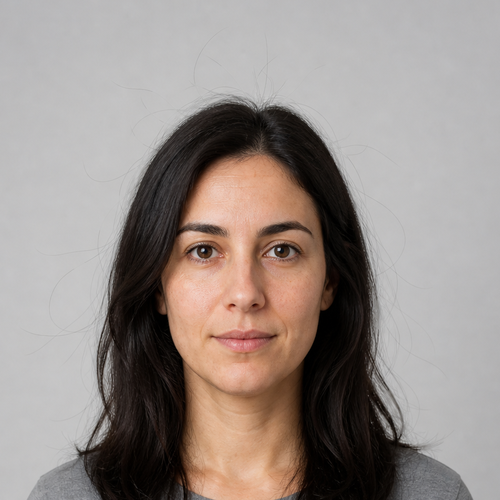
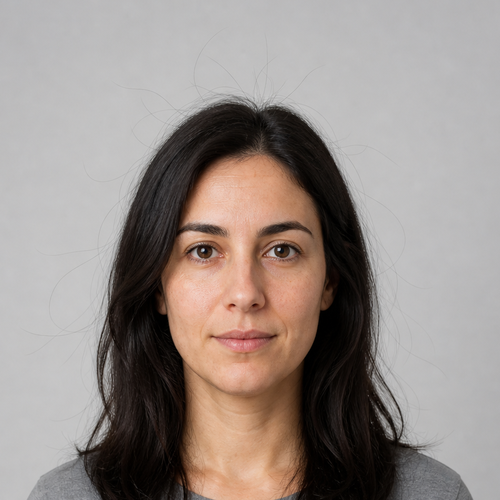
The same source image before and after applying Flyaway Remove.
Flyaway Remove applied to the same source image
Original source image before Flyaway Remove

Flyaway Hair Remover — Remove Verified Stray Strands Only Online

Remove only high-confidence stray strands outside verified hair—without smoothing the hairstyle, repainting the background, or changing the face.

Upload a photo for the Flyaway Remove effect

What you can do with the Flyaway Remove effect

Review the available effect capabilities before you begin.

  • Apply the Flyaway Remove effect to any photo
  • Fine-tune the effect strength to taste
  • Preview your photo live as you edit
  • Download your edited photo in high quality
  • Apply Flyaway Remove to many photos at once

How it works

Flyaway Remove first isolates the main hairstyle with a six-class, face-anchored mask and permits cleanup only outside that hair alpha where the model independently verifies background—not face skin, body skin, clothing, or accessories. It compares each thin component with both the local median background and the source hair color, keeps only hair-colored strands that extend outward from the silhouette, and refuses locally busy backgrounds. Accepted strand pixels blend toward their own nearby source background; no generative inpainting or face reconstruction is used. The result is a lossless PNG, and every pixel outside the verified flyaway mask is copied unchanged.


Processing

Flyaway Remove uses an AI action. Any separate allowance is shown before this effect starts processing.

Best for

sharp portraits with visible, uncovered hair and a clean, contrasting, locally smooth background around sparse stray strands.

Less suited to: hats, turbans, cropped hair, low hair-to-background contrast, very faint or thick loose locks, textured or crowded backgrounds, motion blur, and strands crossing the face, clothing, or another person.

Ways to use Flyaway Remove

  • Clean up sparse high-confidence flyaway strands around the top and sides of a hairstyle.
  • Polish a headshot while preserving the main hair silhouette, face, skin texture, clothing, and background.
  • Apply conservative strand cleanup independently around each safely isolated hairstyle.

Flyaway Remove questions

Does Flyaway Remove regenerate my hair or background?
No. It accepts only thin, hair-colored pixels already located in verified background and replaces them with a local median sampled from that same source photo. All pixels outside the accepted strand mask stay exact.
Why can the tool leave some flyaways or refuse a photo?
Faint strands, thick loose locks, low contrast, or a busy background cannot be distinguished safely enough from real scene edges. The tool keeps or refuses those pixels instead of deleting uncertain content.

More Portrait & Beauty effects

See the featured effects in motion

The strongest effect picks lead this belt before the rest of the catalog.


















