
How it works
The renderer first applies Halftone, then introduces Neon Ink, and finally uses Embossed. Each stage has a distinct role in the line-and-print recipe, while the intensity control blends the completed recipe against the source.
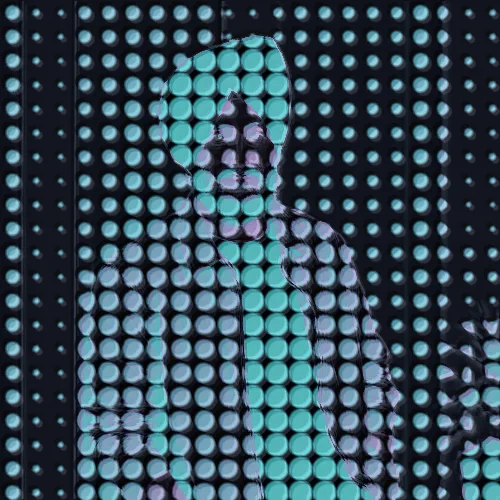

Start with Halftone, shape it with Neon Ink, and close with Embossed in one adjustable line-and-print recipe.
Review the available effect capabilities before you begin.
The renderer first applies Halftone, then introduces Neon Ink, and finally uses Embossed. Each stage has a distinct role in the line-and-print recipe, while the intensity control blends the completed recipe against the source.
Upload a photo, adjust the Halftone · Neon Ink · Embossed intensity, compare its processed preview with the source, and download the finished result.
Use the intensity control to balance the Halftone · Neon Ink · Embossed treatment with the detail and character of your original photo.
A reduced Halftone · Neon Ink · Embossed preview keeps adjustments responsive. Free downloads are clean and web-size; Premium or a credit unlocks the original resolution.
Halftone · Neon Ink · Embossed uploads are processed on secure servers and automatically removed under the normal Pixoate retention policy.
The renderer first applies Halftone, then introduces Neon Ink, and finally uses Embossed. Each stage has a distinct role in the line-and-print recipe, while the intensity control blends the completed recipe against the source.
Halftone · Neon Ink · Embossed runs as a classic image effect and does not use an AI action.
The exact Halftone, Neon Ink, and Embossed recipe works best for landscapes with strong contours, portrait line art, and poster and zine graphics.
Less suited to: Halftone, Neon Ink, and Embossed needs extra care with very noisy photos, low-resolution faces, or scenes whose subject and background have almost no edge contrast.
Tools for common next steps after Photo Effects.
Creative & Design
Turn a photo into classic, storybook, sticker, watercolor, or custom cartoon artwork with editable AI directions.
Try it nowCreative & Design
Convert a photo into a pencil-sketch style image and adjust the shadow depth before download.
Try it nowPhoto Editing & Utilities
Convert an image to black and white. Adjust the intensity and preview the result.
Try it nowThe strongest effect picks lead this belt before the rest of the catalog.























