
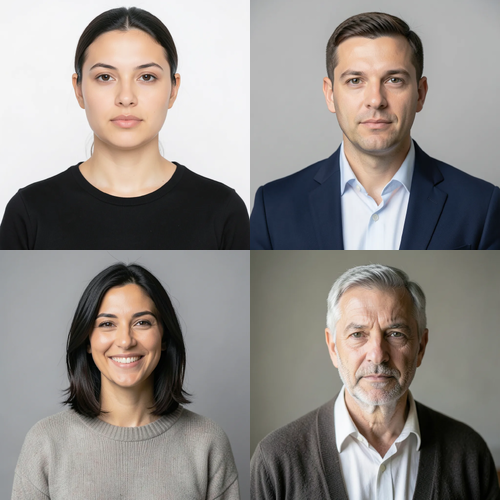
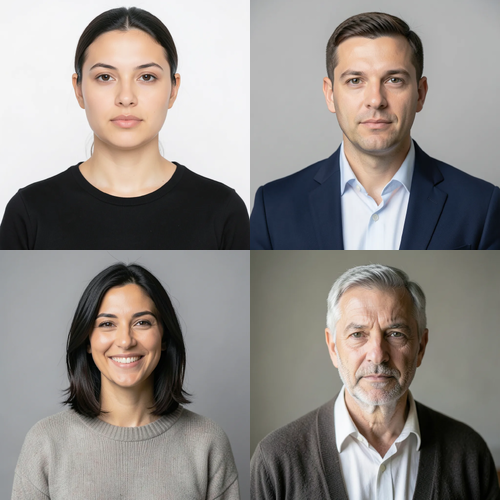
The same source image before and after applying Multi-Face Retouch.
Multi-Face Retouch applied to the same source image
Original source image before Multi-Face Retouch

Multi-Face Retouch — Polish Two or More Faces Without Redrawing Anyone

Apply the same restrained, texture-preserving polish to two or more verified faces—without redrawing anyone or touching the rest of the photo.

Upload a photo for the Multi-Face Retouch effect

What you can do with the Multi-Face Retouch effect

Review the available effect capabilities before you begin.

  • Apply the Multi-Face Retouch effect to any photo
  • Fine-tune the effect strength to taste
  • Preview your photo live as you edit
  • Download your edited photo in high quality
  • Apply Multi-Face Retouch to many photos at once

How it works

Multi-Face Retouch is a localized group-portrait treatment, not a full-frame generator. It requires at least two complete near-front faces. A dedicated face detector proposes each face independently, MediaPipe Face Mesh V2 verifies its full geometry, and MediaPipe six-class portrait segmentation separates its face skin from hair, beard, body, clothing, accessories, background, and neighboring people. Exactly three bounded zones per accepted face cover safe skin on the forehead and both cheeks; dilated face-mesh masks protect every eye, iris, eyebrow, nose, and lip. Each face gets its own skin-mask-normalized local baseline, so another person, background, hair, or beard cannot influence its correction. The renderer reduces only measured mid-scale luminance and chroma variation while retaining fine luminance detail, pores, wrinkles, and age cues. At full intensity, luminance correction is capped at two LAB levels and each chroma correction at three LAB levels. Eyes, irises, eyebrows, nose, lips, inner mouth, hair, beard, facial geometry, expression, bodies, clothing, lighting, background, grid or image boundaries, framing, uploaded alpha, and every pixel outside the accepted per-face zones are copied unchanged into a lossless PNG. It never smooths a whole face, sharpens, reshapes, inpaints, or regenerates a person. Profiles, incomplete or tiny faces, uncertain skin evidence, obstructions, and already-even faces are left unchanged; the request is refused when fewer than two faces remain safe.


Processing

Multi-Face Retouch uses an AI action. Any separate allowance is shown before this effect starts processing.

Best for

sharp group portraits, team headshots, family collages, and event photos with at least two complete, well-lit, near-front faces large enough to verify.

Less suited to: single portraits, side profiles, tilted or cropped faces, glasses, hair or hands covering features, distant crowds, tiny faces, motion blur, heavy makeup, strong color lighting, and photos where fewer than two faces have safe visible skin.

Ways to use Multi-Face Retouch

  • Apply one consistent safety-bounded treatment across a team or family portrait while measuring each face independently.
  • Balance small forehead and cheek variations without changing anyone's identity, age cues, expression, hair, clothing, or surroundings.
  • Retouch the safe faces in a collage while its seams, panels, typography, alpha, and unaccepted faces remain source-exact.

Multi-Face Retouch questions

Will Multi-Face Retouch make every person look the same?
No. Every accepted face is measured against its own source skin and receives the same strict correction limits, not the same target color or generated face. Identity, age cues, expression, geometry, and unaccepted faces stay anchored to the upload.
Why not apply Multi-Face Retouch the same way virtual staging edits a room?
Virtual staging intentionally synthesizes large replaceable room regions. A group photo contains several identity-critical faces beside hair, clothing, hands, and other people. Multi-Face Retouch therefore verifies and masks every face separately, caps local corrections, and refuses fewer than two safe faces instead of asking a generator to redraw the group.

More Portrait & Beauty effects

See the featured effects in motion

The strongest effect picks lead this belt before the rest of the catalog.


















