
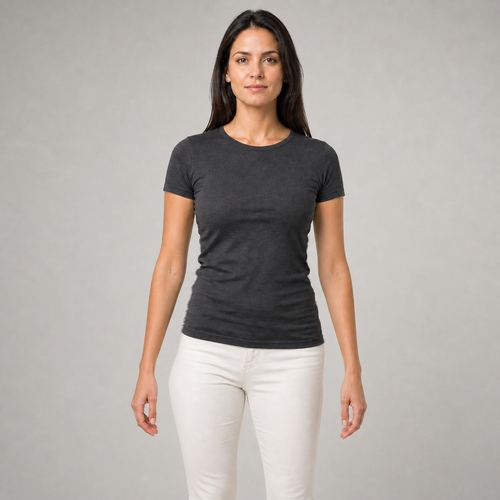
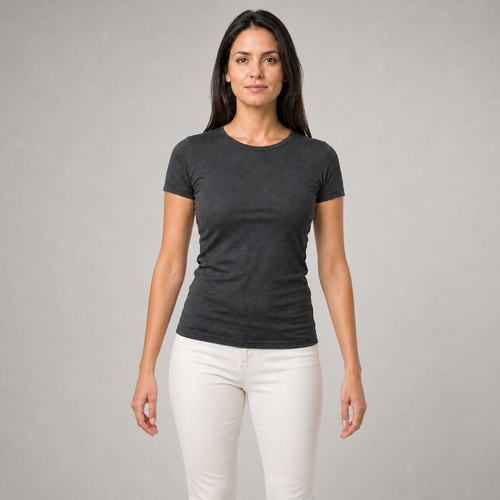
The same source image before and after applying Posture Correct.
Posture Correct applied to the same source image
Original source image before Posture Correct

Posture Correct — Fix a Mild Side Lean Without Regenerating the Portrait

Correct one verified mild sideways lean with a source-pixel torso warp that keeps the face, head, shoulder line, complete arms, hands, and outer frame source-exact.

Upload a photo for the Posture Correct effect

What you can do with the Posture Correct effect

Review the available effect capabilities before you begin.

  • Apply the Posture Correct effect to any photo
  • Fine-tune the effect strength to taste
  • Preview your photo live as you edit
  • Download your edited photo in high quality
  • Apply Posture Correct to many photos at once

How it works

Posture Correct does not regenerate the portrait or infer an unseen 3D body pose. It requires one clear front-facing person, then cross-checks mirrored MoveNet Thunder shoulder, elbow, wrist, and hip landmarks against separate face detection. The head must remain centered over a nearly level shoulder line, while the pelvis may show only a mild measurable sideways offset. Six-class portrait segmentation must continuously trace the fitted clothing, both complete arms and hands, and clean low-detail background gaps between each arm and the torso or hips. Editing starts below the sleeves: a bounded source-pixel field moves only the verified torso and pelvis, peaks at the hips, and fades to zero through the upper thighs. Each row expands or compresses only the verified source background gap beside the torso; both arms and hands are copied from the source exactly instead of being curved by the correction. The face, head, shoulder line, outer background, and every pixel outside the reported torso-and-gap field are also unchanged in the lossless PNG. If an arm touches the body, the destination-side gap is too narrow, or the source background is busy, the tool refuses the photo rather than bending an arm, revealing invented pixels, or regenerating anatomy. Already-upright photos, forward or backward slouch, strong lean, turned poses, missing joints, transparency, and ambiguous silhouettes are refused for the same reason.

Processing

Posture Correct uses an AI action. Any separate allowance is shown before this effect starts processing.

Best for

sharp opaque front-facing photos of one person with an upright head, a mild sideways shoulder-to-hip offset, both complete arms and hands held away from the torso and hips, fitted clothing, and continuous clean low-detail background gaps between each arm and the body.

Less suited to: already-upright photos, forward or backward slouch, strong side lean, turned or seated poses, arms or hands touching the torso or hips, crossed arms, loose clothing, cropped hips or hands, busy backgrounds, transparent cutouts, motion blur, and group photos.

Ways to use Posture Correct

  • Reduce a restrained camera-plane side lean without changing facial identity, expression, limb width, or source texture.
  • Bring the visible pelvis closer to the shoulder center while keeping both source arms and hands pixel-exact.
  • Use intensity to choose a subtle or more defined correction inside verified person and low-detail background limits.

Posture Correct questions

Can Posture Correct fix forward slouch or rounded shoulders?
No. A forward-slouch repair is a 3D pose change that can reveal hidden clothing, skin, hair, and background. Reconstructing those unseen pixels would require generation and could change identity or texture. This source-preserving tool corrects only a mild sideways shoulder-to-hip offset visible in the camera plane.
Why is posture correction stricter than virtual staging?
Virtual staging is expected to synthesize furniture and large room regions. A portrait correction must preserve a real person's identity and anatomy. Posture Correct therefore keeps the face, head, shoulder line, complete arms, and hands fixed, moves only the verified torso and hips, and absorbs that movement only inside measured source-background gaps between the arms and body. If either gap or the body geometry is unsafe, it refuses the photo instead of bending a limb or generating hidden anatomy and background.

More Portrait & Beauty effects

See the featured effects in motion

The strongest effect picks lead this belt before the rest of the catalog.




















