
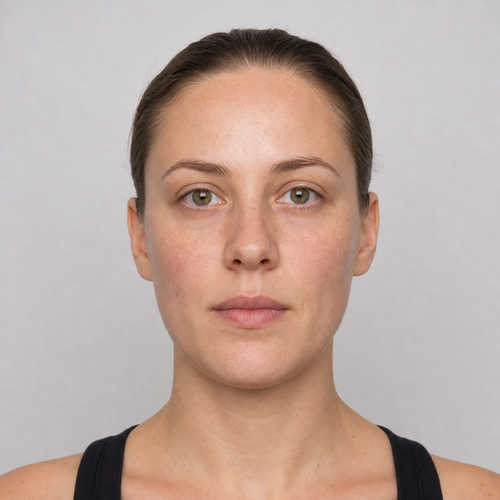
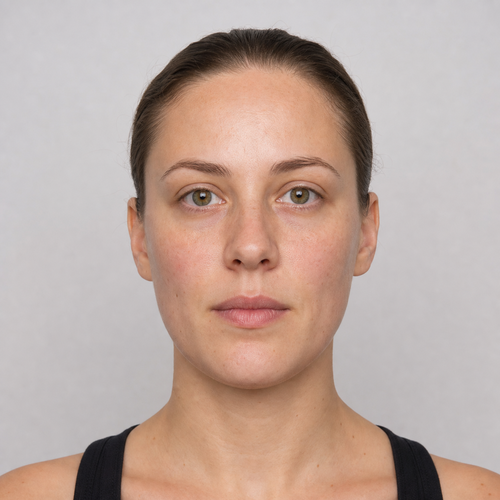
The same source image before and after applying Skin Texture Preserve.
Skin Texture Preserve applied to the same source image
Original source image before Skin Texture Preserve

Skin Texture Preserve — Reinforce Real Detail Without Inventing Pores

Reinforce only fine texture already present in verified forehead and cheek skin—without inventing pores, smoothing, recoloring, or redrawing the face.

Upload a photo for the Skin Texture Preserve effect

What you can do with the Skin Texture Preserve effect

Review the available effect capabilities before you begin.

  • Apply the Skin Texture Preserve effect to any photo
  • Fine-tune the effect strength to taste
  • Preview your photo live as you edit
  • Download your edited photo in high quality
  • Apply Skin Texture Preserve to many photos at once

How it works

Skin Texture Preserve brings back fine skin detail that a previous edit or a heavy compression flattened. It only reinforces detail already present in your photo — it never invents pores, strands or wrinkles. Each face is checked on its own: its full shape is mapped, skin is separated from hair, beard, clothing and background, and the eyes, brows, nose and lips are protected before anything changes. Only three bounded areas on the forehead and both cheeks are touched, measured against that one face alone, so nothing nearby can bleed in, and the change is deliberately slight. Skin colour, facial shape, expression and everything outside those areas are copied straight into a lossless PNG. In a group photo every face is handled separately, and any face that is turned away, incomplete, covered, very small or without enough detail left to build on is left unchanged.


Processing

Skin Texture Preserve uses an AI action. Any separate allowance is shown before this effect starts processing.

Best for

sharp, low-noise, near-front portraits with a complete face and an uncovered forehead, eyebrows, eyes, cheeks, nose, lips, jaw and chin — one person or a whole group.

Less suited to: side profiles, tilted or cropped faces, glasses, hair or hands covering features, very small faces in a wide shot, noisy or grainy photos, motion blur, and skin already flattened past the point where real detail remains.

Ways to use Skin Texture Preserve

  • Keep real pore and fine-detail character legible without changing facial shape, identity, broad tone, or natural skin color.
  • Apply restrained source-only texture definition while eyes, brows, nose, lips, hair, beard, clothing, lighting, and background remain exact.
  • Use intensity to control a three-zone fine-luminance treatment that never invents texture or edits pixels elsewhere.

Skin Texture Preserve questions

Does Skin Texture Preserve generate pores or sharpen my whole face?
No. It can reinforce only fine luminance detail already measured in three verified skin zones. It creates no pores, strands, or wrinkles, applies no chroma correction, and copies protected features and the rest of the image from the source.
Why not preserve skin texture the same way virtual staging edits a room?
Virtual staging intentionally synthesizes large replaceable room regions. Credible skin texture must come from the photographed person, not a generator. This effect therefore measures existing fine detail inside three local zones, caps the correction, and refuses weak evidence instead of inventing a new face surface.

More Portrait & Beauty effects

See the featured effects in motion

The strongest effect picks lead this belt before the rest of the catalog.


















