

AI Body Reshape
Make bounded waist, torso, shoulder, or posture adjustments to a clearly visible person.
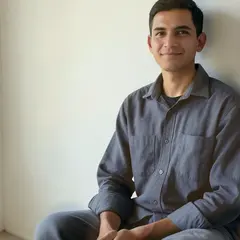
Upload a photo for the Body Slim effect
How to adjust waist, shoulders or posture in a photo with AI
AI Body Reshape makes small, bounded changes to the shape of a person in a photo. Choose Body Slim, Waist Adjust, Shoulder Adjust or Posture Correct, set an intensity and compare the result with your original. The face and everything outside the adjusted area are kept as photographed, and the tool stops rather than guessing when a photo does not give it enough to work with.
Adjust the waist, torso or shoulders in a photo
Upload a sharp, front-facing photo with the face, both shoulders and both hips visible. Pick a Treatment: Body Slim adjusts the width of the torso, Waist Adjust works in a shorter band around the natural waist and Shoulder Adjust broadens the shoulder line. Intensity runs from Subtle to Strong and starts at 40 percent, and each treatment stays inside a fixed limit, so even Strong is a bounded change. Select Apply with the treatment name to run it.
- Upload a sharp, front-facing photo with shoulders and hips in view.
- Choose a Treatment in the Shape tab.
- Set Intensity, keeping it low for a natural result.
- Select Apply with the treatment name.
- Check the outline at full size, then download the PNG.
Straighten a mild side lean
Posture Correct straightens a mild sideways lean while the head, both arms and both hands are held still. It does not fix a forward slouch or a turned pose, which would need parts of the body that the photo did not record. It suits photos with clear space between each arm and the body and a plain background in that gap.
Choose the person in a group photo
When more than one person is found, a picker asks Who should this change? Tap a face to choose, or switch on Apply to everyone in the photo. Reshaping moves nearby pixels, so anyone standing too close to the person beside them is left unchanged instead of being distorted. People packed shoulder to shoulder, seated or side-on poses, crossed arms and cropped hips are the cases where the tool is most likely to stop.
What stays as you shot it
Only existing pixels inside a checked area are moved, the face is not redrawn, and the background behind the new outline is filled from nearby background. The result is saved as a lossless PNG. If a photo is unclear, cut off or transparent the tool refuses it rather than bending the wrong limb. Compare at full size, especially the edge of clothing and straight lines in the background, and even out skin tone on the same photo or ease harsh light with relighting as separate steps.
Before you download the adjusted photo
- Check straight lines near the body, such as door frames and horizons, for bends.
- Compare the silhouette with your original at full size.
- Edit only photos you have the right to change.
Other portrait touch-ups
Skin tone and texture are handled separately when you even out skin without a plastic look; flat or harsh light on the person can be corrected with softbox or Rembrandt light.
A distracting bystander can be erased from the background.
What you can do with AI Body Reshape
Review the main capabilities before you begin.
- Choose a supported body adjustment
- Select a person in a group photo
- Compare a bounded adjustment without regenerating the face
Settings reference
3 settings
Available controls for AI Body Reshape.
Shape
- TreatmentDropdown
- Choose a supported adjustment to the existing body shape.Options: Body SlimWaist AdjustShoulder AdjustPosture Correct
- IntensitySliderRange: 0–100% · Default: 40%
- Adjust the strength before applying the selected treatment.
Person
- Who should this change?Draw on image
- Choose a detected person when more than one face is visible.
Related tools for AI Body Reshape
Tools for common next steps after AI Body Reshape.
AI Image Studio
AI Relight
Adjust golden-hour warmth, soft studio light, or shadow visibility while keeping the subject in place.
Try it now
AI Image Studio
AI Portrait Background Changer
Change a portrait background with studio, office, and garden presets. Refine the selection and compare the result before downloading.
Try it now
Portrait & Headshot Studio
Beautify Face
Apply adjustable skin smoothing and tone correction while reviewing facial detail and edges.
Try it nowFrequently Asked Questions
Watch each transformation land
Every photo crosses the slash untouched and comes out the other side finished.























