A Shelf Can Look Full While the Products Customers Want Run Low
A full-looking shelf can hide gaps in the products people want. Explore Pixoate visible-object counts and the context needed for a useful stock review.
A shelf looks full from across the shop. Up close, one popular product has only a few units left while slower-moving items occupy most of the space. Visual fullness and useful stock availability are different observations.
A reviewed photo count can help document what is visible. It becomes more useful when the tally is connected to product identity, location and the time of the observation.
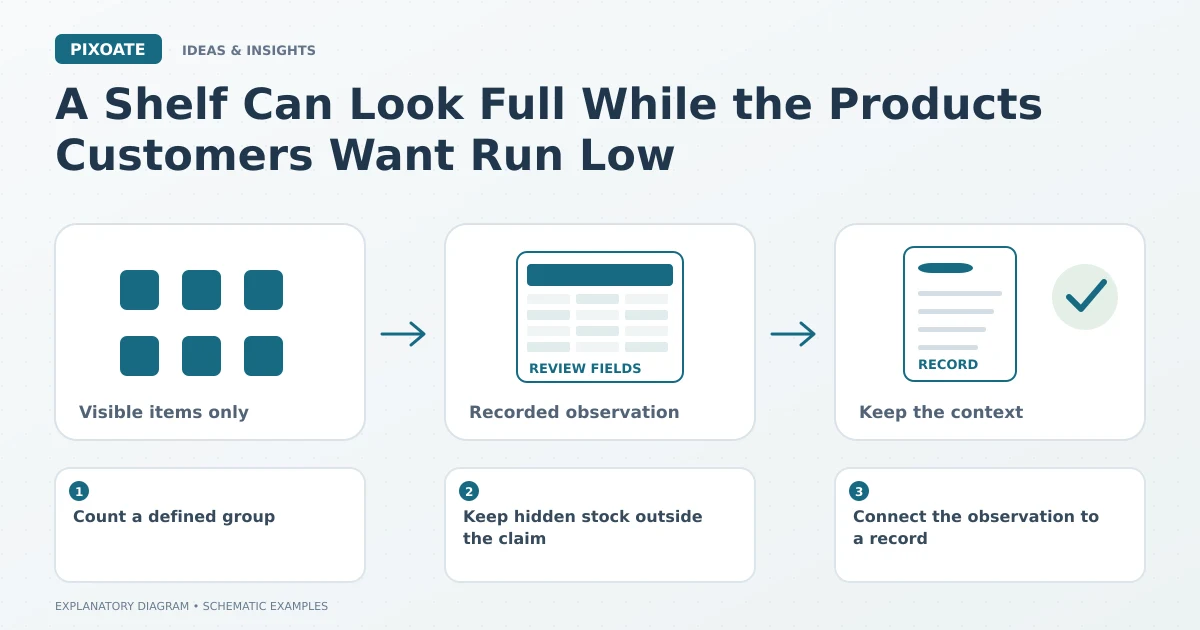
Original explanatory graphic. The scenes and sample records are schematic illustrations, not screenshots or measured tool results.
Count a defined group
Pixoate Count Objects provides an estimate from a supplied image with a result that needs visual review. Choose a clear view of separated, visible items and inspect the markers or other available reference.
Define what belongs in the count. A shelf containing several product types should not become one undifferentiated number if the purchasing question concerns only one item.
Keep hidden stock outside the claim
A photograph cannot show units concealed behind other products or in another storage area. A change between two pictures does not prove sales or theft; deliveries, movement, waste and other events may also explain it.
Use a physical count and your established stock process where the decision requires it. The image is a supporting observation, not a complete inventory system.
Connect the observation to a record
Record the location, date, item definition and reviewed quantity. If the team uses paper stock sheets, Image to Excel can help turn readable tables into editable records.
Keep units consistent. A carton, a pack and an individual item can all look like one visible object while representing different quantities in the stock system.
Ask a more specific replenishment question
The useful question is which verified item needs attention, not whether the shelf appears busy. Compare reviewed observations with your existing records and the relevant operational context.
Start with a small, clearly defined product group. Establish how the image will be captured, reviewed and recorded before extending the approach to a larger area.
Use Pixoate Count Objects to support a focused visual tally, then connect it to the stock information your business actually uses for replenishment decisions.