How to See What Furniture Will Look Like in Your Room Before You Buy
Measure first, preview furniture styles and layouts on a photo of your room and check scale and walkways before you order anything.
Written by the Pixoate team. We check how each tool behaves before we describe it, and we date any prices or portal rules we quote.
Furniture is expensive, bulky and annoying to return. Yet we usually buy it from a small picture in a showroom or online listing, and hope it suits our room. Too often the sofa is bigger than expected, the color clashes with the floor or the layout blocks the door.
You can reduce the risk by testing furniture ideas on a photo of your own room first. This guide shows how to do that, how to check the result against real measurements, and what a preview cannot tell you.
Before you shop
- Measure the room and mark doors, windows and radiators.
- Photograph the room from a corner, level and well lit.
- Preview furniture styles and layouts on the photo.
- Tape out the real footprint on the floor.
- Buy only after you have checked dimensions and walkways.
Start with measurements
A picture cannot replace a tape measure. Before you shop:
- Measure the length and width of the room.
- Note the position and size of doors, windows, radiators and sockets.
- Measure the doorways and stairs the furniture must pass through.
- Write down the maximum size for each piece you need.
Keep this list with you when you compare products.
Take a photo that works
- Stand in a corner with the camera level and the whole room in frame.
- Use daylight and turn the lights on.
- Remove loose items from the floor so the space is clear.
- If you are replacing old furniture, take a photo with it in place and, if you can, one with it moved.
Preview furniture in the photo
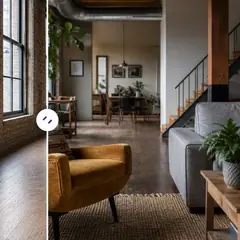
Open the AI Furniture Visualizer and upload your photo. It is set up to place suitable furniture in the room at realistic scale while keeping the walls, windows and doors as they are, though you should always check that it has. Describe what you want, such as "a three-seat sofa in light grey, a wooden coffee table and a rug," or choose a style direction. For other rooms and wider layouts, use AI Room Staging, and you can add items like a rug, curtains, wall art or a floor lamp with the buttons on the page.
Generate two or three versions with different layouts and compare them.
Check the concept against reality
The image is a visual idea. It does not know your actual measurements or the real size of a product you are considering. Verify:
- Scale. Compare the sofa in the image with your measured space.
- Walkways. Leave comfortable paths between pieces and to doors.
- Doors and drawers. Make sure they can open fully.
- Color. Screens change color, so order fabric or finish samples.
- Light. Check how the piece looks in your light at different times.
A useful trick is to mark the footprint on the floor with masking tape, or lay out cardboard, and walk around it for a day.
A worked example: choosing a sofa for a narrow living room
Imagine a living room about three and a half meters wide with a window at one end and a door at the other. The owners are choosing between a large corner sofa and a smaller three-seater. The corner sofa looks comfortable in the showroom, but in the room it would sit along two walls.
They preview both on a photo and mark the footprint of each with masking tape on the floor. With the corner sofa, the walkway from the door to the window narrows to a squeeze, the coffee table no longer fits and the room feels like a furniture store. With the three-seater, there is room for a side table, an armchair and a clear path.
They choose the three-seater, and they would never have noticed the problem from a catalog photo. The preview showed the style, and the tape showed the space. Used together, the two methods catch the mistakes that cost the most to fix.
Keep the room usable
A room can look good in a picture and not work in daily life. Leave space for storage, lighting and the activities you do. A lighter, simpler layout often feels better than a full one.
Choosing fabrics and materials
A sofa that looks beautiful in a picture can be miserable to live with if the fabric is wrong. Think about how the piece will be used. A household with children and pets needs a tough, easy-clean fabric, while a rarely used formal room can take something delicate. Leather ages in a particular way and can feel cold or sticky depending on your climate. Light fabrics show marks, and dark ones show dust and pet hair.
Ask for fabric samples and keep them in your room for a few days. Rub them, spill a little water and look at them in morning and evening light. Check the frame, the cushion filling and the warranty. A concept shows shape and color, but only a sample and a good look at the construction tell you whether the piece will last.
Questions to ask before you order
Before you pay, check the delivery size against doorways and stairs, whether the piece can be assembled in the room, the return policy, and whether fabric and finish samples are available. A piece that looks perfect in a preview still has to fit through the front door.
Details that make furniture look right in a room
A few points help you judge a furniture concept honestly. Scale is the first: check the height of the sofa back against the window and the width against the wall, since pieces that are too big make a room feel crowded and ones that are too small look lost. Proportion between pieces is the second: a huge sofa with a tiny coffee table looks wrong. Color and material should relate to the floor and walls rather than fighting them. And light matters: a dark sofa in a dim room will feel heavy, while the same sofa near a large window can look rich.
If a generated concept looks right on these points, it is a reasonable starting idea. If it looks wrong, ask for a different arrangement or style and compare again.
If you sell furniture
A furniture retailer can use previews to help customers imagine a piece in their room, as long as the image is clearly labelled as an illustration. Do not present a generated image as the real product, and keep real product photos on the listing. Use it as a visual aid to a conversation.
Pieces that earn their space
In a small or busy room, each piece should justify its place. Furniture that does two jobs, such as a bed with storage, a coffee table with shelves or an ottoman that opens, often earns more than one that only does one. Items on legs let you see the floor beneath them, which keeps the room feeling light. Choose items scaled to the room instead of a set that comes as a package, and buy the most important piece first so the rest can be chosen to suit it.
Consider how your needs may change. A sofa that works in your current space but would not fit through the door of your next home is a poor long-term buy. Thinking ahead, and testing the layout in a preview and on the floor with tape, helps you choose furniture you will enjoy for years instead of regretting within months.
Related guides
For a small space, read how to make a small living room look bigger. To test colors before you buy furniture to match, see how to see wall colors before you paint. For the wider picture, see our guide to visualizing a renovation.
Frequently asked questions
Can I see a sofa in my own living room before buying?
You can generate a concept of a sofa in a photo of your room to compare styles and layouts. Check real dimensions and samples before you buy.
Will the furniture in the image be the exact size I need?
Not necessarily. Furniture in the image is a visual idea. Use measurements to confirm that a specific product fits.
Can I preview several layouts?
Yes. Generate different versions and compare how each one affects walkways and the feel of the room.
Can I use it for a bedroom or dining room?
Yes. AI Room Staging covers different rooms, and you can describe the furniture you want.
Tape on the floor tells you about space, and a preview tells you about style, so use both. The AI Furniture Visualizer covers the second half.