
Luxury Executive AI Headshot Generator
Review facial likeness and identity-relevant details before publishing
The luxury-executive style speaks in materials and restraint — deep warm backdrop, tailored dark attire, low sculpted light — for private-wealth bios, boutique-firm pages, and premium advisory brands. This direction builds that richness and tells the AI to leave out the props that cheapen it: no invented watches, cars, or marble lobbies.
- Premium said with restraint, not props
- Explicit same-person identity constraints
- Full likeness and generated-detail review
Choose a clear portrait for your luxury executive headshot
JPG, PNG, WebP, HEIC, and other supported formats. Free up to 20 MB; Premium and higher up to 50 MB for this tool.
A luxury executive portrait built on restraint
The luxury executive style suits private wealth, boutique law and advisory firms, and premium real estate: tailored mid-tone clothing, a warm taupe-to-slate backdrop, and soft sculpted key light. The direction tells the AI not to add watches, jewelry, cars, interiors, or brand marks, because generated status symbols look counterfeit to the clients this style is aimed at.
Confirm the result has not added accessories anyway, such as a watch at the edge of the frame, cufflinks, or a pocket square you were not wearing. Check the fabric too: fine wool and silk are hard to render, and an odd sheen gives the image away.
Sculpted light makes skin tone worth a second look, so compare the result with a daylight photo even though the direction asks for bright, accurate skin and open shadows. Printed brochures need the original resolution. For a more standard leadership look, see the executive direction.
Set up for Luxury Executive AI Headshot Generator
Prepared settings
- Starting point
- One clear, recent portrait
- Choose a clear portrait for your luxury executive headshot
- Prepared direction
- Luxury Executive
- Deep tones, tailored restraint, low key light.
- Output shape
- Same framing as your upload
- The result keeps the frame of the photo you upload, so crop to head and shoulders before you start.
- Review rule
- Compare likeness and every identity-relevant detail
- Check facial structure, skin tone, hair, age, clothing, and background before professional use.
Best-fit uses
- Luxury Executive profile artwork
- Premium said with restraint, not props
- Reviewed web, directory, biography, or professional profile images
Luxury Executive headshot example
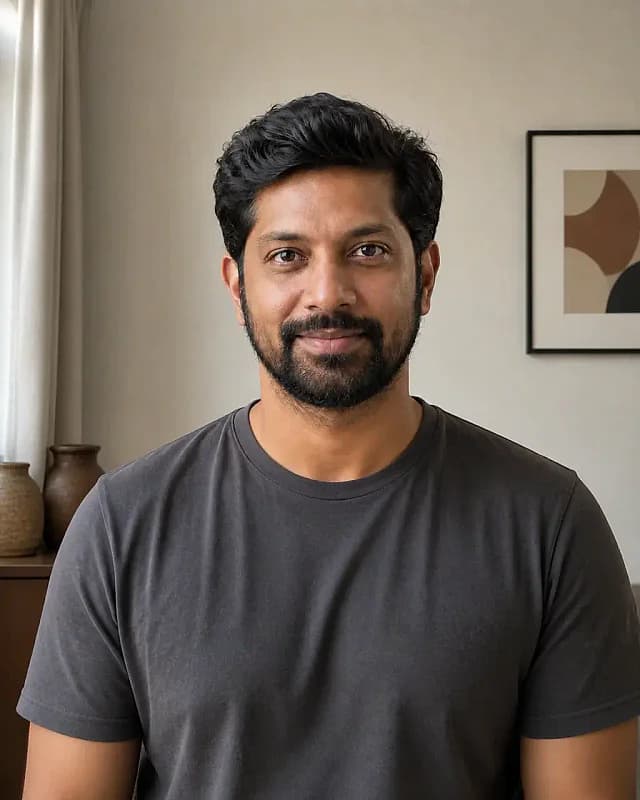

Synthetic style illustration, not an output from this tool. These images were authored separately to illustrate the Luxury Executive direction; they do not demonstrate a transformation or typical results.
Original image by Pixoate Studio under the Pixoate Original Synthetic Photography.
Frequently asked questions
- What makes a portrait read as premium?
- Subtraction: deep tones, tailored lines, controlled light, and nothing extra. Generated luxury props read as counterfeit to exactly the audience this style targets — wealth recognizes restraint and distrusts display.
- Which brands should use the luxury-executive register?
- Private wealth, boutique law and advisory, premium real estate, executive coaching at the top of market. If your clients expect a lobby with fresh flowers, this is the portrait dialect; if they expect a product demo, use startup-founder instead.
- Will a luxury executive headshot keep me recognizable?
- The prompt treats identity as a constraint, but generative results can vary. Inspect the face, hair, age, expression character, clothing, jewelry, and background, and reject any result that changes who you appear to be.
- Can I use the luxury executive result professionally?
- Use it only when you own or may use the source, the result remains an honest representation, and the destination accepts AI-assisted imagery. It is not an identity document or proof of a role or qualification.
What you can do with LinkedIn Headshot Generator
Review the main capabilities before you begin.
- Turn a selfie into a professional headshot
- Add a clean studio background
- Get polished head-and-shoulders framing
- Even out lighting for a work-ready look
- Prepare a headshot for LinkedIn and resumes
- Direct clothing, background, and lighting with a style prompt
Settings reference
5 settings
Available controls for LinkedIn Headshot Generator.
Workflow
- Single image or Batch imagesPresets
- Process one image, or use Premium Batch images to apply the same automatic recipe to a set and download one ZIP.Options: Single imageBatch images
Styles
- One-tap presetsPresets
- Pick a ready-made direction with one tap; generation uses the selected preset automatically.Options: Neutral studioModern officeWarm editorial
- Custom instructions (optional)Text input
- Describe the requested change, relevant materials, lighting, perspective, and details that must remain unchanged.
Output
- Headshot aspect ratioPresets
- The generated headshot keeps the framing of the photo you upload whichever ratio is selected, so crop your selfie to head and shoulders first.Options: Portrait 4:5Square 1:1Portrait 3:4
- Ask AI to preserve subject identity and product detailsText input
- Adds an explicit instruction to retain the main subject, shape, branding, labels, and readable text unless the request changes them.
Related tools for Luxury Executive AI Headshot Generator
Tools for common next steps after Luxury Executive AI Headshot Generator.
Portrait & Headshot Studio
Avatar Generator
Create corporate, gaming, social, or illustrated avatars from a portrait with editable AI style directions.
Try it now
Portrait & Headshot Studio
Beautify Face
Apply adjustable skin smoothing and tone correction while reviewing facial detail and edges.
Try it now
Background Studio
Remove Background
Remove a photo background and download a transparent PNG. Review hair and edges before use.
Try it nowHow LinkedIn Headshot Generator helps you get it done
Real problems it solves every day — for businesses, creators, and everyday tasks. Find the use case that fits you and start.
LinkedIn Profile Photos
Turn a casual selfie into a professional LinkedIn headshot with a clean studio background
Resumes & Job Applications
Create a polished headshot for resumes, CVs, and job applications without a photo studio
Company Directories & Team Pages
Standardize team headshots with consistent framing and backgrounds for about and team pages
Speaker Bios & Conference Profiles
Produce a professional headshot for conference speaker bios, panels, and event profiles
Brand-Color Team Headshots for Startups
Use the custom background color picker to match your exact brand hex behind every teammate's headshot, so the About page and team directory look cohesively branded without booking a real studio.
Real Estate Agent Profile Photos
The Soft Blue and Warm Beige backdrop presets read as approachable and trustworthy for agent bios and listing sites — keep retouch strength low for a credible, authentic look buyers trust.
Freelancer & Consultant Portfolio Photos
Swap in the Charcoal or Brand Blue backdrop for a confident, premium portrait to reuse across Upwork, a personal website and pitch decks.
Alumni & University Directory Photos
White or Light Gray backdrops give every submitted photo the same neutral background, so an alumni directory or faculty page looks consistent even when everyone uploads a different selfie.
Guides for this tool
- How to Create Consistent Staff Headshots for a Company WebsiteCreate consistent staff headshots for a company website with Pixoate. Coordinate framing and backgrounds while keeping each person's likeness clear.
- A Better Team Page Starts with Headshots That Belong TogetherA coherent team page starts with portraits that belong together. Explore Pixoate framing and background choices that preserve individual likenesses.
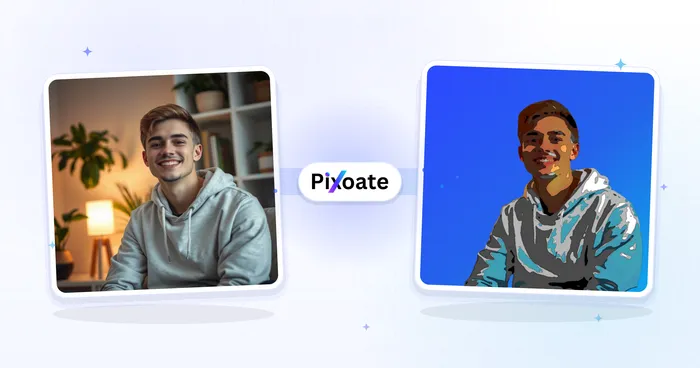
Watch each transformation land
Every photo crosses the slash untouched and comes out the other side finished.























